

AI-Powered Daily Journal: Day 2 - AI Mood & Theme Analyzer
This project gives you hands-on practice with AI analysis, sentiment analysis, theme extraction, JSON caching, metadata management, and building intelligent tools — essential skills for AI-powered app

Projects in this week’s series:
This week, we build an AI-Powered Daily Journal that writes markdown entries, analyzes your mood with AI, and visualizes your emotional patterns over time!
Day 1: Markdown Journal Writer
Day 2: AI Mood & Theme Analyzer (Today)
Day 3: Insights Dashboard
Today’s Project
Yesterday we built a markdown journal. Today we’re adding AI-powered analysis — Gemini reads each entry, scores your mood from -1 (negative) to +1 (positive), and extracts 3-5 recurring themes!
All analysis is cached as JSON metadata, so re-running is instant and free!
Project Task
Enhance the journal with AI analysis that:
New
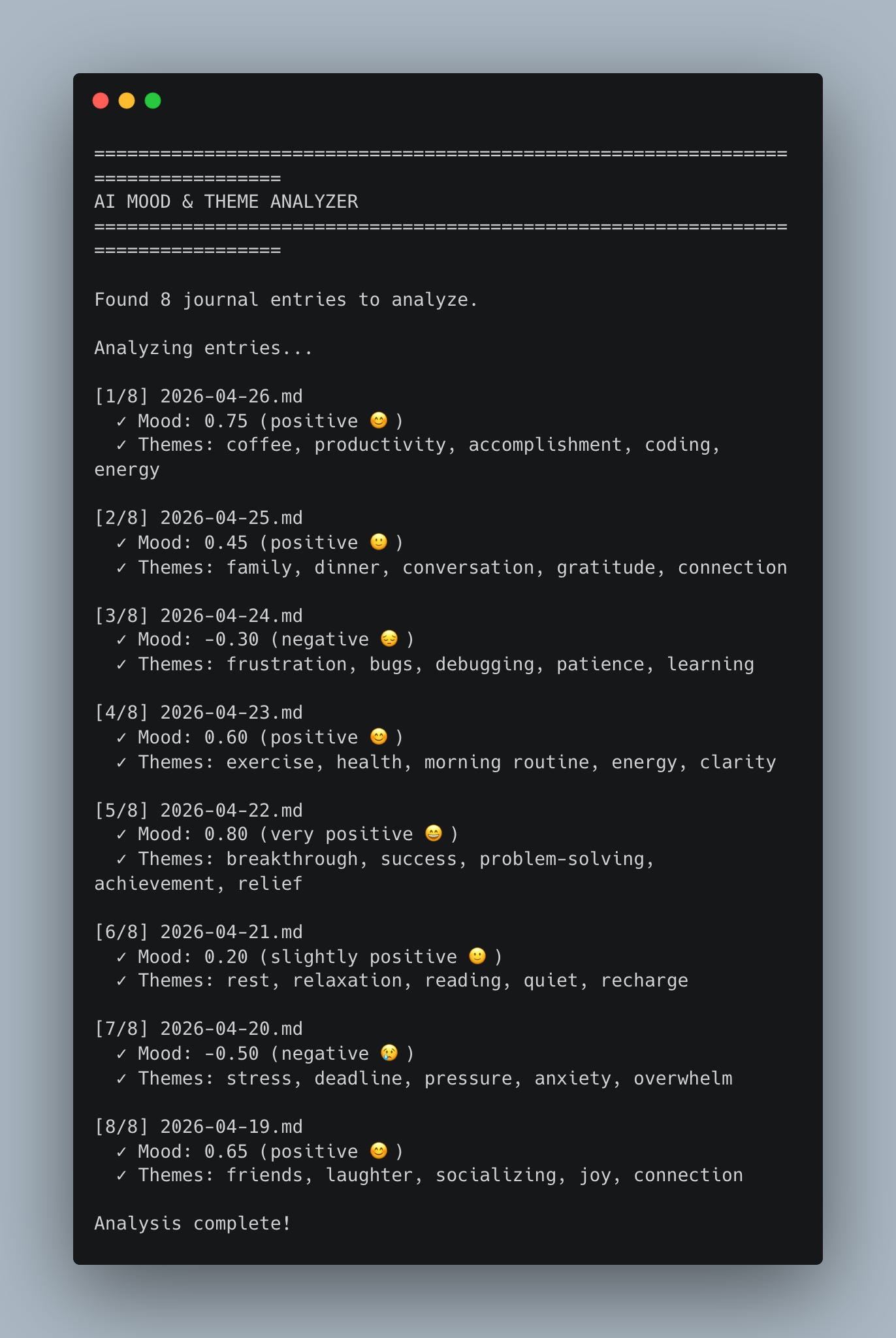
reviewcommand analyzes entriesUses Gemini to score mood (-1 to 1 scale)
Extracts 3-5 recurring themes per entry
Caches analysis as JSON metadata files
Re-runs are instant (reads from cache)
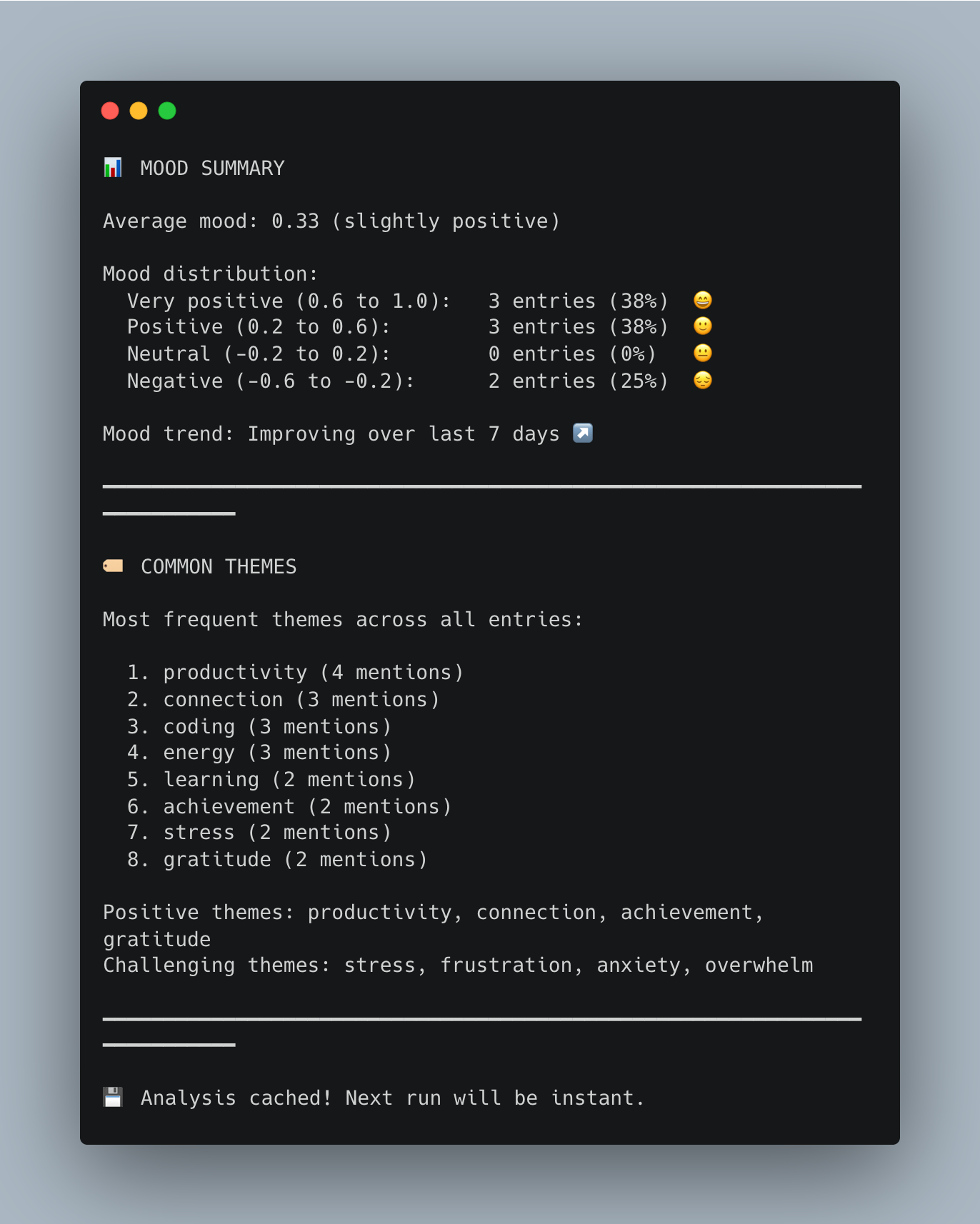
Shows mood trends over time
Lists most common themes across all entries
Clean output with mood emoji indicators
All Day 1 features still work
This project gives you hands-on practice with AI analysis, sentiment analysis, theme extraction, JSON caching, metadata management, and building intelligent tools — essential skills for AI-powered applications!
Expected Output
Analyzing entries for the first time:
python journal.py reviewConsole Output:
Setup Instructions
Install Required Package:
pip install langchain-google-genaiGet Your Google API Key:
Go to Google AI Studio
Click “Create API Key”
Copy your key
Set environment variable:
# Mac/Linux
export GOOGLE_API_KEY="your-key-here"

# Windows (PowerShell)
$env:GOOGLE_API_KEY="your-key-here"
Or edit the script:
This is a simpler method to provide the API key, but less secure.
GOOGLE_API_KEY = "your-key-here" # Paste your keyRun analysis:
python journal.py review
Understanding AI Mood Analysis
What is mood scoring?
The AI reads your entry and assigns a score from -1 to 1:
 1.0  Very positive   😄  Joyful, excited, grateful, accomplished
 0.5  Positive        🙂  Happy, content, optimistic
 0.0  Neutral         😐  Balanced, matter-of-fact
-0.5  Negative        😔  Sad, frustrated, disappointed
-1.0  Very negative   😢  Devastated, hopeless, extremely upset
How it works:
Keep reading with a 7-day free trial
Subscribe to Daily Python Projects to keep reading this post and get 7 days of free access to the full post archives.