

Build a Note Taking App with FastAPI and HTMX - Day 2: Wiki-links between notes + full-text search
Type [[groceries]] in one note and it becomes a live link. That’s how Notion, Obsidian, and Roam work under the hood.

Yesterday you built a proper multi-user web app: signup, login, notes with real security. Impressive on its own — but by the end of the post, a plain list of notes is still just a list of notes. Today we add the two features that turn it into something that feels like Notion, Obsidian, or Roam.
Projects in this week’s series:
Day 1 (Yesterday): Sign up, log in, and take notes
When the user visits the site, they see a clean signup / login page. After creating an account, they land in their notes dashboard, with a form to add notes and a list of all their existing ones:
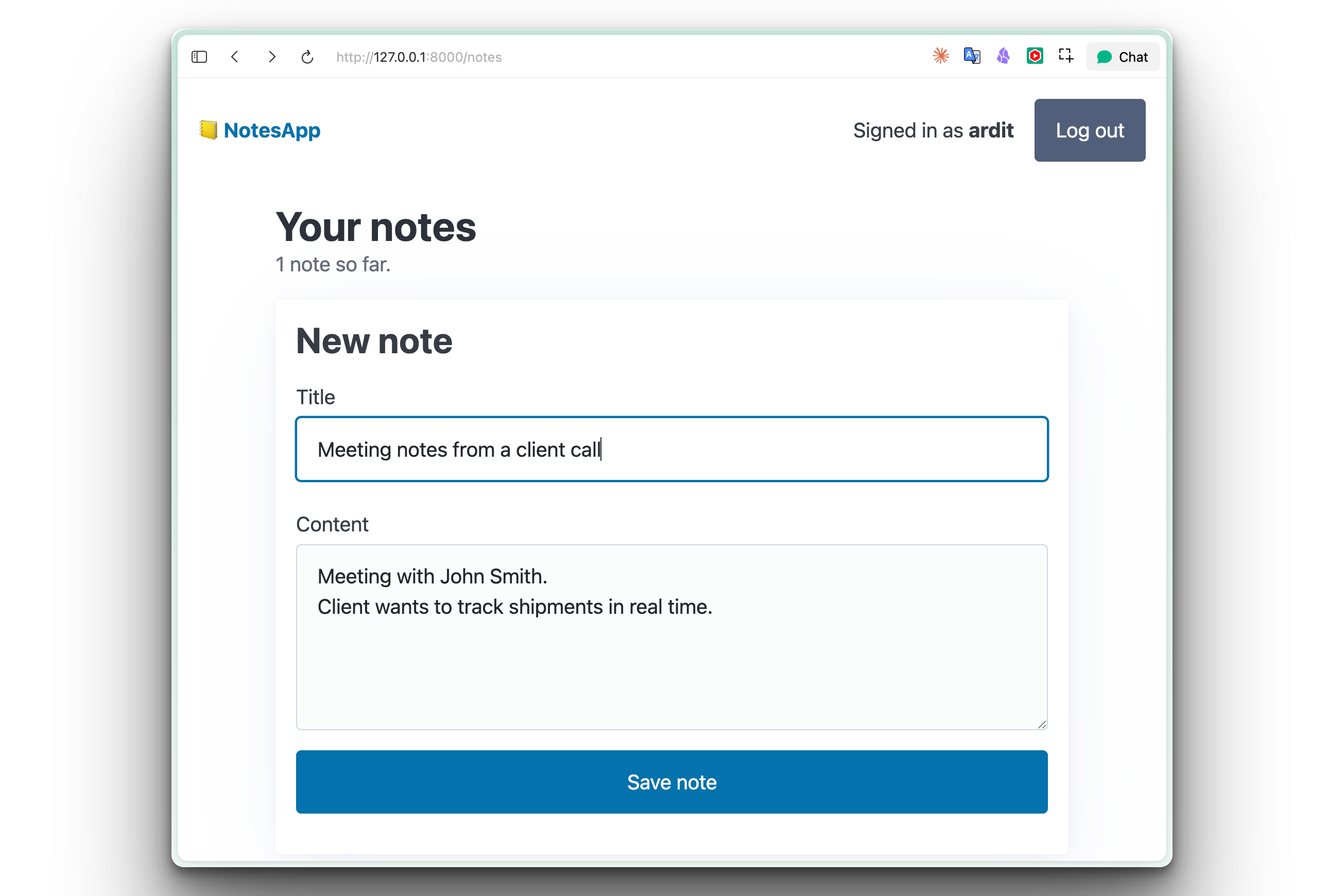
Each note has a delete button that removes it instantly, without a full page reload. Logging out clears the session, and trying to visit /notes while logged out bounces you back to the login page. Every user only sees their own notes — I can’t peek at yours, you can’t peek at mine.
👉 Day 2 (Today): Wiki-links between notes + full-text search
Type [[computer tricks]] in one note:
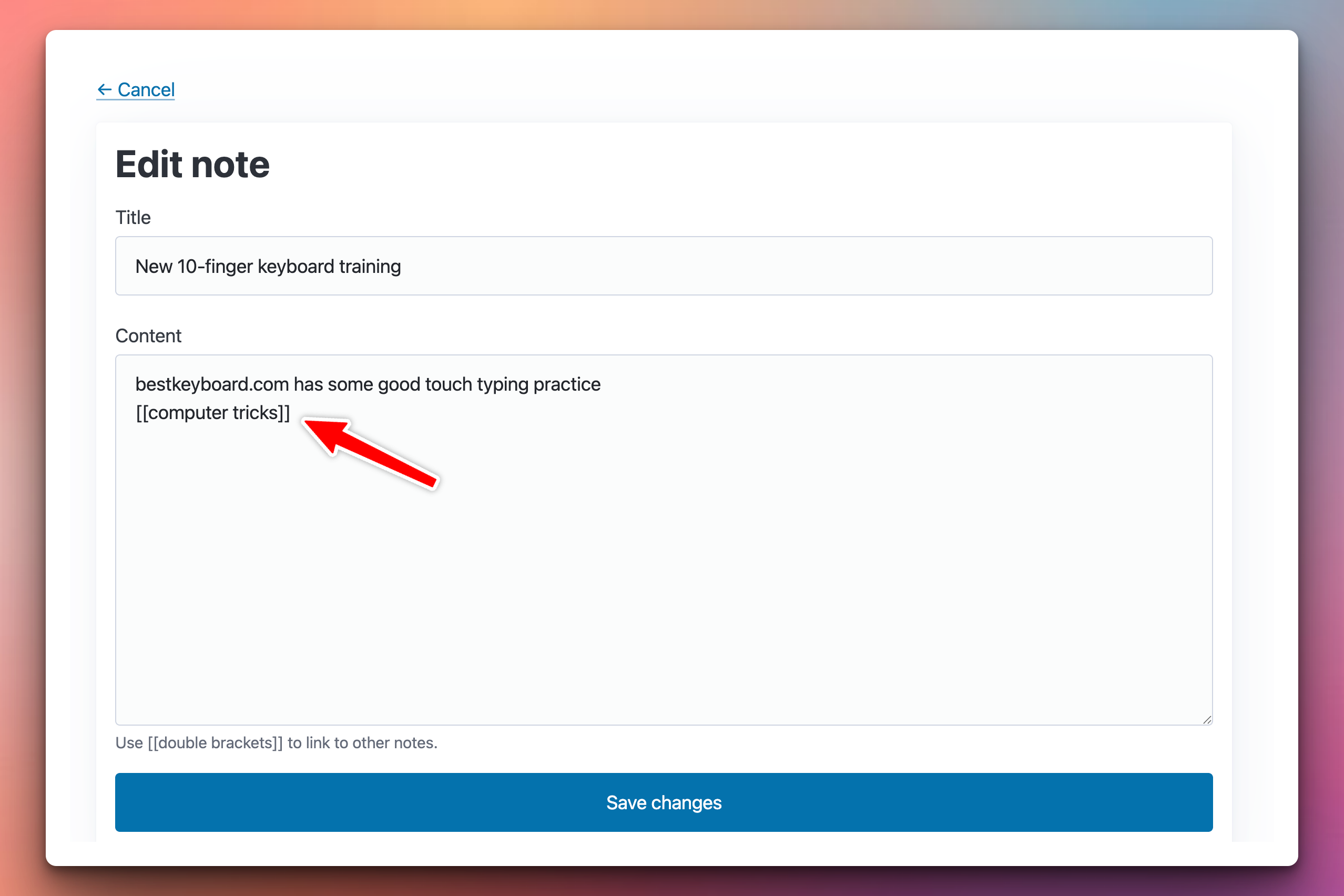
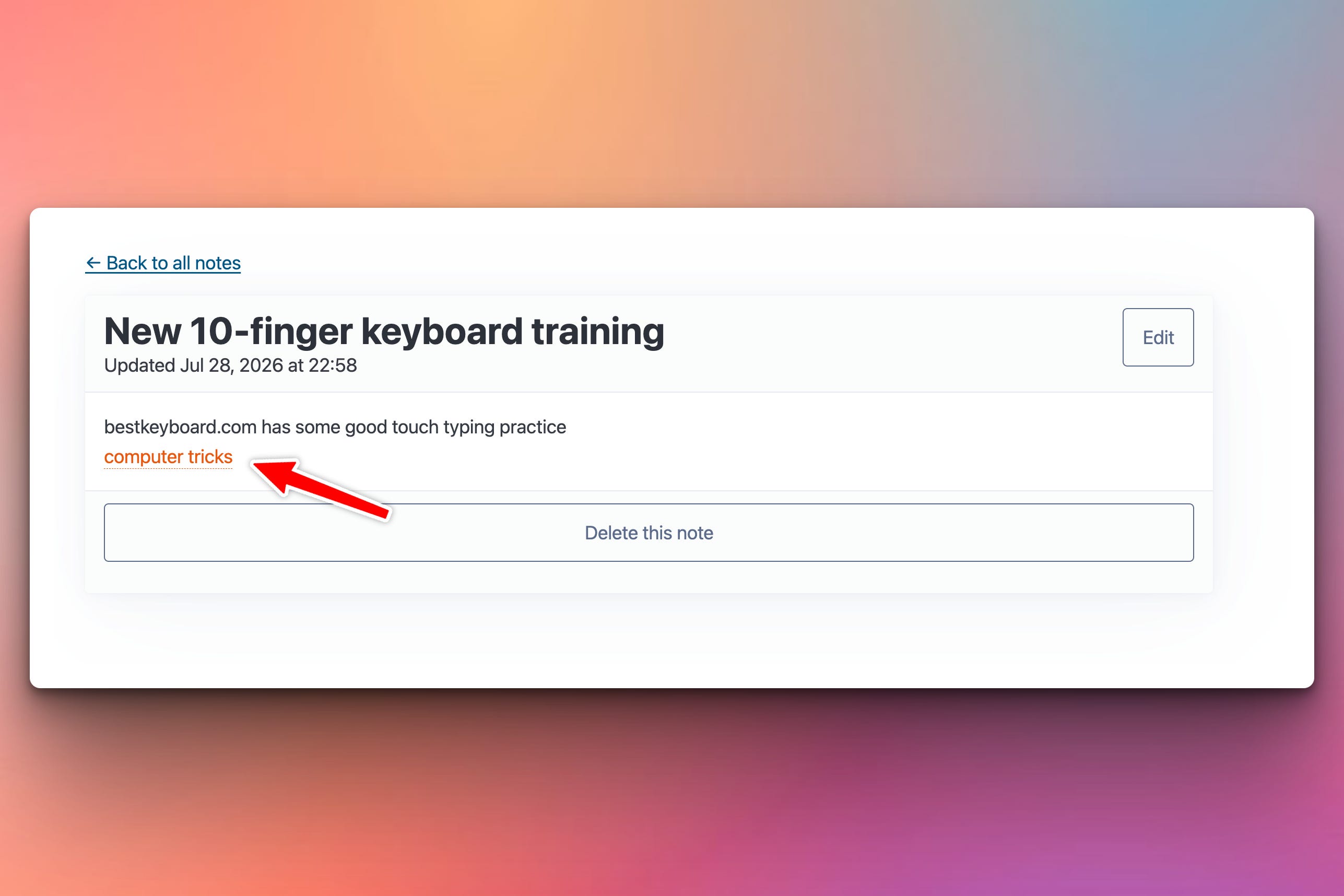
And “computer tricks” automatically becomes a separate note and a clickable hyperlink in the first note:
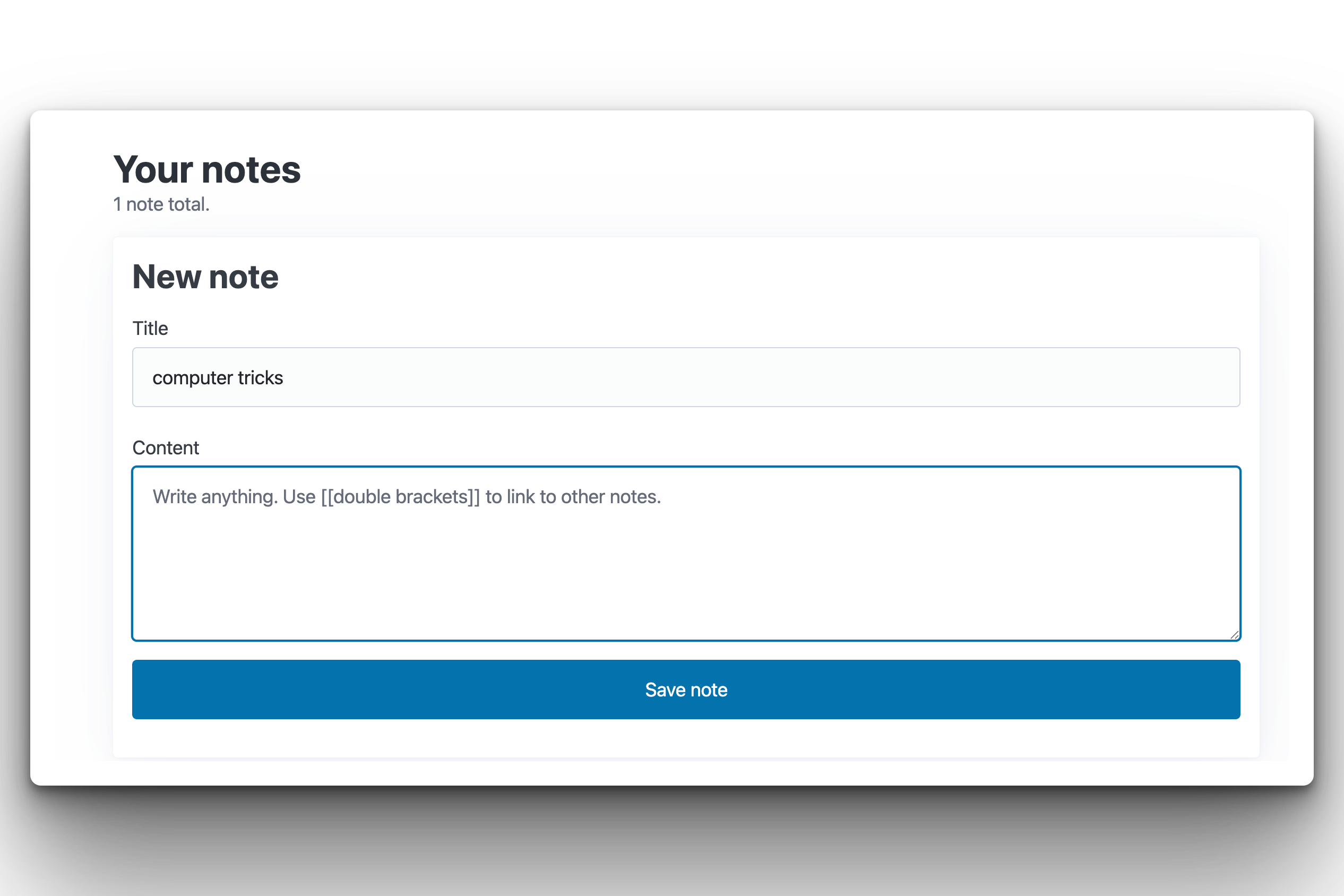
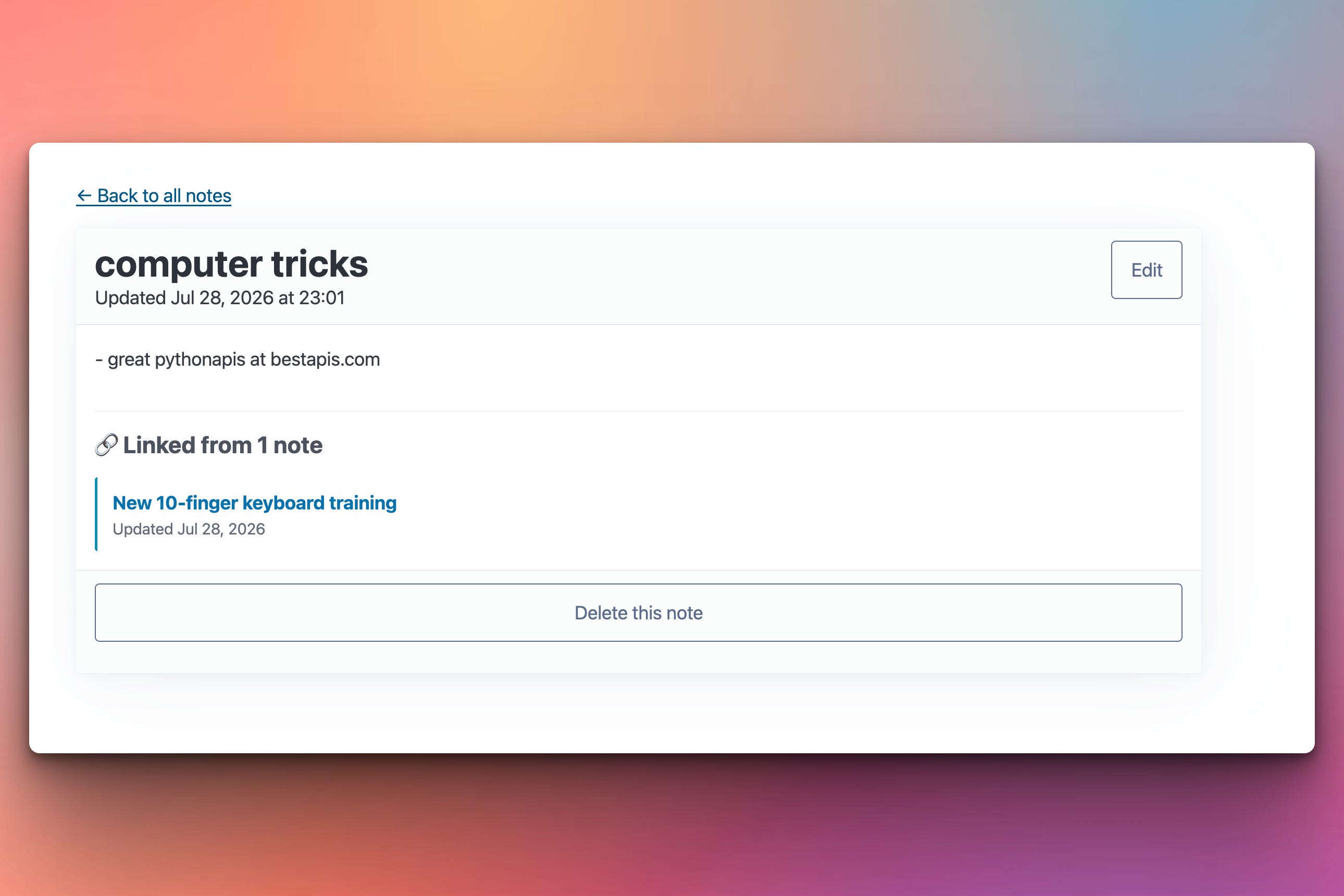
Click it, and you’re on the “computer tricks” note where you can enter more details about that new note:
The app also shows a backlinks section at the bottom listing every other note that mentions this one. Same pattern as Notion, Obsidian, and Roam Research.
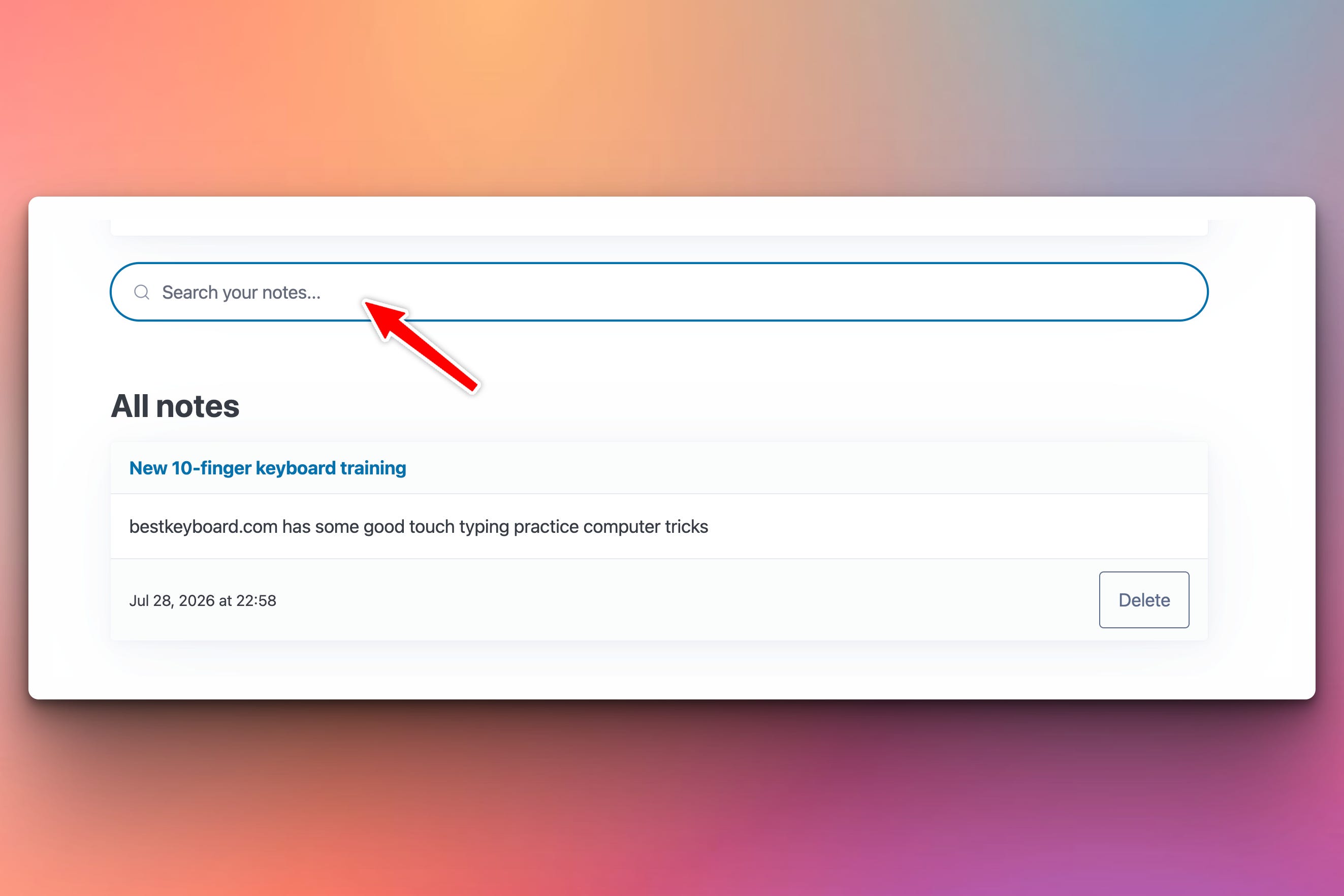
Plus a search bar on the notes list that finds any word across all your notes as you type — powered by SQLite’s built-in FTS5 full-text search extension, no external dependencies. Type a word, wait 250ms, and the notes grid updates in place with matching notes:
Setup Instructions
Same dependencies as yesterday, no new packages:
pip install fastapi uvicorn jinja2 sqlalchemy bcrypt itsdangerous python-multipartEverything today uses stuff that’s already installed: re for parsing, sqlalchemy.text for the raw SQL that creates the FTS5 virtual table, markupsafe.Markup to tell Jinja “I’ve already escaped this HTML, don’t double-escape it.”
Run it:
uvicorn notes_app_wiki:app --reloadSame as yesterday. The notes.db file from Day 1 works — the new tables (wiki_links and notes_fts) get created on startup if they don’t exist. Your existing notes stay, but they won’t be indexed for search or wiki-links until you edit-save them once (because indexing happens on write, not on read).
Understanding Wiki-Links as a Graph
A note is not just text — it’s a node in a graph. Every [[link]] inside a note’s content is a directed edge to another note. Once you have edges, you get all the things graphs give you: neighborhoods, paths, backlinks, connected components.
The technical decision that unlocks this: store the link target as a string, not as a foreign key.
class WikiLink(Base):
    __tablename__ = "wiki_links"
    id = Column(Integer, primary_key=True)
    user_id = Column(Integer, ForeignKey("users.id"), nullable=False, index=True)
    source_note_id = Column(Integer, ForeignKey("notes.id"), nullable=False, index=True)
    target_title = Column(String, nullable=False, index=True)
Note that target_title is a plain string, not a ForeignKey(notes.id). This is deliberate. If it were a foreign key, you couldn’t create the link before the target note existed — which would ruin the Obsidian pattern of writing [[future recipe]] first and creating the actual note later. Storing the title as text lets you write “forward references” that resolve automatically when the target gets created.
The trade-off: renaming a note breaks all links pointing to its old name. Same as Obsidian. Most systems handle this by finding-and-updating all wiki-links on rename; we skip that for now.
Understanding the Wiki-Link Parser
Two functions do the work: extract_wiki_links (for indexing) and render_wiki_links (for display):
import re

WIKI_LINK_RE = re.compile(r"\[\[([^\[\]]+)\]\]")

def extract_wiki_links(content: str) -> list[str]:
    """Return lowercased target titles from all [[links]] in text."""
    return [m.group(1).strip().lower()
            for m in WIKI_LINK_RE.finditer(content)]
The regex is intentionally simple: two brackets, one or more characters that aren’t brackets, two brackets. No nesting, no multi-line links. Fewer edge cases, fewer surprises.
We lowercase the target title on the way out because wiki-link lookups should be case-insensitive — [[Groceries]] and [[groceries]] should point to the same note. Store lowercase, query lowercase, display whatever the user typed.
Understanding Safe HTML Rendering
This part is subtle. When we render a note’s content, we’re generating HTML from user input, which is where XSS vulnerabilities usually live. The naive “just escape everything at the end” doesn’t work — we’re intentionally producing HTML for the wiki-links, and Jinja’s autoescape would treat our generated <a> tags as text.
The right approach is to tokenize the content into pieces and escape each piece separately as we go:
from html import escape as html_escape
from urllib.parse import quote
from markupsafe import Markup

def render_wiki_links(text, notes_by_title):
    parts = []
    last_end = 0

    for match in WIKI_LINK_RE.finditer(text):
        # Regular text before this link - escape it as HTML
        parts.append(html_escape(text[last_end:match.start()]))

        raw_title = match.group(1).strip()
        safe_display = html_escape(raw_title)     # for display in the link
        target = notes_by_title.get(raw_title.lower())

        if target is not None:
            parts.append(
                f'<a href="/notes/{target.id}" class="wiki-link">'
                f'{safe_display}</a>'
            )
        else:
            safe_url = quote(raw_title, safe="")   # for the URL
            parts.append(
                f'<a href="/notes/new?title={safe_url}" '
                f'class="wiki-link broken">{safe_display}</a>'
            )
        last_end = match.end()

    parts.append(html_escape(text[last_end:]))
    return Markup("".join(parts))
Two things happen safely:
Every piece of user content — the text between links, and the link titles themselves — goes through
html_escapebefore being placed in the HTML. A note that contains<script>gets rendered as literal<script>.We return
Markup(...)at the end, which tells Jinja “trust this string, don’t escape it again.” Otherwise Jinja’s autoescape would turn our<a>tags into<a>and destroy the links.
The URL title gets quote() instead of html_escape because it’s going into a URL, not into HTML. quote() handles URL-encoding (spaces → %20, special chars percent-encoded). Same principle: escape for the context you’re inserting into.
Understanding the Sync Pattern
The wiki-links table doesn’t magically populate itself — you have to keep it in sync with the notes table by hand. Every time a note is created, edited, or deleted, the wiki-links index has to be updated:
def sync_wiki_links(db: Session, note: Note) -> None:
    """Rebuild the wiki_links rows for one note. Call after create or edit."""
    db.query(WikiLink).filter(WikiLink.source_note_id == note.id).delete()
    for target_title in extract_wiki_links(note.content):
        db.add(WikiLink(
            user_id=note.user_id,
            source_note_id=note.id,
            target_title=target_title,
        ))
Simple pattern: delete all wiki-links FROM this note, re-parse the content, insert the new set. No fancy diff-and-update logic. For hundreds of links per note it might matter, but for typical note content it’s fine.
Then the create/edit routes call this after saving the note:
@app.post("/notes")
async def create_note(title, content, user, db):
    note = Note(user_id=user.id, title=title.strip(), content=content)
    db.add(note)
    db.flush()                    # need note.id for the derived indices
    sync_wiki_links(db, note)     # update the wiki-links table
    fts_insert(db, note)          # update the FTS5 index
    db.commit()
    return RedirectResponse(f"/notes/{note.id}", status_code=303)
Note db.flush() — this sends the INSERT to SQLite so note.id gets populated, but doesn’t commit yet. We need the ID to link the derived tables. Then everything commits together as one atomic transaction.
This is the pattern for every derived index in every real app. Materialized views, cache layers, search indexes, activity feeds — they all follow this shape. Source of truth (your notes) gets a write, then N derived indexes get updated in the same transaction. If any step fails, everything rolls back and stays consistent.
Understanding Backlinks
Once wiki-links are indexed, backlinks are trivial — just query the same table in the other direction:
def get_backlinks(db: Session, note: Note) -> list[Note]:
    """Notes (of the same user) that link TO this note via [[title]]."""
    rows = (db.query(WikiLink.source_note_id)
              .filter(WikiLink.user_id == note.user_id,
                      WikiLink.target_title == note.title.lower(),
                      WikiLink.source_note_id != note.id)
              .distinct()
              .all())
    ids = [row[0] for row in rows]
    if not ids:
        return []
    return (db.query(Note)
              .filter(Note.id.in_(ids))
              .order_by(Note.updated_at.desc())
              .all())
Two queries, two SQL round-trips: find the note IDs, then hydrate them. Indexed on both user_id and target_title, so this stays fast even with thousands of notes.
The source_note_id != note.id filter avoids showing a note as its own backlink if it happens to contain [[itself]]. Small polish; you’d hit this bug in production without it.
Understanding SQLite FTS5
Here’s a fact that surprises most people: SQLite has a built-in full-text search engine. It’s called FTS5, it’s compiled into virtually every SQLite install since 2015, and it’s genuinely production-grade. Big tech uses it internally for shipping products. You don’t need Elasticsearch, Meilisearch, Algolia, or even PostgreSQL’s tsvector — just a CREATE VIRTUAL TABLE statement:
def init_fts(engine):
    with engine.connect() as conn:
        conn.execute(text("""
            CREATE VIRTUAL TABLE IF NOT EXISTS notes_fts USING fts5(
                note_id UNINDEXED,
                user_id UNINDEXED,
                title,
                content,
                tokenize = 'porter unicode61'
            )
        """))
        conn.commit()
A few important pieces:
USING fts5(...)— this is a virtual table. It doesn’t work like a normal table; it’s backed by an inverted index. You stillINSERT,UPDATE,DELETEinto it, but the storage under the hood is optimized for fast text search.UNINDEXED— these columns are stored in the FTS5 table but not searchable.note_idanduser_idare just tags we use to filter results and link back to the notes table. Marking them UNINDEXED skips building an index for them and saves disk space.titleandcontent— these are the searchable columns. FTS5 tokenizes them and builds an inverted index.tokenize = 'porter unicode61'— this stacks two tokenizers.unicode61handles Unicode text properly (Chinese, Arabic, accented Latin, emoji).porterapplies English stemming — sorunningmatchesrun,fliesmatchesfly. If you’re not making an English notes app, dropporter.
The FTS5 virtual table lives entirely inside your existing notes.db SQLite file. No new database process, no new port, no new dependency. That’s a real production-grade full-text search engine embedded in a single file.
Understanding HTMX Search-as-You-Type
The search input on the notes list has four HTMX attributes:
<input type="search"
       name="q"
       placeholder="Search your notes..."
       hx-get="/notes/search"
       hx-trigger="input changed delay:250ms, search"
       hx-target="#notes-grid"
hx-swap="innerHTML">hx-get="/notes/search"— send a GET request to this URLhx-trigger="input changed delay:250ms, search"— fire on input changes with a 250ms debounce, and also on the browser’s native “search” event (fired when the user clears the input via the × button on the search input)hx-target="#notes-grid"— put the response into the element with this IDhx-swap="innerHTML"— replace the target’s inner HTML with the response
The 250ms debounce is critical. Without it, every keystroke fires a request — a user typing “groceries” would fire 9 requests. With the debounce, HTMX waits until the user has been idle for 250ms before firing one request. Instant-feeling for humans, gentle on the server.
What’s Next
Thursday’s post is a standalone deep-dive on a specific piece of infrastructure. Coming this week: why your app should never talk to your database on port 5432, and the three-line change that makes it 10x faster. Free post, all subscribers get it.
Next week I’m switching gears into a different kind of build — details on Tuesday.
Solution
Below you will find the source code of this project which will produce the same output as shown in the screenshots in this post.
Get the source code here:
Keep reading with a 7-day free trial
Subscribe to Daily Python Projects to keep reading this post and get 7 days of free access to the full post archives.