

Build a Personal Finance Tracker - Day 1: Basic with Functions
Level: Beginner

🎉 Welcome to our first official Weekly Series!
Here’s something most coding tutorials get wrong: they show you the finished product all at once. But that’s not how real software gets built!
In the real world, developers start with a Minimum Viable Product (MVP) — the simplest version that actually works. Then they iterate, adding features based on what users need. This is how companies like Facebook, Airbnb, and Stripe built their products: ship fast, learn, improve, repeat.
That’s exactly what we’re doing this week and in the weeks ahead.
You won’t just build a personal finance tracker — you’ll experience the entire development lifecycle. You’ll see how a basic script evolves into a professional application. You’ll learn when to refactor, when to add features, and how to make smart architectural decisions.
This is how you build real projects. This is how you think like a developer.
Projects in this week’s series:
This week, we progressively build a finance tracker with Python.
Day 1: Basic with Functions (Today)
Day 2: Object-Oriented
Day 3: With CSV Storage
Day 4: With GUI
By Thursday, you’ll have a practical tool for managing your finances while learning essential programming concepts that apply to any data-driven application!
Today’s Project: Basic Expense Logger (MVP)
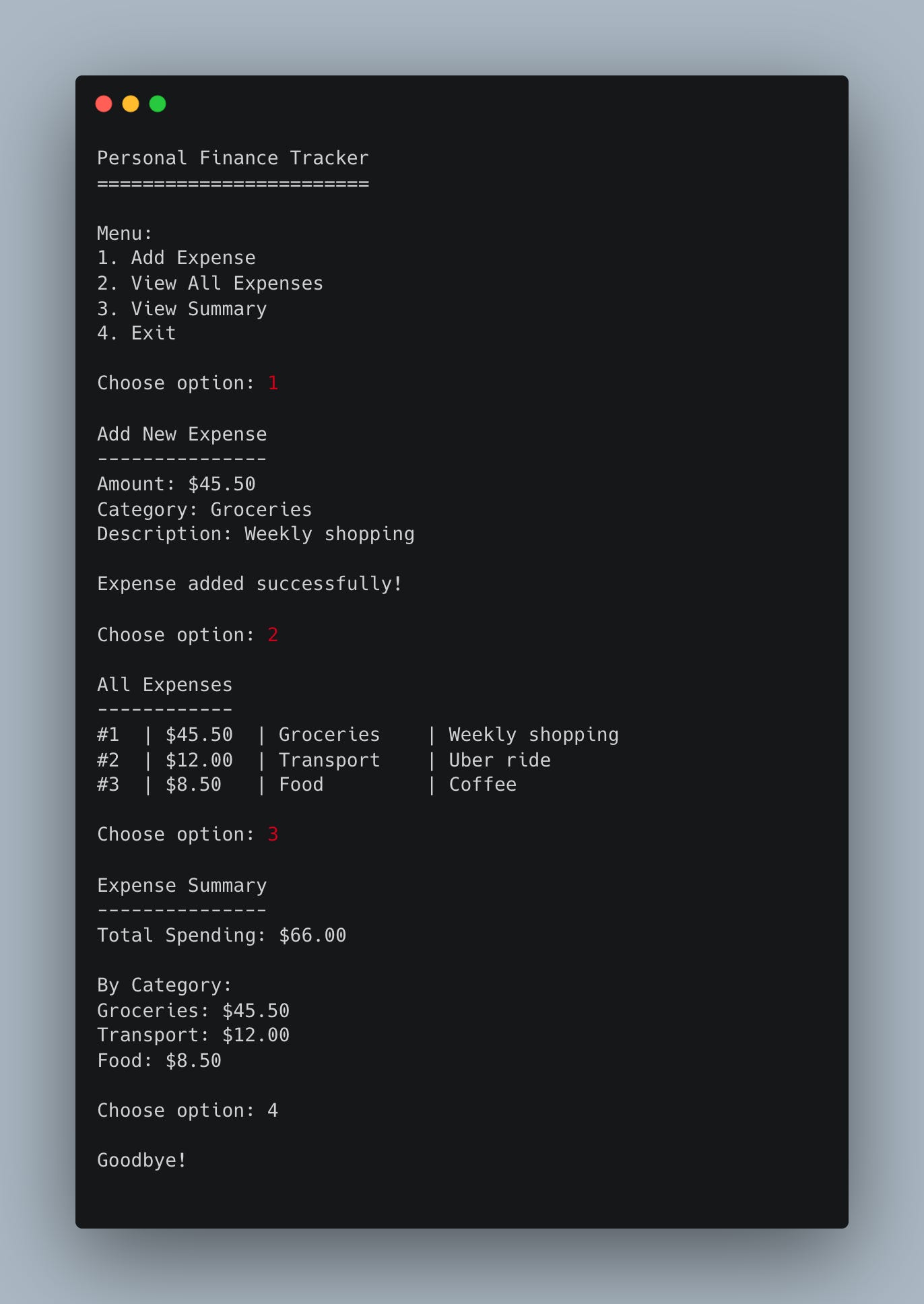
Your task today is to create a simple expense logging system using functions. Users can add expenses with amount, category, and description, then view all their expenses in a formatted list.
Why start here? Because this is our MVP — the minimum version that solves the core problem: “I need to track what I’m spending.” Everything else we add this week will be enhancements to this foundation.
Project Task
Create an expense logger that:
Uses functions to organize different operations
Allows users to add expenses with amount, category, and description
Stores expenses in a Python list (in-memory for now)
Displays all expenses in a clean, formatted output
Calculates and shows total spending
Shows spending breakdown by category
Uses a simple menu system for user interaction
This project gives you hands-on practice with functions, lists, dictionaries, data organization, and building interactive programs — essential skills for creating practical applications.
Expected Output
What You’ll Learn Today
How to structure a program with multiple functions
Working with lists and dictionaries to store data
Creating interactive menu systems
Formatting output for readability
Basic data analysis (totals and breakdowns)
Most importantly: How to build a working MVP that solves a real problem
Coming Tomorrow
Tomorrow we’ll refactor this into classes — creating Expense objects that make our code more organized and scalable. This is exactly what happens in real development: you start simple, then improve the architecture as needs evolve. You’ll see why refactoring matters and when to do it!
Skeleton and Solution
Below you will find both a downloadable skeleton.py file to help you code the project with comment guides and the downloadable solution.py file containing the correct solution.
Get the code skeleton here:
Get the code solution here:
you need to track everything if you want more visibility!