

Build a Personal Finance Tracker - Day 3: With CSV Storage
Level: Beginner

Projects in this week’s series:
This week, we progressively build a finance tracker with Python.
Day 1: Basic with Functions
Day 2: Object-Oriented
Day 3: With CSV Storage (Today)
Day 4: With GUI
Today’s Project
Yesterday we refactored our expense tracker with classes. Today we’re adding two powerful features that transform our app from a simple logger into a real financial management tool: persistent storage and budget alerts.
This is where your class-based architecture pays off — adding these features is much cleaner than it would have been with our Day 1 functions!
Today’s Challenge: Add Persistence & Budget Limits
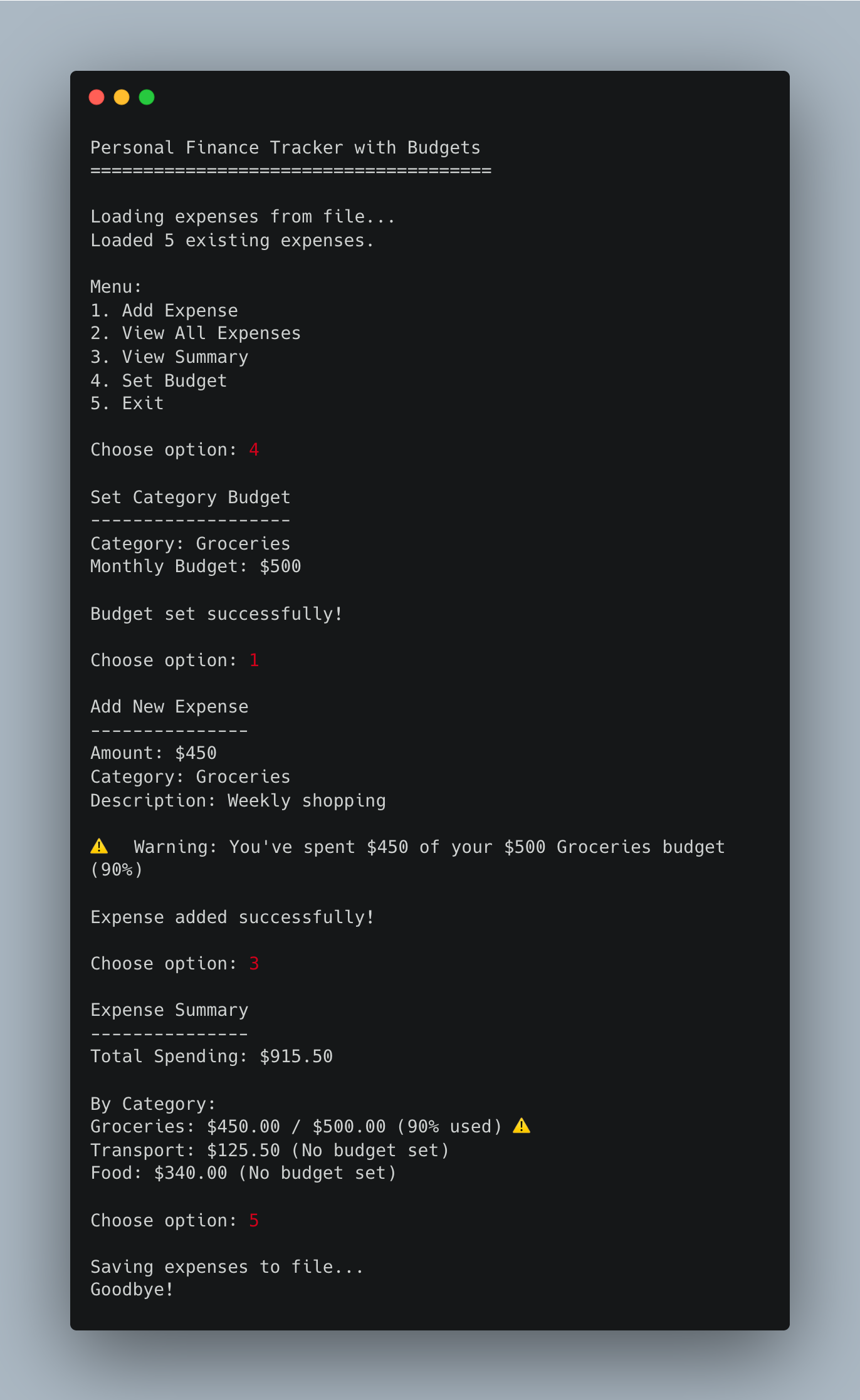
Today we’re making our tracker actually useful for real financial management. We’ll add:
CSV Storage - Save expenses to a file so they persist between sessions
Budget Limits - Set spending limits per category and get warnings when approaching them
This is what separates a toy project from a real application — your data persists, and the app helps you make better financial decisions!
Project Task
Create an expense tracker with storage and budgets that:
Saves all expenses to a CSV file automatically
Loads existing expenses when the program starts
Allows users to set budget limits for each category
Warns users when they’re approaching budget limits (80% threshold)
Alerts users when they exceed budgets
Shows budget status in the summary view
Maintains all previous functionality (classes, viewing, totals)
This project gives you hands-on practice with file I/O, CSV operations, data persistence, conditional logic, and building practical features — essential skills for real-world applications.
Expected Output
Coming Tomorrow
Tomorrow we’re building the web dashboard with interactive charts! You’ll see your spending visualized with pie charts and bar graphs in a beautiful Streamlit interface. All the groundwork we’ve laid this week makes that final step much easier!
View Code Evolution
Compare today’s solution with earlier versions and see how the code evolves.
Really smart progression adding persistance here. I've built similar trackers before and dunno why but people always skip the CSV storage step and jump straight to databases, which is overkill for personal finance apps. The budget threshold at 80% is clever, gives users actionable alerts before they actualy blow the limit not just after.
brilliant ideas here!