

Build a Stock Market Analysis & Alert System: Day 1 - Stock Price Tracker
Level: Beginner

Projects in this week’s series:
This week, we progressively build a stock market analysis and alert system with Python.
Why build this? Because tracking stocks manually is tedious and slow. Whether you’re an investor, day trader, or just curious about the market — automated stock tracking gives you real-time insights without constantly refreshing websites.
What you’ll learn: This series teaches you API integration, financial data handling, data analysis, and building tools that work with real-world markets. These skills apply to finance, data science, and automation.
Why users love this: No more switching between tabs or paying for premium stock apps. Get instant access to stock data, set your own alerts, and stay informed — all with your own free tool!
Day 1: Stock Price Tracker (Today)
Day 2: Technical Analysis & Price Alerts
Day 3: Automated Email Reports
Today’s Project
We’re starting with the foundation: we’re creating a command-line tool that fetches real-time stock data for any ticker symbol. Enter stock symbols, get instant prices, changes, volume, and key metrics.
You’ll learn how to work with financial APIs, fetch live market data, and display it in a clean, readable format!
Project Task
Create a stock price tracker that:
Takes stock ticker symbols as input (e.g., AAPL, TSLA, MSFT)
Fetches real-time stock data using yfinance
Displays current price, change amount, change percentage
Shows volume, market cap, and 52-week high/low
Tracks multiple stocks at once
Formats output in a clean table
Updates data on demand
This project gives you hands-on practice with financial APIs, data retrieval, formatting numerical data, and building real-time market tools — essential skills for finance and data analysis!
Expected Output
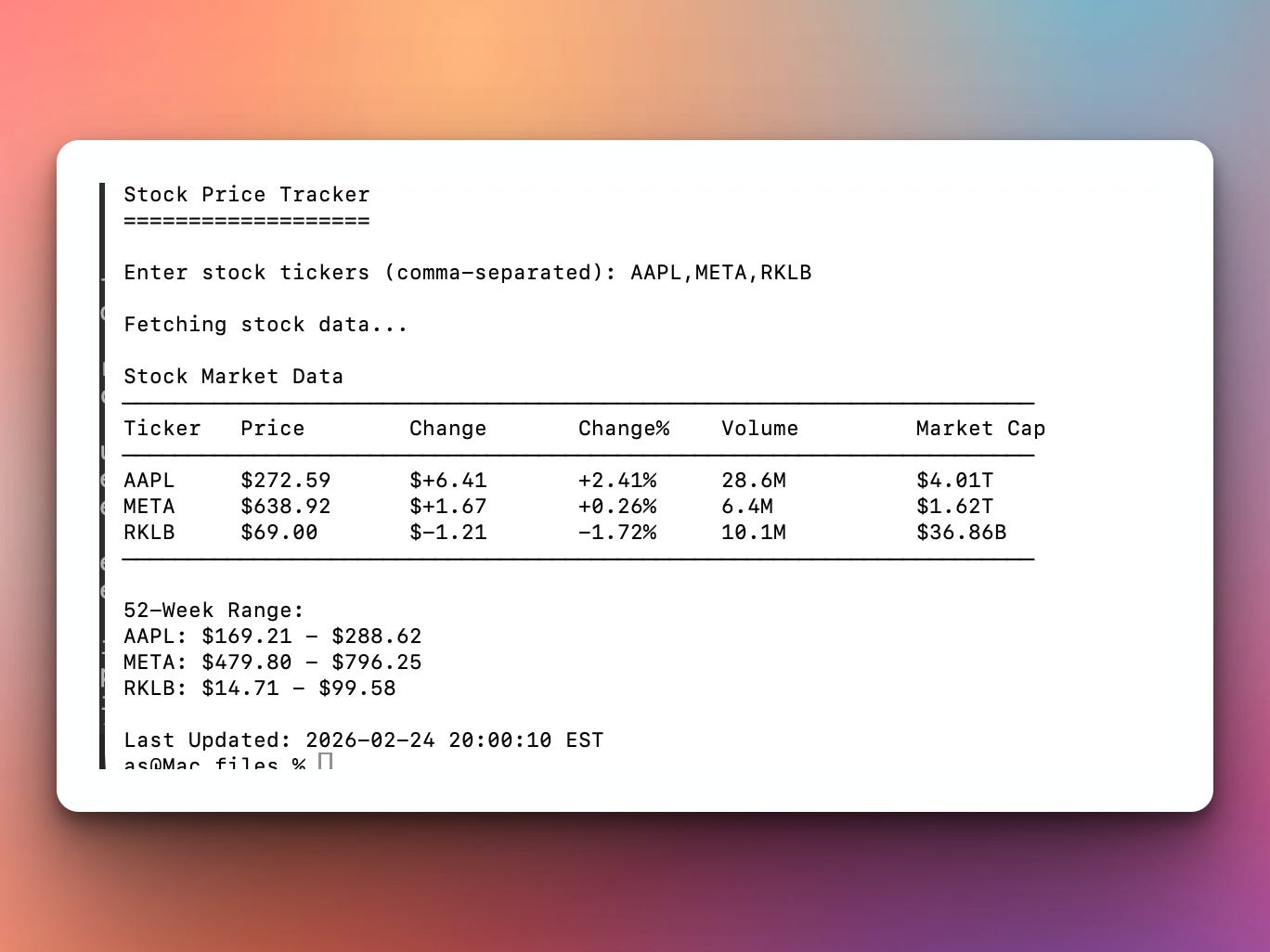
When run, the program will ask the user to type in some stock ticker symbols (e.g., AAPL, META, RKLB) and fetch stock data from the API for those stocks and show a summary with a 52-week range of the prices.
Setup Instructions
Install yfinance:
pip install yfinanceyfinance is a free Python library that fetches stock data from Yahoo Finance. No API key required!
Coming Tomorrow
Tomorrow we’ll add technical analysis and price alerts — calculate moving averages, RSI, MACD, and set up automated alerts that notify you when stocks hit your target prices. Your simple tracker becomes an intelligent monitoring system!
Skeleton and Solution
Below you will find both a downloadable skeleton.py file to help you code the project with comment guides and the downloadable solution.py file containing the correct solution.
Get the code skeleton here:
Get the code solution here:
Hi Ardit,
Thank you for the project code on Day 1 yesterday.I am looking forward to see the next project Day 2.
How do you combine the day1 Day2 and Day 3 code together or separately