

Build a Workout Tracker Suite: Day 1 - Barbell Plate Calculator
Today we will build a visual barbell plate calculator with Python that shows you exactly how to load your barbell!

Projects in this week’s series:
This week, we build a Workout Tracker Suite that helps you log lifts, visualize progress, and optimize your training — perfect for anyone serious about strength training!
Why build this? Because tracking workouts manually is tedious, and most apps are overcomplicated. You’ll create tools that solve real problems: calculating plates, logging progress, and seeing gains visualized!
What you’ll learn: This series teaches you GUI development, data visualization, mathematical calculations, user interface design, and building practical fitness tools — essential skills for desktop applications!
Why users love this: A plate calculator that shows exactly what your barbell looks like? Instant dopamine! By Day 3, you’ll have a complete training dashboard that tracks every lift and shows your progress charts in real-time!
Day 1: Barbell Plate Calculator (Tkinter GUI) (Today)
Day 2: Workout Logger with Live Charts
Day 3: Complete Workout Dashboard
Today’s Project
We’re starting with something immediately satisfying: a visual plate calculator that shows you exactly how to load your barbell! No more mental math at the gym!
You’ll build a beautiful GUI that calculates the optimal plate combination and displays your loaded barbell visually!
Project Task
Create a barbell plate calculator with:
Target weight input (kg or lbs)
Visual barbell display showing loaded plates
Optimal plate combination calculator
Common lift presets (45/135, 60/185, 100/225, etc.)
Support for standard plate sets (45, 35, 25, 10, 5, 2.5)
Bar weight selection (20kg/45lbs standard, women’s bar, specialty bars)
Save favorite lifts
Clean, intuitive Tkinter interface
Color-coded plates by weight
Real-time updates as you type
This project gives you hands-on practice with Tkinter GUI, canvas drawing, mathematical optimization, event handling, and building visual tools — essential skills for desktop applications!
Expected Output
The app runs on the desktop. It lets the user to set the target weight. Based on that, the visual is instantly updated with the correct number of plates and their weights for the target weight:
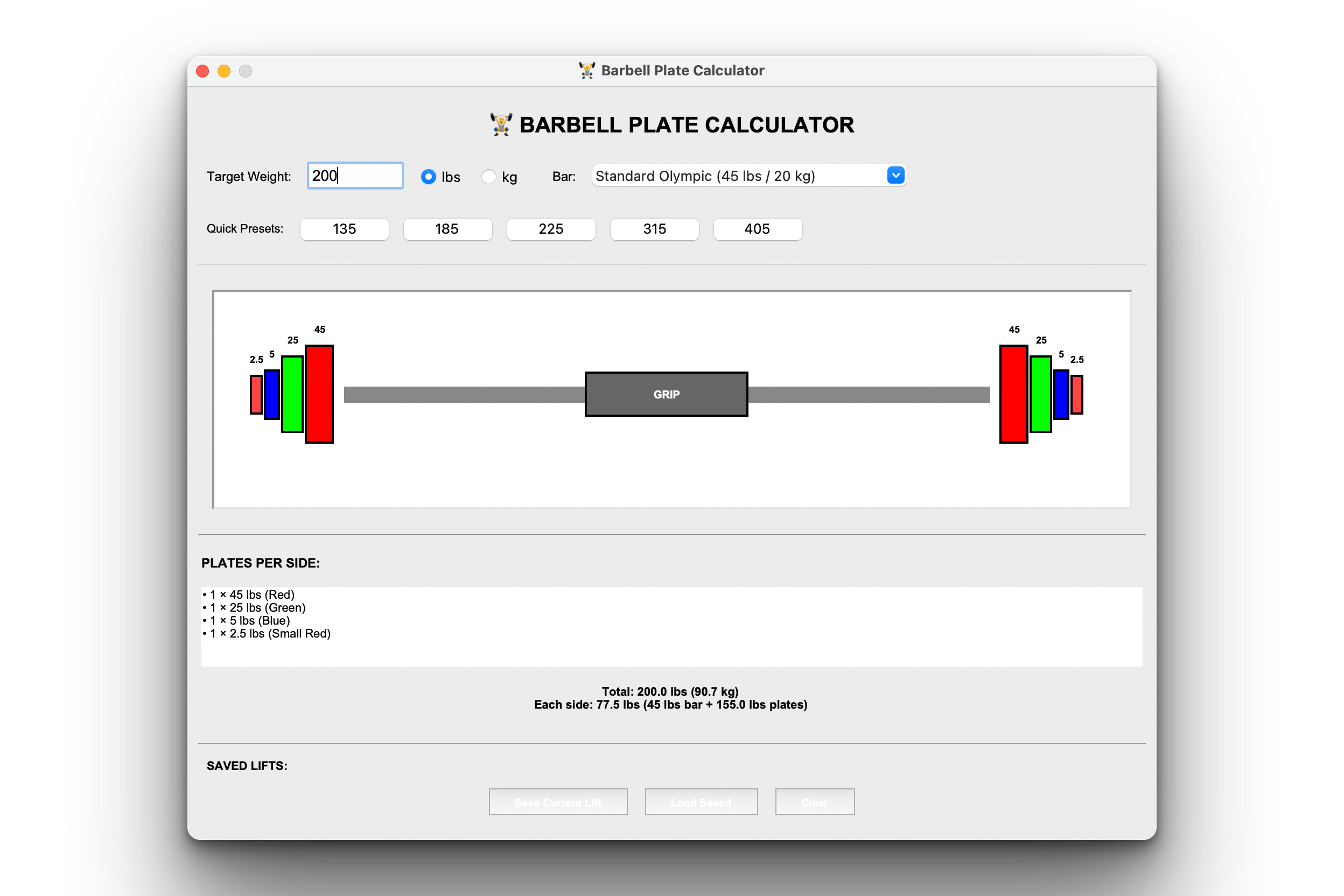
The user can also press the “Save Current” button to save a configuration and load it later.
Setup Instructions
No installations needed!
Uses Python standard library only (Tkinter is built-in):
python plate_calculator.pyUnderstanding Plate Calculation Algorithm
The Challenge:
Given a target weight, find the minimum number of plates to load on each side.
Standard plate sets:
Pounds (lbs):
45 lbs (red) - biggest
35 lbs (yellow)
25 lbs (green)
10 lbs (white)
5 lbs (blue)
2.5 lbs (small red)
Kilograms (kg):
25 kg (red)
20 kg (blue)
15 kg (yellow)
10 kg (green)
5 kg (white)
2.5 kg (small red)
1.25 kg (small blue)
Algorithm (Greedy approach):
def calculate_plates(target_weight, bar_weight, plates):
    # Weight needed on plates (both sides)
    plates_weight = target_weight - bar_weight

    # Weight per side
    weight_per_side = plates_weight / 2

    # Greedy algorithm: largest plates first
    plates_needed = []
    remaining = weight_per_side

    for plate in sorted(plates, reverse=True):
        count = int(remaining / plate)
        if count > 0:
            plates_needed.append((plate, count))
            remaining -= plate * count

    return plates_needed

# Example
target = 225  # lbs
bar = 45      # lbs
plates = [45, 35, 25, 10, 5, 2.5]

result = calculate_plates(target, bar, plates)
# [(45, 1), (25, 1), (10, 1), (5, 1)]
# = 1×45 + 1×25 + 1×10 + 1×5 = 85 lbs per side
# = 85 × 2 + 45 bar = 215 lbs... wait, that's not 225!
Problem: Rounding!
225 - 45 = 180 lbs plates / 2 = 90 lbs per side
But 1×45 + 1×25 + 1×10 + 1×5 = 85 lbs per side (10 lbs short!)
Solution: Round to nearest 5 lbs (smallest plate × 2)
def calculate_plates(target, bar, plates):
    # Round to nearest achievable weight
    smallest_increment = min(plates) * 2  # 2.5 × 2 = 5 lbs
    target = round(target / smallest_increment) * smallest_increment

    weight_per_side = (target - bar) / 2

    # ... rest of algorithm
Understanding Tkinter Canvas Drawing
Why Canvas?
Tkinter Canvas lets us draw custom graphics:
import tkinter as tk

root = tk.Tk()
canvas = tk.Canvas(root, width=800, height=200, bg='white')
canvas.pack()

# Draw rectangle (plate)
canvas.create_rectangle(100, 50, 150, 150, fill='red', outline='black')

# Draw circle
canvas.create_oval(300, 75, 350, 125, fill='blue')

# Draw line (barbell)
canvas.create_line(50, 100, 750, 100, fill='gray', width=10)

# Draw text
canvas.create_text(400, 50, text="225 lbs", font=('Arial', 16, 'bold'))

root.mainloop()
Our barbell drawing:
def draw_barbell(canvas, plates_per_side):
    canvas.delete('all')  # Clear previous

    # Bar dimensions
    bar_length = 600
    bar_x_start = 100
    bar_y = 100

    # Draw bar
    canvas.create_line(
        bar_x_start, bar_y,
        bar_x_start + bar_length, bar_y,
        fill='gray', width=15
    )

    # Draw plates on left side
    x_offset = bar_x_start - 10
    for plate_weight, count in plates_per_side:
        for _ in range(count):
            color = get_plate_color(plate_weight)
            width = get_plate_width(plate_weight)
            height = get_plate_height(plate_weight)

            # Draw plate
            canvas.create_rectangle(
                x_offset - width, bar_y - height/2,
                x_offset, bar_y + height/2,
                fill=color, outline='black', width=2
            )

            # Label
            canvas.create_text(
                x_offset - width/2, bar_y - height/2 - 15,
                text=str(plate_weight), font=('Arial', 10, 'bold')
            )

            x_offset -= width + 5

    # Mirror for right side
    # ...
Understanding Saved Lifts
Persistence with JSON:
import json
from pathlib import Path

SAVED_LIFTS_FILE = 'saved_lifts.json'

def save_lift(name, weight, unit):
    # Load existing
    if Path(SAVED_LIFTS_FILE).exists():
        with open(SAVED_LIFTS_FILE, 'r') as f:
            lifts = json.load(f)
    else:
        lifts = {}

    # Add new
    lifts[name] = {'weight': weight, 'unit': unit}

    # Save
    with open(SAVED_LIFTS_FILE, 'w') as f:
        json.dump(lifts, f, indent=2)

def load_lifts():
    if Path(SAVED_LIFTS_FILE).exists():
        with open(SAVED_LIFTS_FILE, 'r') as f:
            return json.load(f)
    return {}

# Usage
save_lift('Squat', 315, 'lbs')
save_lift('Bench', 225, 'lbs')

lifts = load_lifts()
# {'Squat': {'weight': 315, 'unit': 'lbs'}, ...}
Practical Use Cases
1. Pre-planning workouts:
Before gym: Check what plates you need
At gym: Load bar exactly right, no confusion
2. Progressive overload:
Current: 225 lbs
Next week: 230 lbs
Calculator: Shows you need 2.5 lb plates!
3. Home gym setup:
See which plates you use most
Buy optimal plate set
Avoid buying unnecessary weights
4. Teaching form:
Show beginners what "135" looks like
Visual reference for proper loading
Safety check before lifting
5. Multiple lifters:
Save each person's working weights
Quick load for different people
No mental math during workout
Coming Tomorrow
Tomorrow we’re adding workout logging with live progress charts! Log your sets/reps/weight and see your strength gains visualized in real-time. The plate calculator becomes part of a complete training tool!
Skeleton and Solution
Below you will find both a downloadable skeleton.py file to help you code the project with comment guides and the downloadable solution.py file containing the correct solution.
Get the code skeleton here:
Get the code solution here:
Nice hands-on project