

Build a Workout Tracker Suite: Day 3- Complete Workout Dashboard
Today we’re creating a complete training dashboard with templates, 1RM calculator, strength standards, and session timers!
Projects in this week’s series:
This week, we build a Workout Tracker Suite that helps you log lifts, visualize progress, and optimize your training — perfect for anyone serious about strength training!
Day 1: Barbell Plate Calculator (Tkinter GUI)
Day 2: Workout Logger with Live Charts
Day 3: Complete Workout Dashboard (Today)
Today’s Project
Welcome to the finale! We’ve built a plate calculator and workout logger. Today we’re creating a complete training dashboard with templates, 1RM calculator, strength standards, and session timers!
You’ll have a professional-grade workout tracking system that rivals commercial fitness apps!
Project Task
Create a complete workout dashboard with:
Workout templates (Push/Pull/Legs, Upper/Lower, Full Body)
1RM (one-rep max) calculator with multiple formulas
Strength standards comparison (beginner/intermediate/advanced)
Session timer with rest period alerts
Progressive overload recommendations
Volume tracking with periodization suggestions
Export workout reports as text files
Enhanced charts with volume and intensity trends
All Day 1 & 2 features integrated
This project gives you hands-on practice with advanced GUI design, mathematical formulas, timer functionality, template systems, data analysis, and building production-ready fitness applications — essential skills for complete software solutions!
Expected Output
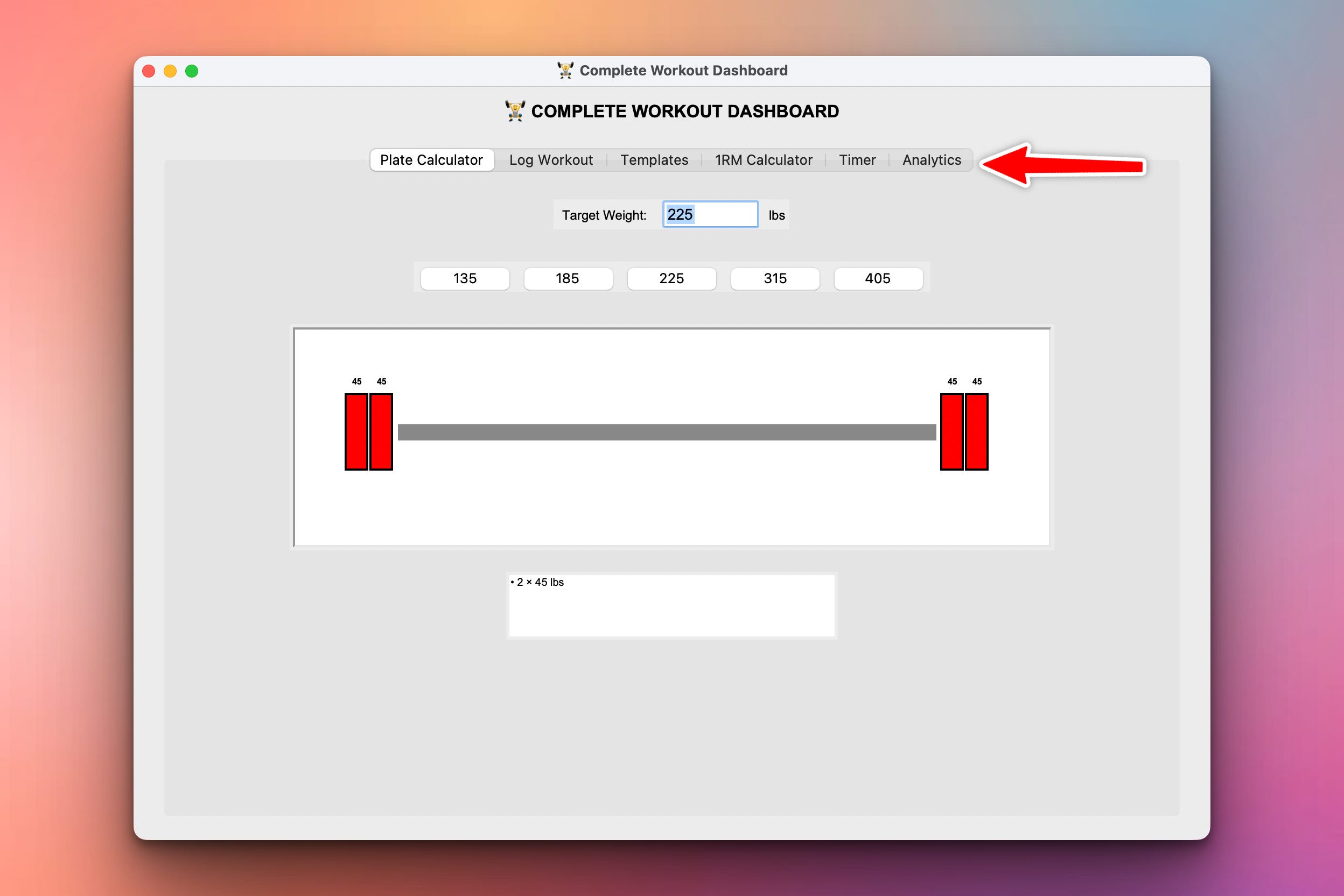
We have gone one step further in this version of the GUI and added tabs. This is a major milestone because it demonstrates one of the most popular techniques to organize a GUI when we are adding more features in the app. With tabs we can organize the various functionalities of the apps as you can see below:
For example, we have now moved the weight progress to a new “Analytics” tab:
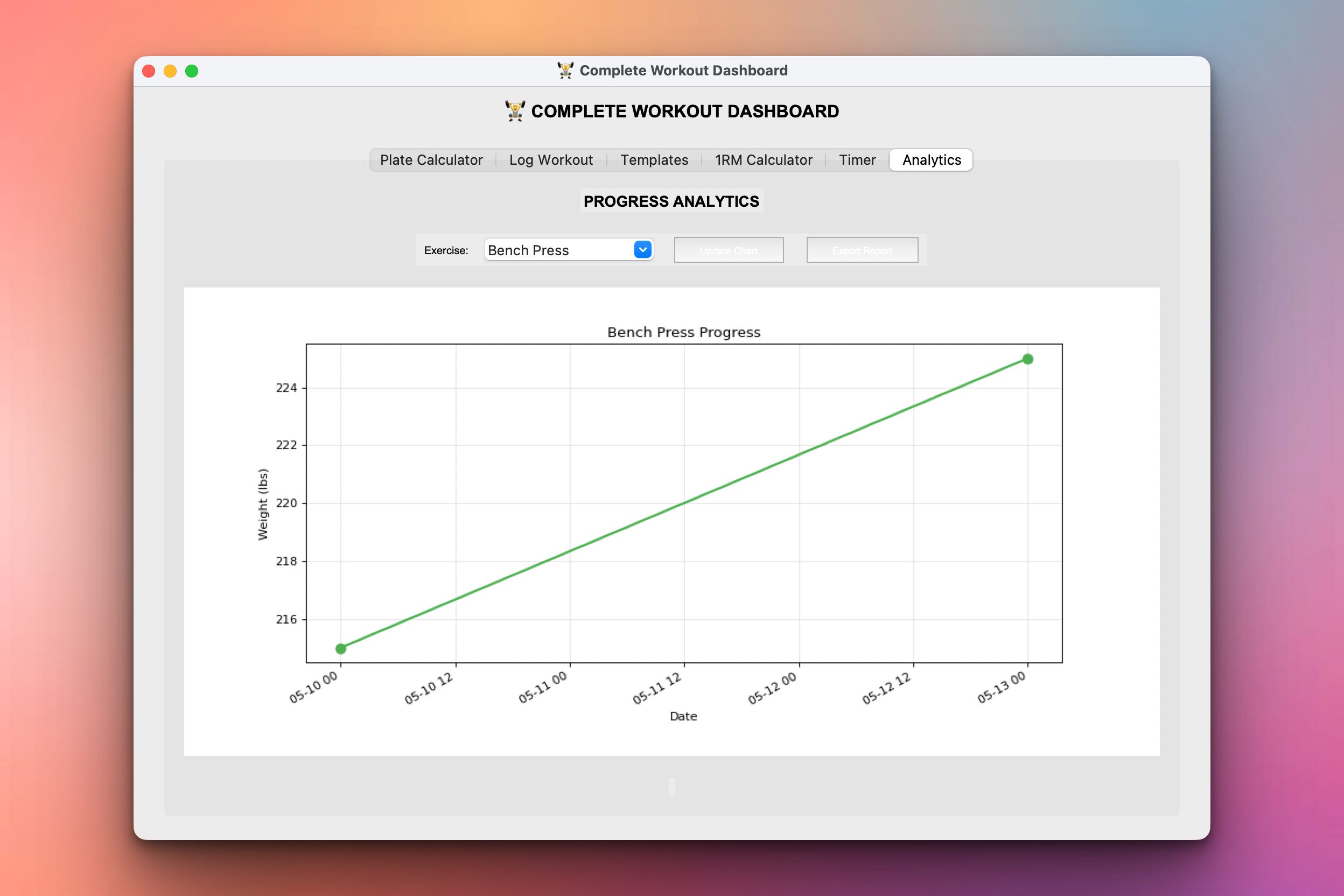
And we have also added other tabs as it can be seen in the screenshots.
Setup Instructions
Install Required Packages:
pip install matplotlib pandas
Run the dashboard:
python workout_dashboard.py
All features ready to use:
No additional setup needed
Data persists in CSV files
Templates saved as JSON
Reports export as TXT files
Understanding 1RM Calculations
What is 1RM?
Your one-rep max - the maximum weight you can lift for exactly one rep.
Why calculate it?
Design training programs (% of 1RM)
Track true strength gains
Compare against standards
Set realistic goals
Common formulas:
1. Epley Formula:
1RM = weight × (1 + reps/30)

# Example: 225 lbs × 8 reps
1RM = 225 × (1 + 8/30)
1RM = 225 × 1.267
1RM = 285 lbs
2. Brzycki Formula:
1RM = weight × (36 / (37 - reps))

# Example: 225 lbs × 8 reps
1RM = 225 × (36 / (37 - 8))
1RM = 225 × (36 / 29)
1RM = 279 lbs
3. Lander Formula:
1RM = (100 × weight) / (101.3 - 2.67123 × reps)

# Example: 225 lbs × 8 reps
1RM = (100 × 225) / (101.3 - 2.67123 × 8)
1RM = 22500 / 79.93
1RM = 281 lbs
Our implementation:
def calculate_1rm(weight, reps):
    # Epley
    epley = weight * (1 + reps/30)

    # Brzycki
    brzycki = weight * (36 / (37 - reps))

    # Lander
    lander = (100 * weight) / (101.3 - 2.67123 * reps)

    # Lombardi
    lombardi = weight * (reps ** 0.10)

    # Average
    average = (epley + brzycki + lander + lombardi) / 4

    return {
        'epley': round(epley, 1),
        'brzycki': round(brzycki, 1),
        'lander': round(lander, 1),
        'lombardi': round(lombardi, 1),
        'average': round(average, 1)
    }
Understanding Strength Standards
What are strength standards?
Benchmarks for comparing your lifts to typical progression levels.
Standard categories:
STRENGTH_STANDARDS = {
    'Bench Press': {
        'Beginner': 0.75,      # 0.75× bodyweight
        'Novice': 1.0,         # 1.0× bodyweight
        'Intermediate': 1.25,  # 1.25× bodyweight
        'Advanced': 1.5,       # 1.5× bodyweight
        'Elite': 1.75,         # 1.75× bodyweight
    },
    'Squat': {
        'Beginner': 1.0,
        'Novice': 1.5,
        'Intermediate': 2.0,
        'Advanced': 2.5,
        'Elite': 3.0,
    },
    'Deadlift': {
        'Beginner': 1.25,
        'Novice': 1.75,
        'Intermediate': 2.25,
        'Advanced': 2.75,
        'Elite': 3.25,
    }
}
Understanding Workout Templates
What are templates?
Pre-designed workout programs with exercises, sets, reps, and rest times.
Common splits:
Push/Pull/Legs (PPL):
TEMPLATES = {
    'Push': [
        {'exercise': 'Bench Press', 'sets': 4, 'reps': 8, 'rest': 180},
        {'exercise': 'Overhead Press', 'sets': 3, 'reps': 10, 'rest': 120},
        {'exercise': 'Incline DB Press', 'sets': 3, 'reps': 12, 'rest': 90},
        {'exercise': 'Lateral Raises', 'sets': 3, 'reps': 15, 'rest': 60},
        {'exercise': 'Tricep Extensions', 'sets': 3, 'reps': 12, 'rest': 60},
    ],
    'Pull': [
        {'exercise': 'Deadlift', 'sets': 3, 'reps': 5, 'rest': 180},
        {'exercise': 'Pull-ups', 'sets': 3, 'reps': 10, 'rest': 120},
        {'exercise': 'Barbell Row', 'sets': 4, 'reps': 8, 'rest': 120},
        {'exercise': 'Face Pulls', 'sets': 3, 'reps': 15, 'rest': 60},
        {'exercise': 'Bicep Curls', 'sets': 3, 'reps': 12, 'rest': 60},
    ],
    'Legs': [
        {'exercise': 'Squat', 'sets': 4, 'reps': 6, 'rest': 180},
        {'exercise': 'Romanian Deadlift', 'sets': 3, 'reps': 10, 'rest': 120},
        {'exercise': 'Leg Press', 'sets': 3, 'reps': 12, 'rest': 90},
        {'exercise': 'Leg Curls', 'sets': 3, 'reps': 15, 'rest': 60},
        {'exercise': 'Calf Raises', 'sets': 4, 'reps': 20, 'rest': 60},
    ]
}
Loading a template:
def load_template(template_name):
    exercises = TEMPLATES[template_name]

    print(f"\n{template_name.upper()} DAY:")
    for i, ex in enumerate(exercises, 1):
        print(f"{i}. {ex['exercise']}")
        print(f"   {ex['sets']}×{ex['reps']}")
        print(f"   Rest: {ex['rest']}s")
We also have other features such as the timer which the user can use to time your workout sessions.
What You’ve Accomplished This Week
🎉 Congratulations! You’ve built a complete workout tracking system!
Day 1: Visual plate calculator
Day 2: Workout logger with charts
Day 3: Complete training dashboard
You now have:
✅ Plate calculator - Visual barbell loading
✅ Workout logging - Track all exercises
✅ Progress charts - See gains visualized
✅ 1RM calculator - Multiple formulas
✅ Strength standards - Compare your lifts
✅ Workout templates - Pre-built programs
✅ Session timers - Track workout & rest
✅ Analytics - Volume & intensity trends
✅ Export reports - Share your progress
✅ Professional GUI - Tabbed interface
Next steps:
Add exercise video library
Integrate with fitness trackers
Build mobile version
Add nutrition tracking
Social features (share workouts)
Online coaching integration
You’ve built the foundation for a complete fitness platform! 🚀
View Code Evolution
Compare today’s complete dashboard with earlier versions and see the full progression from simple calculator → logger → complete system!
Keep reading with a 7-day free trial
Subscribe to Daily Python Projects to keep reading this post and get 7 days of free access to the full post archives.