

Build an AI PDF Analyzer - Day 1: PDF Question Answering
Ask questions to the app and get answers from the AI about your PDF documents.

Projects in this week’s series:
This week, we build a smart PDF analyzer powered by LangChain and Google’s Gemini AI that lets you upload PDFs and ask questions about them.
Why build this? Because we’re drowning in PDF documents — contracts, research papers, reports, manuals. Reading everything takes hours. What if you could just ask questions and get instant answers from your documents?
What you’ll learn: This series teaches you AI-powered document analysis with LangChain, PDF text extraction, prompt engineering with context injection, and building conversational AI tools. These skills apply to any AI document processing project.
Why users love this: No more reading 50-page PDFs cover to cover. Upload any document and ask “What are the key terms?”, “What’s the refund policy?”, “Summarize section 3” — get instant, accurate answers extracted directly from the content!
Day 1: PDF Question Answering (Today)
Day 2: Multi-PDF Comparison
Day 3: PDF Analyzer Web App
Today’s Project
We’re starting with the foundation: a command-line tool that loads any PDF, extracts all the text, and answers your questions using Google’s Gemini AI with the entire document as context!
You’ll learn how to extract text from PDFs, inject document content into AI prompts, maintain conversation history, and build an intelligent PDF chatbot!
Project Task
Create a PDF question answering tool that:
Loads any PDF file from your computer
Extracts all text from every page
Creates a system prompt containing the full document
Uses LangChain + Gemini to answer questions
Maintains conversation history for follow-up questions
Handles multi-page documents
Works entirely from command line
Simple, clean implementation with no complex dependencies
This project gives you hands-on practice with PDF text extraction, LangChain, prompt engineering, context injection, conversation management, and AI-powered document analysis — essential skills for building practical AI applications!
Expected Output
When you run the program, it will ask you to provide the name of your PDF file and lets you ask a question about that PDF.
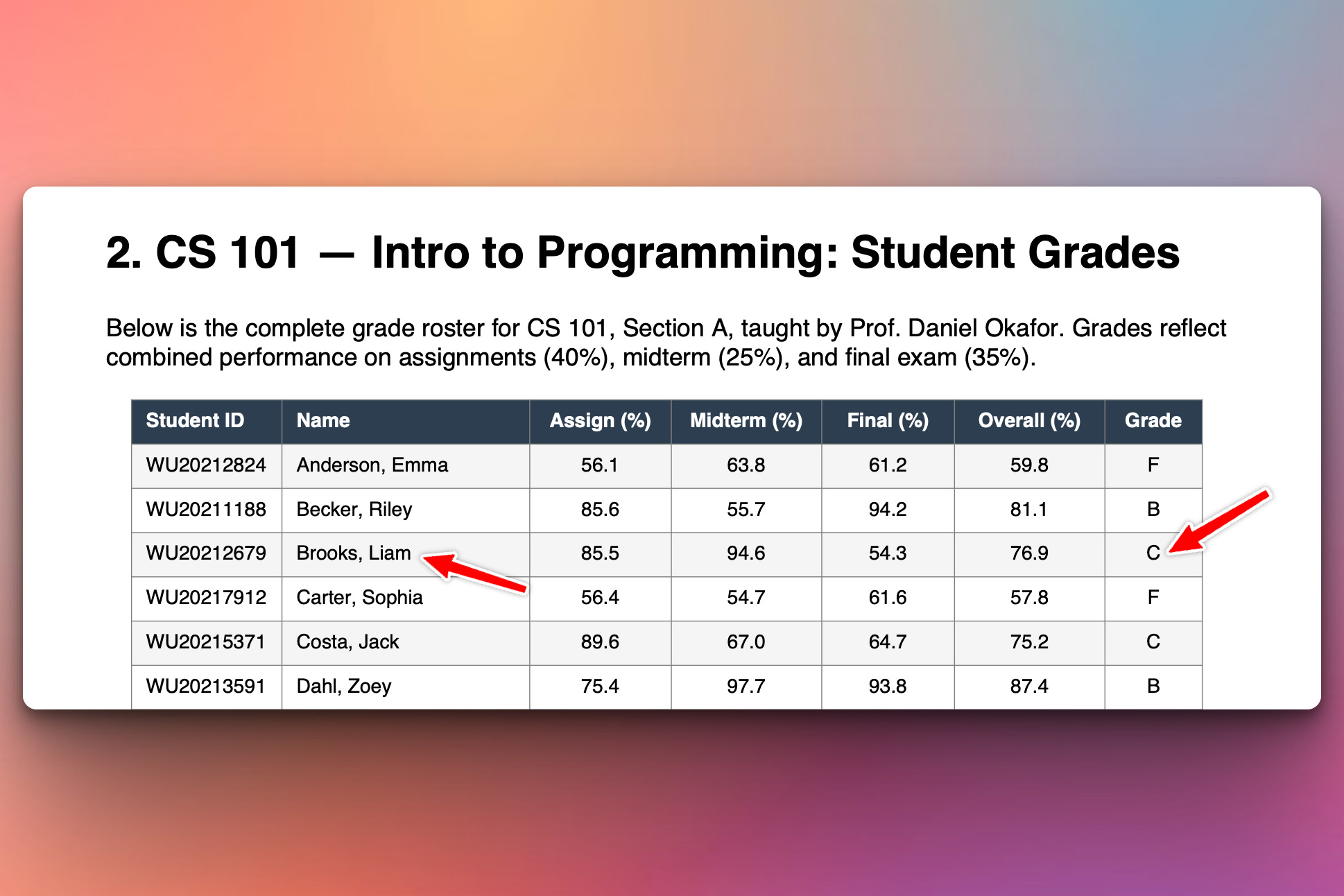
In this example we will use the following PDF:

Here is a screenshot of that PDF:
Below we run the program and ask a question about Liam Brooks and the program gives the correct answer based on the data and information in the PDF:
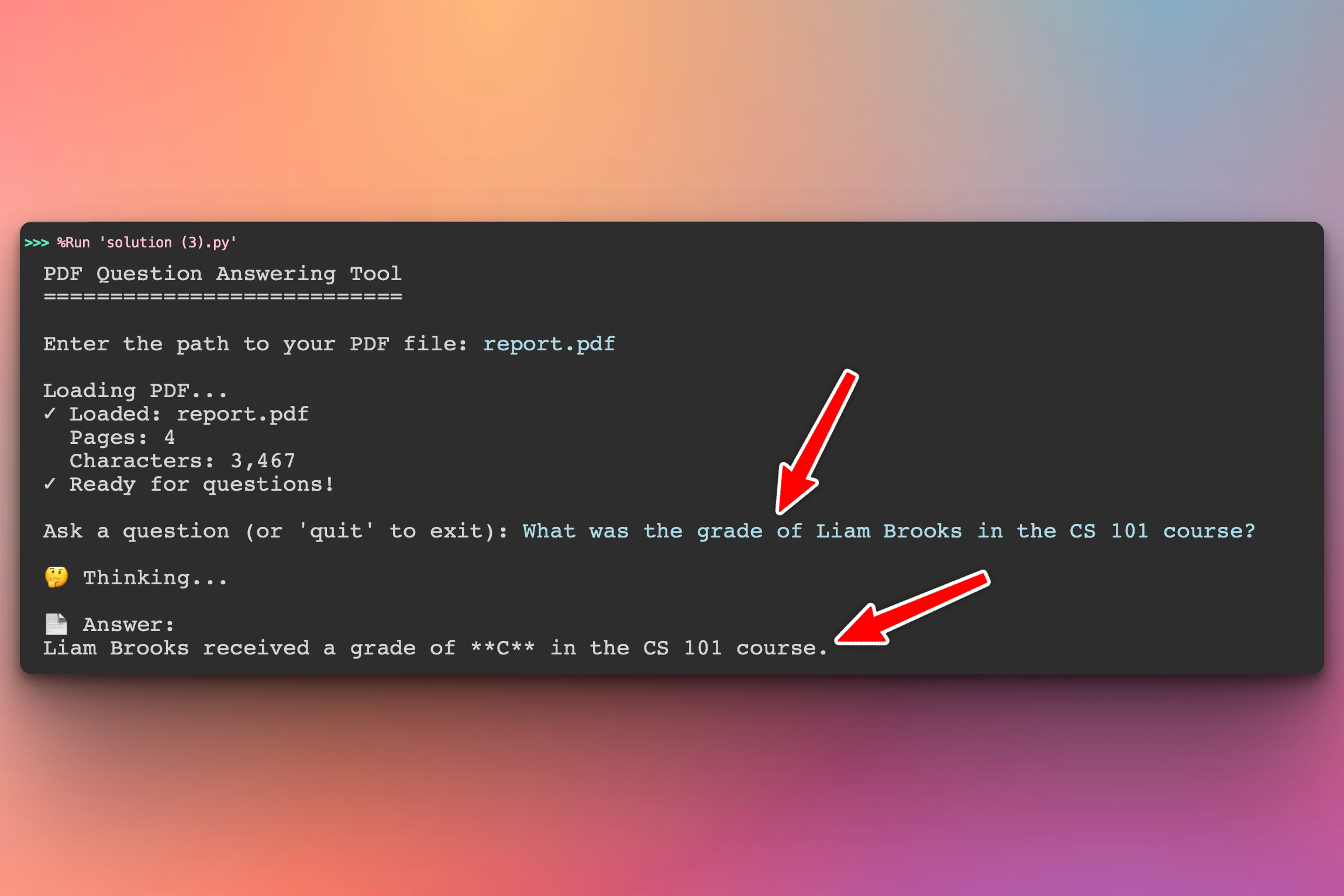
As you can see our program answered the user’s question (in blue) stating that Liam Brooks’ grade is C which is actually correct. That’s his grade in the PDF document.
Setup Instructions
Install Required Packages:
pip install langchain-google-genai pypdfGet Your Google API Key:
Go to Google AI Studio
Click “Create API Key”
Copy your key
Paste it in the script where it says
YOUR_GOOGLE_API_KEY
That’s it! Just 2 packages and your API key in the script.
What each package does:
langchain-google-genai- Google Gemini integration for LangChainpypdf- PDF file reading and text extraction
Run the tool:
python solution.pyThen enter your PDF path and start asking questions!
Understanding the Approach
How it works:
Your PDF → Extract all text → Put in system prompt → Send to Gemini
                                                            ↓
Your question → Add to conversation → Gemini answers using PDF context
                                                            ↓
Follow-up question → Gemini remembers previous Q&A → Better answers!
Simple 3-step process:
Step 1: Extract PDF text
from pypdf import PdfReader

reader = PdfReader(pdf_path)
content = "\n".join(page.extract_text() for page in reader.pages)
Step 2: Create system prompt with content
system_prompt = f"""You are a helpful assistant that answers questions
about this PDF document.

Document content:
{content}

Answer based only on the information in this document."""
Step 3: Chat with context
messages = [SystemMessage(content=system_prompt)]

# Add user question
messages.append(HumanMessage(content=question))

# Get answer
response = llm.invoke(messages)

# Add response to history for follow-ups
messages.append(response)
Why this approach?
✅ Simple - No embeddings, no vector stores, no RAG complexity
✅ Fast - Direct text extraction, instant answers
✅ Conversational - Maintains full conversation history
✅ Context-aware - Follow-up questions work naturally
✅ Accurate - Entire document in context, nothing missed
Perfect for:
Small to medium PDFs (up to ~50 pages)
Contracts, reports, research papers
When you need conversational Q&A
Quick document analysis
Gemini’s huge context window (1M tokens) means it can handle the entire document at once!
Coming Tomorrow
Tomorrow we’ll expand to multi-PDF comparison — upload multiple documents and ask questions across all of them. “Which resume is stronger?”, “Compare these 3 research papers”, “What do all these contracts have in common?”
Skeleton and Solution
Below you will find both a downloadable skeleton.py file to help you code the project with comment guides and the downloadable solution.py file containing the correct solution.
Get the code skeleton here:
Get the code solution here: