

Build an AI Travel Itinerary Planner: Day 2 - AI Itinerary Generator with Gemini
We will build an AI assistant that writes a travel itinerary for us and then plots it in an interactive web map.

Projects in this week’s series:
This week, we build an AI Travel Itinerary Planner that turns a destination into a beautiful, interactive map you can explore and share — perfect for trip planning!
Day 1: Interactive Trip Map with Folium
Day 2: AI Itinerary Generator with Gemini (Today)
Day 3: Travel Planner Web App
Today’s Project
Yesterday we built the map engine and hand-fed it a Lisbon itinerary. Today the AI writes the itinerary for us. You describe a trip in plain English — “4 days in Rome, I love food and ancient history” — and Gemini, through LangChain v1, returns a fully structured itinerary with coordinates baked in. That output drops straight into yesterday’s map code, unchanged.
This is the payoff of Day 1’s design: because we built a stable data shape first, the AI just has to fill it.
Project Task
Build an AI itinerary generator that:
Takes a plain-English trip request (destination, days, interests)
Uses LangChain v1 + Gemini to generate a structured itinerary
Returns each stop with name, day, lat, lon, category, and description
Uses Pydantic models so the AI output is validated and type-safe
Uses
with_structured_output()— no manual JSON parsingFeeds the AI itinerary into the Day 1 Folium map engine
Handles API errors and missing keys gracefully
Saves the finished map as a shareable HTML file
This project gives you hands-on practice with LangChain v1, the Gemini API, structured AI output, Pydantic schema validation, and connecting an AI layer to a visualization layer — essential skills for AI-powered applications.
Expected Output
Running the AI generator:
python ai_trip_map.py
Console Output:
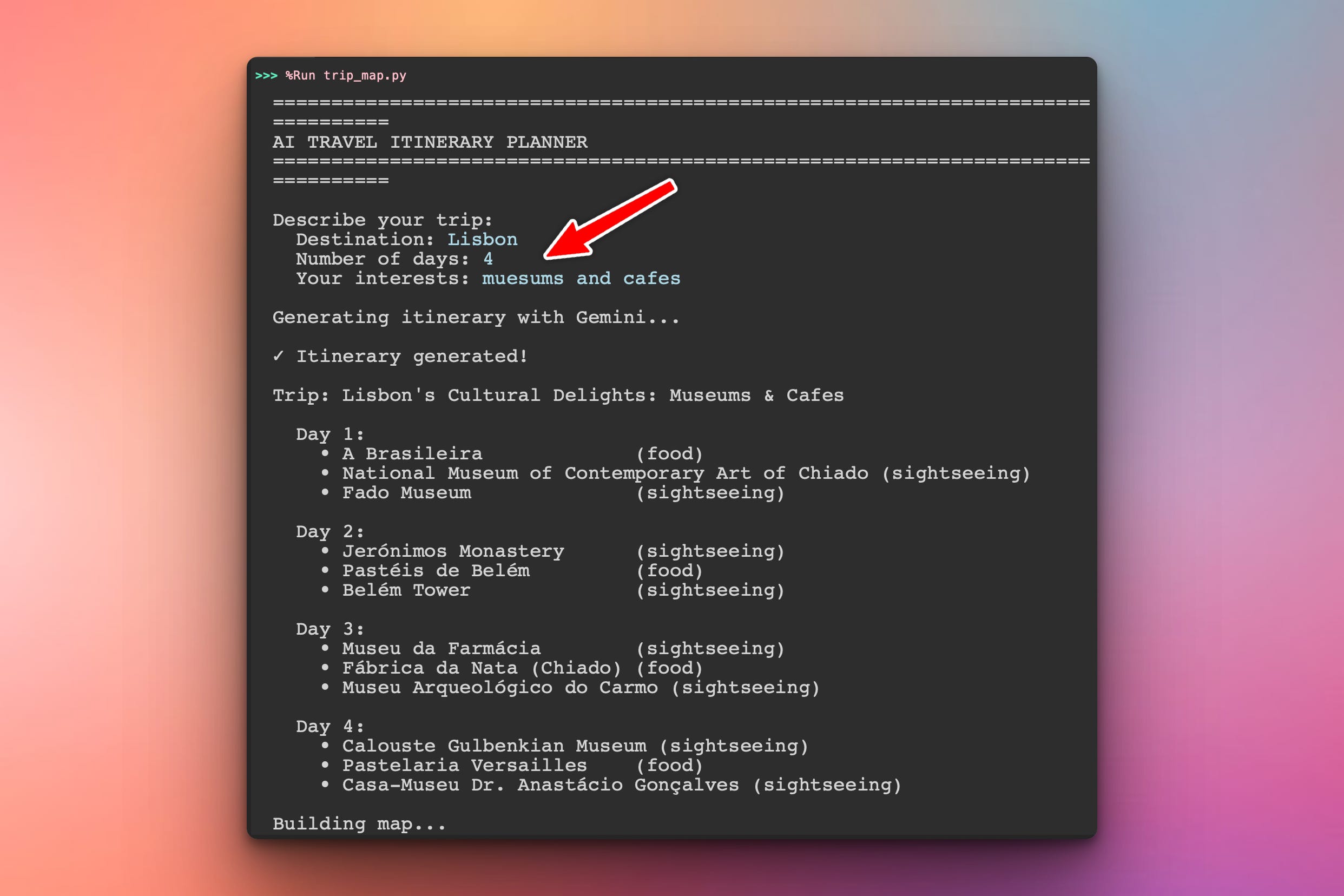
The user can define their trip preferences in the terminal and the program will print out an itinerary:
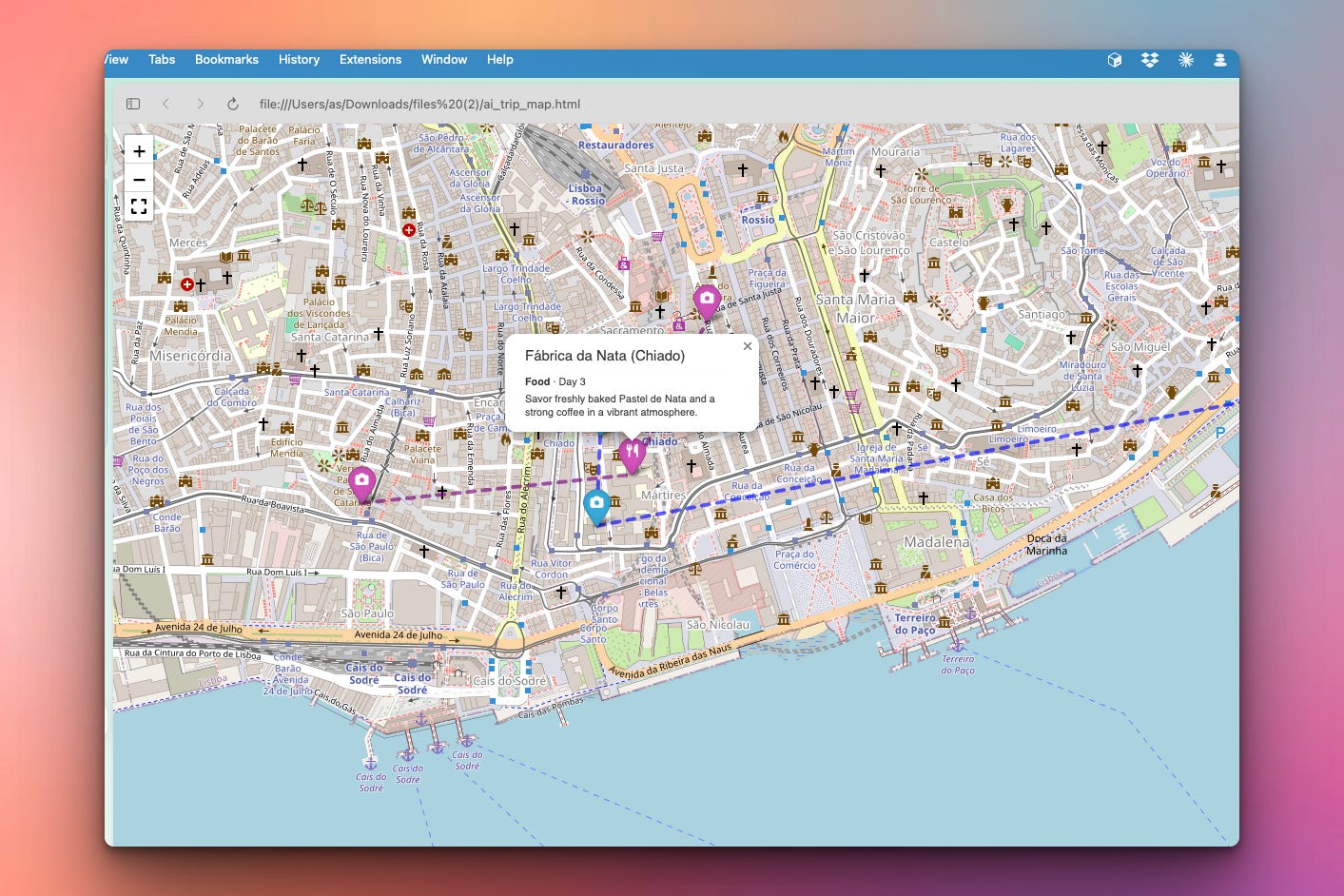
After that runs an HTML file will be created which can be opened in the browser. It will contain the itinerary with interactive map pins:
Setup Instructions
Install Required Packages:
pip install langchain langchain-google-genai folium
Get Your Google API Key:
Go to Google AI Studio
Click “Create API Key” and copy it
Assign the key to the GOOGLE_API_KEY variable as a string in the code.
Run it:
python ai_trip_map.pyUnderstanding Structured Output
The hardest part of using an LLM in real code is that it returns text. Free-form text is unreliable — you’d be writing fragile parsers and praying the model uses the right quote style.
LangChain’s with_structured_output() solves this. You define the shape you want as a Pydantic model, and the AI is constrained to return exactly that shape — already parsed into Python objects:
from pydantic import BaseModel
from langchain_google_genai import ChatGoogleGenerativeAI

class Person(BaseModel):
    name: str
    age: int

llm = ChatGoogleGenerativeAI(model="gemini-2.5-flash")
structured_llm = llm.with_structured_output(Person)

result = structured_llm.invoke("Tell me about a person named Alice, age 30")
# result is a Person object: Person(name='Alice', age=30)
No JSON parsing. No string cleanup. You get a typed object, and if the AI returns something malformed, Pydantic raises a clear error instead of silently corrupting your data.
Understanding the Pydantic Schema
We need the AI to return the exact data shape our Day 1 map expects. So we describe it as Pydantic models — one for a single stop, one for the whole itinerary:
from pydantic import BaseModel, Field

class Stop(BaseModel):
    """A single stop on the trip."""
    name: str = Field(description="Name of the place")
    day: int = Field(description="Which day of the trip this stop is on")
    lat: float = Field(description="Latitude coordinate")
    lon: float = Field(description="Longitude coordinate")
    category: str = Field(description="One of: food, sightseeing, hotel, activity, transport")
    description: str = Field(description="One-sentence description of the stop")

class Itinerary(BaseModel):
    """A complete multi-day travel itinerary."""
    trip_title: str = Field(description="A short title for the trip")
    stops: list[Stop] = Field(description="All stops across all days, in visiting order")
Why the Field(description=...) matters: those descriptions aren’t just documentation. LangChain sends them to the model as part of the schema. They’re how you tell the AI “category must be one of these five values” or “give me one sentence, not a paragraph.” Good field descriptions are effectively prompt engineering.
Understanding the LangChain v1 + Gemini Setup
LangChain v1 keeps the model setup clean. You create the chat model, then attach the schema:
import os
from langchain_google_genai import ChatGoogleGenerativeAI

def build_ai():
    llm = ChatGoogleGenerativeAI(
        model="gemini-2.5-flash",
        google_api_key=os.getenv("GOOGLE_API_KEY"),
        temperature=0.7,  # a little creativity for varied suggestions
    )
    # Constrain every response to the Itinerary schema
    return llm.with_structured_output(Itinerary)
temperature=0.7 is a deliberate choice: trip planning benefits from variety, so we don’t want the near-deterministic 0 you’d use for data extraction. The structured-output constraint still guarantees the shape — temperature only affects the content.
Understanding the Prompt
Even with structured output, the prompt still matters — it’s where you give the AI its instructions and quality bar:
def build_prompt(destination, days, interests):
    return f"""You are an expert travel planner.

Create a {days}-day travel itinerary for {destination}.
The traveler is interested in: {interests}.

Requirements:
- Plan exactly 3 stops per day.
- Spread stops geographically so each day is walkable where possible.
- Include a mix of categories, with at least one food stop per day.
- Use real, well-known places with accurate latitude and longitude.
- Keep each description to a single vivid sentence.
- Order stops within each day in a sensible visiting sequence.
"""
Notice we ask for accurate latitude and longitude directly. Gemini knows the coordinates of famous landmarks well, so for a travel planner this is reliable enough — and it keeps the project to a single API call with no separate geocoding service.
Understanding the AI-to-Map Handoff
Here’s where Day 1’s design pays off. The AI returns an Itinerary object full of Stop objects. Our map engine expects a list of plain dicts. One small conversion bridges them:
def itinerary_to_stops(itinerary):
    """Convert the AI's Pydantic Itinerary into the dict list the map expects."""
    return [
        {
            "name": stop.name,
            "day": stop.day,
            "lat": stop.lat,
            "lon": stop.lon,
            "category": stop.category,
            "description": stop.description,
        }
        for stop in itinerary.stops
    ]
After this, every map function from Day 1 works untouched — build_trip_map, add_day_to_map, fit_map_to_stops, all of it. The AI is just a new data source plugged into a finished engine.
Understanding Error Handling
AI calls fail in ways normal code doesn’t — missing keys, rate limits, network drops. A travel app shouldn’t crash on any of them:
def generate_itinerary(ai, destination, days, interests):
    if not os.getenv("GOOGLE_API_KEY"):
        print("✗ No GOOGLE_API_KEY found. Set it as an environment variable.")
        return None

    prompt = build_prompt(destination, days, interests)

    try:
        return ai.invoke(prompt)
    except Exception as e:
        print(f"✗ Itinerary generation failed: {e}")
        return None
The check for the missing key happens before the call — a fast, friendly failure. The try/except catches everything else and reports it instead of dumping a stack trace.
Understanding Why Pydantic Validation Helps
Keep reading with a 7-day free trial
Subscribe to Daily Python Projects to keep reading this post and get 7 days of free access to the full post archives.