

Code a Python Quiz Game with Classes and Gradio Interface
Level: Real World

Your task for today is to build an interactive quiz game using Python classes and a Gradio web interface. This project teaches how to design a system with multiple interconnected classes and wrap it into a user-friendly web app.
📝 Project Task
Core Classes
Question(text: str, options: list[str], answer: int)
Represents one question. Stores the text, a list of options, and the index of the correct answer.Quiz(questions: list[Question])
Manages the flow of the game.Methods:
next_question()→ returns the currentQuestionobjectsubmit(choice: int)→ checks answer, updates score, advances to nextreset()→ resets all progress and scoresummary()→ returns final score, accuracy, and time taken
Expected Output
This is a web app that uses the Gradio web framework. Here is how the app will look like:
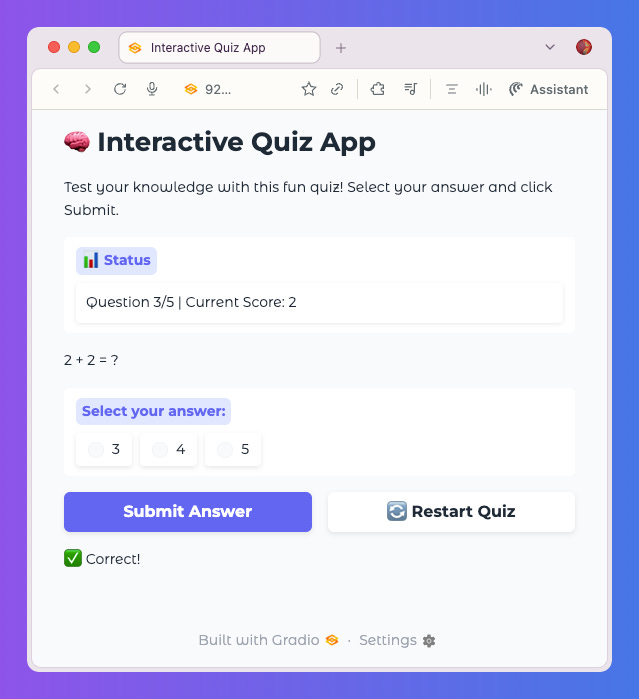
The user can answer questions in the app, submit their answers, and the score in the “Status” tab is updated in real time.
Data
In the example provided in the Jupyter Notebook linked at the bottom of this page we are using these sample data:
# Sample questions
questions = [
    Question("What is the capital of France?", ["Paris", "London", "Berlin"], 0),
    Question("Which language is this quiz written in?", ["Java", "Python", "C++"], 1),
    Question("2 + 2 = ?", ["3", "4", "5"], 1),
    Question("What is the largest planet in our solar system?", ["Earth", "Jupiter", "Saturn"], 1),
    Question("Which year did World War II end?", ["1944", "1945", "1946"], 1)
]
💻 Launch This Project in Colab
Open the interactive Google Colab notebook for today’s project — with full instructions, hints, and solutions.
Click the button below to start coding — no setup needed:
Keep reading with a 7-day free trial
Subscribe to Daily Python Projects to keep reading this post and get 7 days of free access to the full post archives.