

Day 3 + BIG NEWS: The Gen AI Engineer Bootcamp is Live!
My new Gen AI Engineer Bootcamp is live. Special $9.99 early-bird price for subscribers.

Today for Day 3, we are turning our Telegram bot into an AI chatbot, but before we jump into that, I have some big news.
🚀 The Gen AI Engineer Bootcamp is LIVE on Udemy!
As a subscriber, you can get it at the lowest price that Udemy allows - $9.99 by using the coupon code EARLY_ACCESS or by clicking the link below:
Coupon code expires March, 30, 20226.
In the course, you will learn how to build AI-powered apps with Python and the latest version of LangChain, build AI agents and intelligent automations, AI voice assistants, AI image recognition via Python and much more. All you need is some basic Python knowledge, which I assume you already have since you are part of this newsletter.
Now, back to today’s Telegram bot project!
Projects in this week’s series:
This week, we progressively build a Telegram bot from basic messaging to AI-powered conversations.
Day 1: Send Telegram Messages with Python
Day 2: Interactive Telegram Bot
Day 3: AI-Powered Telegram Bot with Gemini & LangChain (Today)
Today’s Project
Welcome to the finale! We’ve built a message sender and a rule-based bot. Today we’re upgrading to AI-powered intelligence using LangChain and Google Gemini — the bot will understand ANY question, have real conversations, remember context persistently in SQLite, and provide genuinely useful answers!
What’s LangChain? LangChain is a framework for building AI applications. Instead of calling the Gemini API directly, LangChain provides powerful tools for conversation management, persistent memory, agent creation, and advanced AI workflows. Think of it as the professional way to build AI apps — used by companies worldwide for production AI systems.
We’re transforming our limited keyword-matching bot into an intelligent AI assistant with persistent memory that lives in your Telegram!
Project Task
Create an AI-powered Telegram bot that:
Uses LangChain framework for AI conversation management
Connects to Google Gemini AI (free tier)
Stores conversation history in SQLite database (persistent!)
Maintains conversation context across bot restarts
Understands and answers any question
Generates creative and helpful responses
Provides personality modes (helpful/funny/professional)
Each mode has its own conversation thread
Shows typing indicator while thinking
Logs all AI interactions
This project gives you hands-on practice with LangChain, AI agents, persistent conversation storage, SQLite integration, prompt engineering, and building production-ready AI assistants — essential skills for modern AI application development!
Expected Output
To use the bot, you should first run the script in your computer.
Then you can go to Telegram on your phone and start chatting with the AI bot. Here is a screenshot I took:
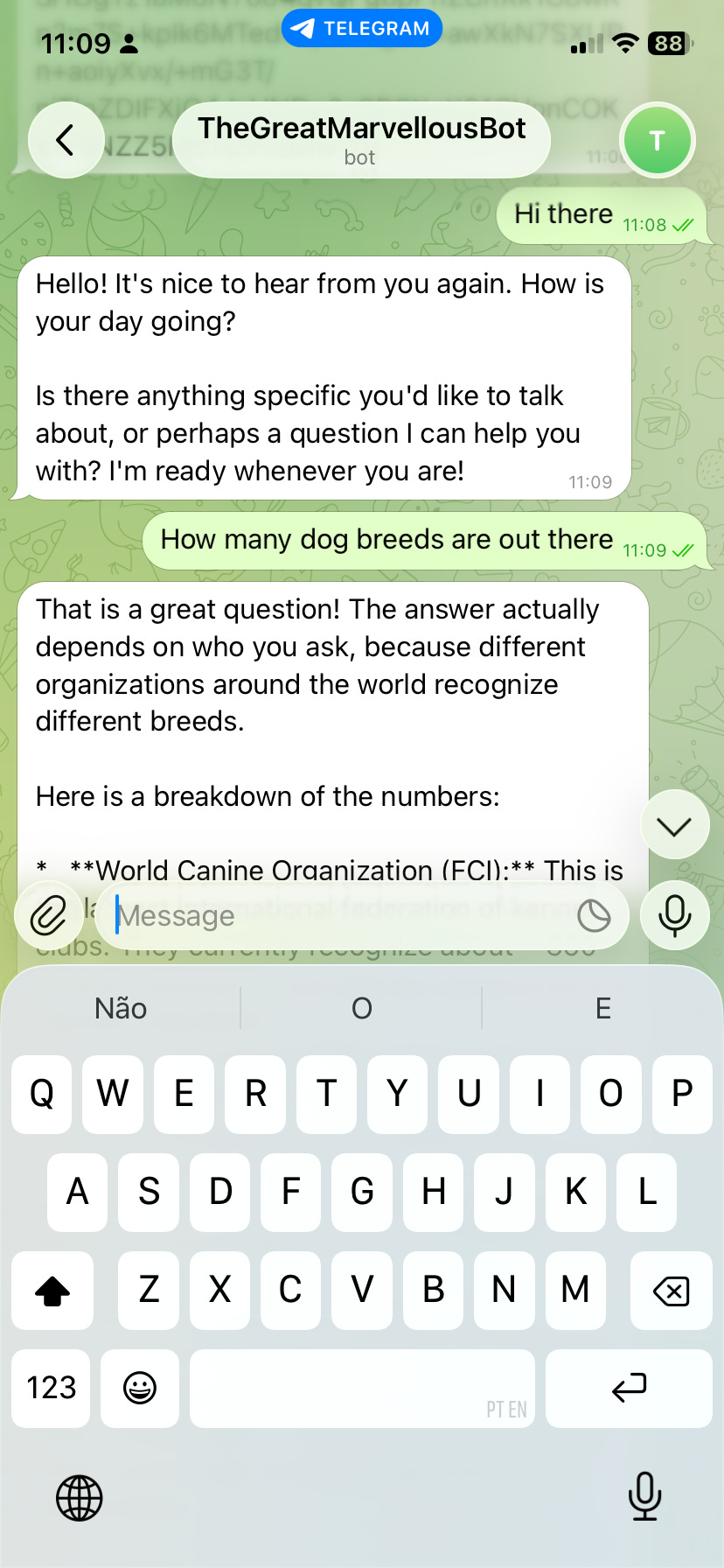
As you can see the bot has now AI powers so it can answer any questions. That’s quite powerful!
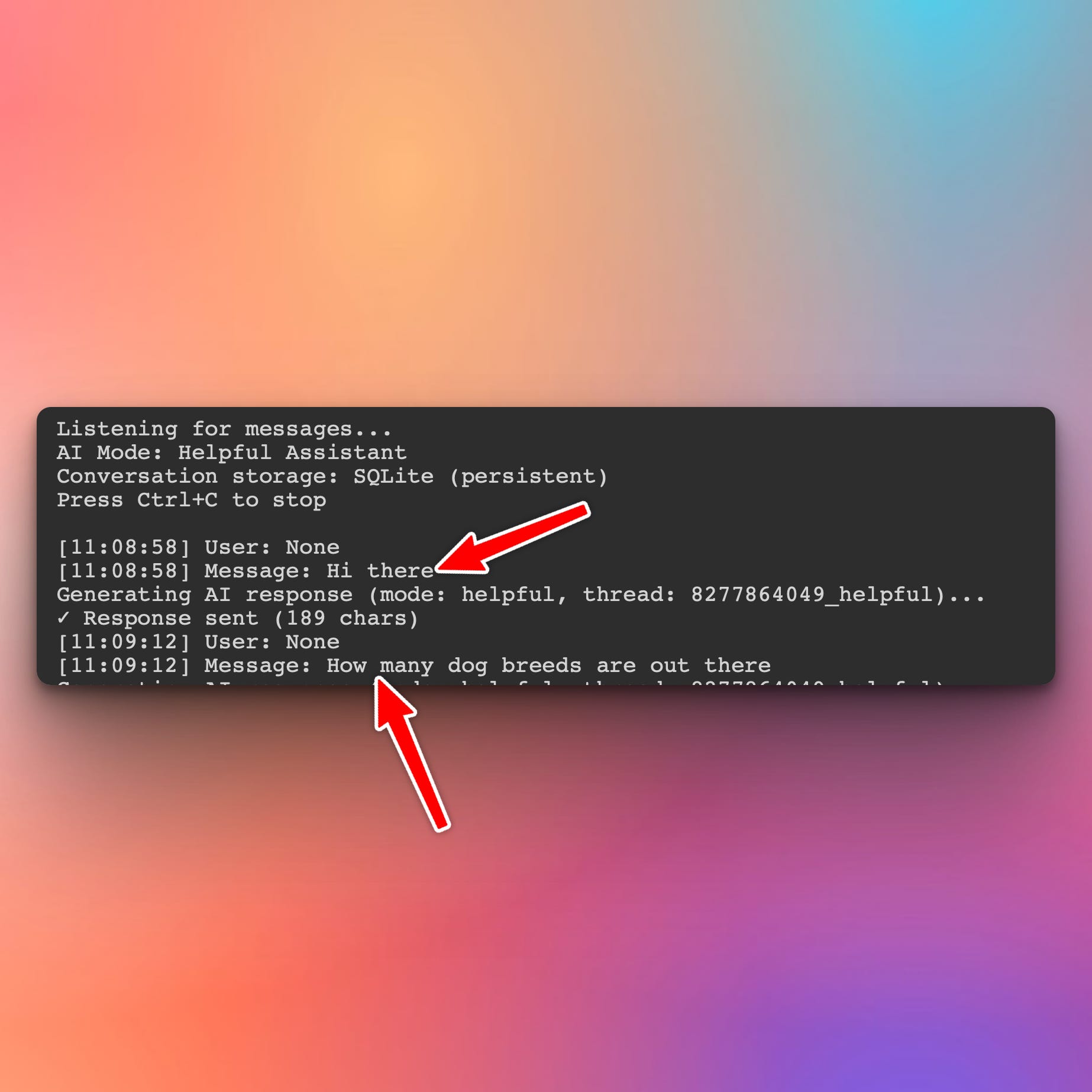
And in your terminal you will see the messages sent by the user to the bot:
Setup Instructions
Step 1: Install Required Packages
This project uses several packages for AI and bot functionality:
pip install python-telegram-bot langchain langchain-google-genai langgraph python-dotenvWhat each package does:
python-telegram-bot- Telegram Bot API wrapperlangchain- AI application framework (core)langchain-google-genai- Google Gemini integration for LangChainlanggraph- Graph-based agent workflows (includes SqliteSaver)python-dotenv- Environment variable management
Step 2: Get Google Gemini API Key (FREE)
Go to: https://aistudio.google.com/app/apikey
Click “Create API Key”
Copy the key (starts with
AIza...)
Free tier includes:
15 requests per minute
1,500 requests per day
1 million tokens per day
Perfect for personal projects!
Step 3: Use Your Telegram Bot Token
Use the same bot token from Day 1 (no new setup needed!)
Step 4: Create .env File
Create a .env file in your project folder:
TELEGRAM_BOT_TOKEN=your_telegram_bot_token_here
GOOGLE_API_KEY=your_gemini_api_key_here
Step 5: Run the Bot
python solution.pyStep 6: Test in Telegram
Send /start to your bot and start chatting!
Understanding the Technology Stack
Why LangChain?
Instead of calling Gemini API directly, we use LangChain because it provides:
✅ Conversation Management - Handles chat history automatically
✅ Persistent Memory - Stores conversations in SQLite
✅ Agent Framework - Professional AI application structure
✅ Thread Management - Separate conversations per user/mode
✅ Production-Ready - Used by companies for real AI products
Without LangChain (manual approach):
# You'd manually manage:
- Conversation history lists
- Context window limits
- Memory persistence
- Thread separation
# 100+ lines of boilerplate code
With LangChain (framework approach):
agent = create_agent(
    model=llm,
    checkpointer=SqliteSaver.from_conn_string('db.db')
)
# Memory and threading handled automatically!
SQLite Conversation Storage
How it works:
User sends message → LangChain saves to SQLite
AI responds → Response saved to same thread
Next message → LangChain loads history from database
Bot restarts? Conversations persist in
telegram_conversations.db
Thread structure:
User 123456 + Helpful mode  = Thread "123456_helpful"
User 123456 + Funny mode    = Thread "123456_funny"
User 789012 + Helpful mode  = Thread "789012_helpful"
Each combination has its own conversation history!
LangGraph Agent Architecture
LangGraph provides the agent workflow:
User Message → Agent → Gemini AI → Response
                ↓
          SqliteSaver (persistent memory)
The agent:
Manages conversation flow
Loads history from SQLite
Sends context + new message to Gemini
Saves response back to SQLite
What You’ve Accomplished This Week
🎉 Congratulations! You’ve built a complete AI-powered Telegram bot and learned:
Day 1: Telegram Bot API and message sending
Day 2: Interactive commands and conversation handling
Day 3: LangChain framework + AI integration + persistent memory
You now have a production-ready AI assistant that: ✅ Uses industry-standard LangChain framework
✅ Stores conversations persistently in SQLite
✅ Answers any question intelligently
✅ Remembers conversation context (even after restarts!)
✅ Adapts personality on command
✅ Handles multiple users with separate threads
✅ Lives in Telegram (accessible anywhere)
This is a professional AI application architecture — the same patterns used in real-world AI products!
Database File
After running the bot, you’ll see a new file:
telegram_conversations.dbThis SQLite database contains:
All conversation threads
Message history per user+mode
Persistent across bot restarts
Can be backed up, copied, or analyzed
View Code Evolution
Reveal the working code that produces this exact project in the button below. You will also be able to compare the code with the earlier versions and see how we evolved from simple messages to rule-based commands to professional AI framework integration.
Already got the new Gen Ai Engineer Bootcamp and it looks awesome!