

Practice Challenge: Build a Simple Python Chatbot That Talks Back
Level: Beginner

Build Your Python Muscles One Project at a Time 💪
Every small Python program you create sharpens your problem-solving skills and grows your confidence.
That’s why these daily projects matter — they give you bite-sized challenges that teach you how to break down problems, design logic, and actually use Python for something real.
Today’s project is a fun one: you’ll create a simple text-based chatbot.
It won’t use any AI or machine learning — instead, it’s a rule-based chatbot that replies based on keywords.
This is exactly how many early chat systems worked, and it’s a great way to practice string matching, conditionals, and loops.
Project Description
Your task is to build a basic text chatbot that runs in the terminal.
The user can type any message, and your bot will look for certain keywords to decide how to respond.
For example:
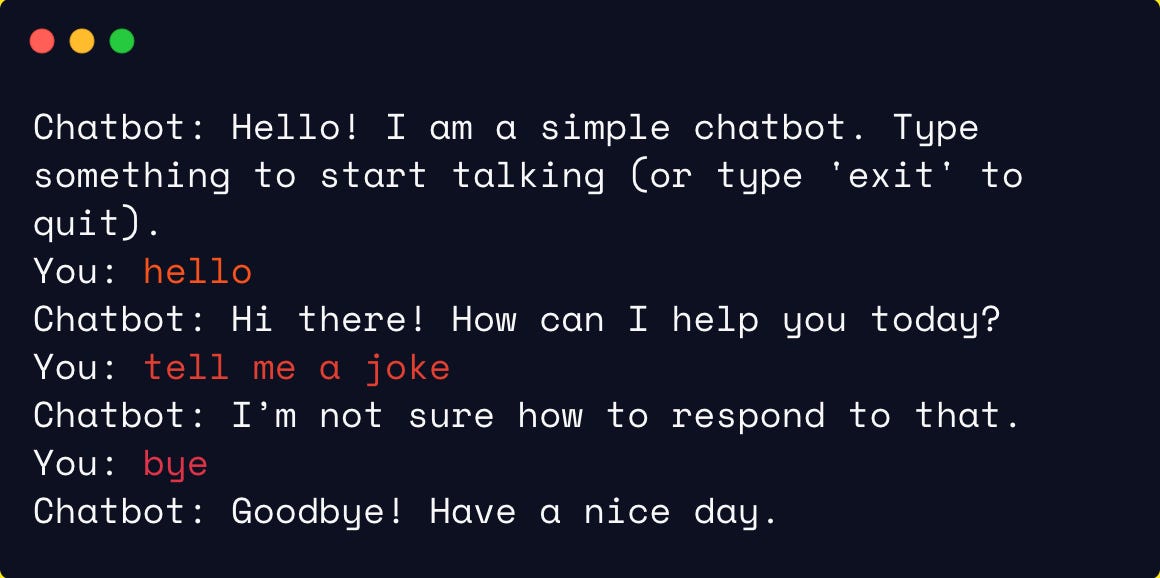
If the user says “hello”, the bot could reply with “Hi there! How can I help you today?”
If the user says “bye”, the bot could say “Goodbye! Have a nice day.”
If the message doesn’t contain any known keywords, the bot can say “I’m not sure how to respond to that.”
This is an awesome way to practice:
Loops (to keep the conversation going),
Conditionals (to check for keywords),
Basic string handling (like
.lower()andin).
Expected Output
💡 Hint
Not sure how to begin? Click the Show Hint button.
It’ll show you how to set up a while loop that keeps asking for user input, and use simple if / elif checks to determine how the bot responds.
🤖 It also suggests using .lower() so you can match keywords case-insensitively.
𝌣 Solution
🔒 This solution is available to paid subscribers only.
✅ Includes a clean implementation you can adapt to more keywords or even randomize replies for variety.
🚀 Want to keep leveling up?
Browse hundreds of projects at dailypythonprojects.substack.com/archive and unlock all solutions by subscribing. Build real Python skills daily and transform how you learn — one project at a time.