

Web Scraping with BeautifulSoup: Day 1 - Scrape a Single Page
Learn how to fetch a web page, parse it with BeautifulSoup, and extract structured data from a list of repeated items.

Projects in this week’s series:
This week, we build a Web Scraping with BeautifulSoup suite that extracts a complete product catalog from a real website, scales up to thousands of items across many pages, and turns the scraped data into a searchable mini-database.
Why build this? Because web scraping is one of the most genuinely useful Python skills. Data that’s locked inside a website becomes yours — to analyze, search, compare, or feed into other tools. Every analyst, data scientist, and automation engineer needs this skill.
What you’ll learn: This series teaches you HTTP requests, HTML parsing with BeautifulSoup, CSS selectors, handling lists of repeated elements, pagination, polite scraping with delays, structured data extraction, and querying the result.
Why this matters: By Day 3, you’ll have scraped a complete catalog of 1,000 books and built a tool to search and analyze them. That’s a real, portfolio-worthy project — and the techniques transfer directly to scraping any catalog-style site.
Day 1: Scrape a Single Page (Today)
Day 2: Multi-Page Scraping with Pagination
Day 3: Search & Analyze the Scraped Data
Today’s Project
Today you learn the fundamentals: fetching a web page, parsing it with BeautifulSoup, and extracting structured data from a list of repeated items.
The target is books.toscrape.com — a real, public site explicitly built for scraping practice. It’s the official sandbox of the Python scraping community. Today’s mission: scrape every book on the homepage (20 books), capture each one’s title, price, rating, and availability, and save the result as a clean CSV.
By the end, you’ll understand how every catalog-style scraper works — because the pattern is the same whether you’re scraping books, products, jobs, real estate, or any other list of repeated items.
Project Task
Build a single-page book scraper that:
Fetches the books.toscrape.com homepage with
requestsSets a polite User-Agent header to identify your script
Parses the HTML with BeautifulSoup
Finds every book card on the page
For each book, extracts:
Full title (from the link’s
titleattribute, not the truncated text)Price as a real number (no
£symbol)Star rating as an integer (1–5)
Stock availability (in stock / out of stock)
Link to the book’s detail page
Reports progress as it works
Saves all books to a CSV with proper column types
This project gives you hands-on practice with requests, BeautifulSoup, CSS class selection, attribute access, text cleanup, and writing structured data to CSV — the core of every web scraper.
Expected Output
Running the scraper:
python scrape_books.pyConsole Output:
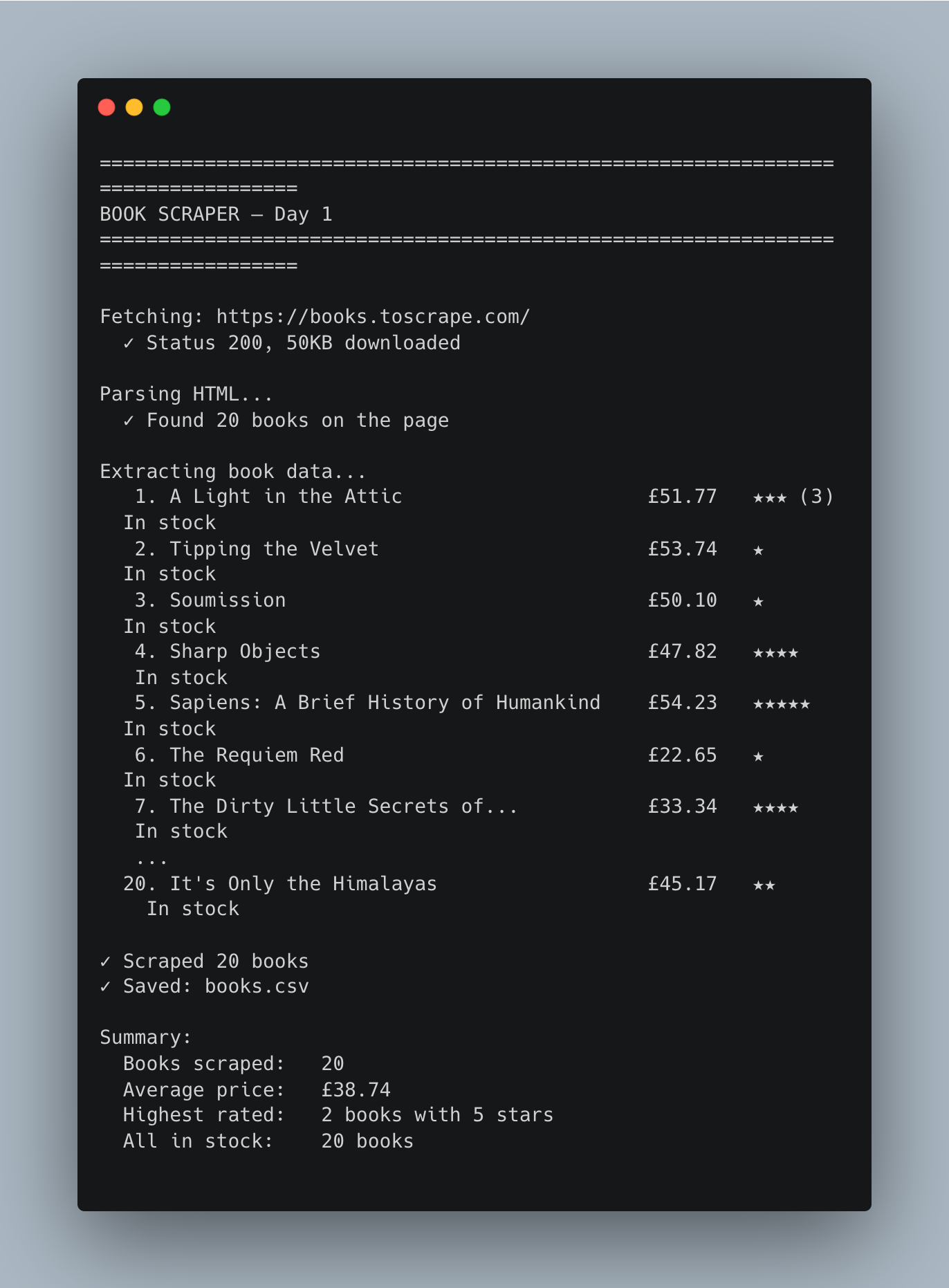
Generated books.csv:
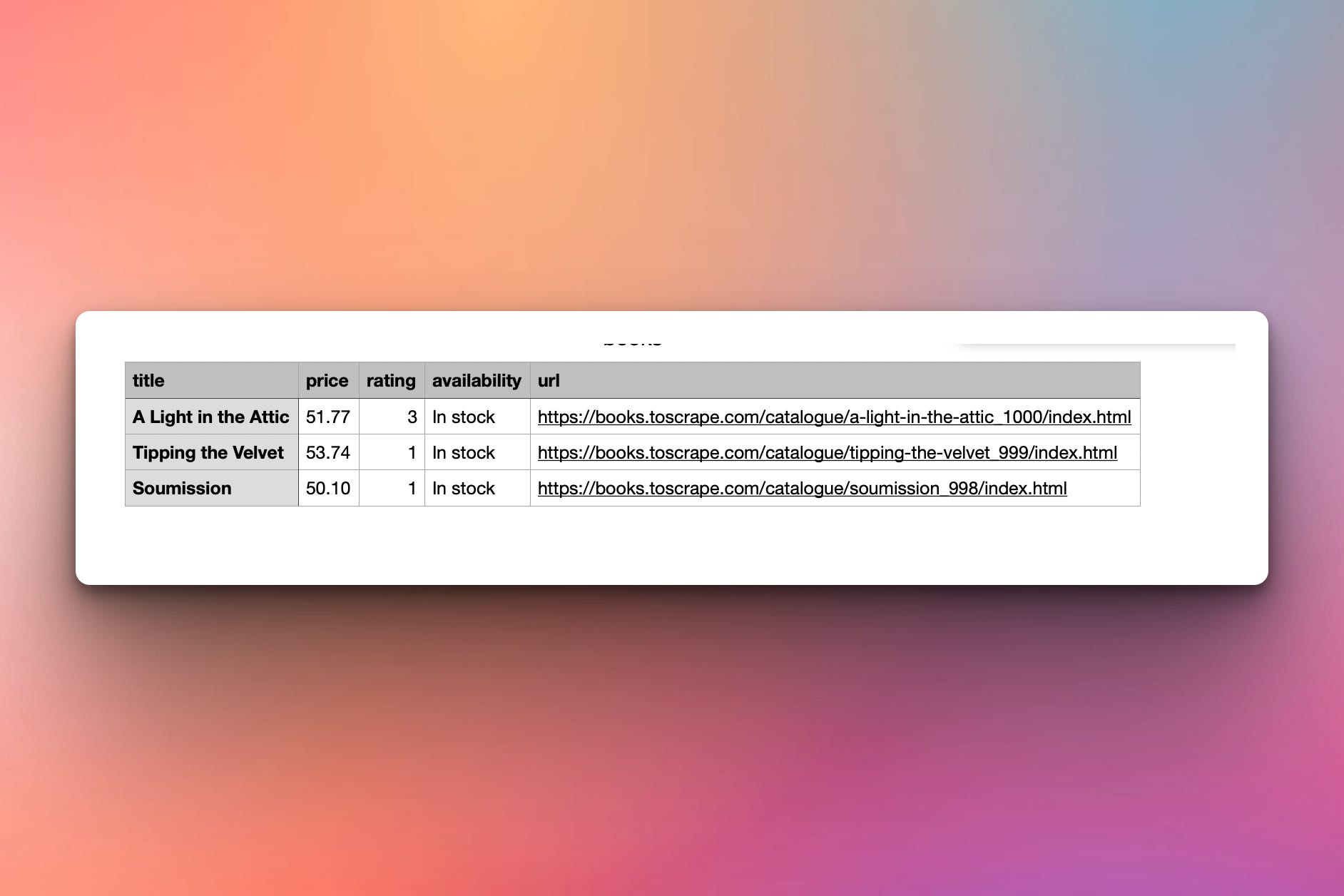
Real prices as numbers, ratings as integers, links absolute — ready for analysis without further cleanup.
Setup Instructions
Install Required Packages:
pip install requests beautifulsoup4
That’s it — two libraries. requests fetches the page, beautifulsoup4 parses it.
Run it:
python scrape_books.py
The script reads from the live site and writes books.csv next to itself.
Understanding the Target Site
Before writing any code, always look at the page in your browser. Open https://books.toscrape.com/ and right-click any book → “Inspect Element.”
You’ll see that every book on the page is wrapped in an <article> tag with the class product_pod:
<article class="product_pod">
  <div class="image_container">
    <a href="catalogue/a-light-in-the-attic_1000/index.html">
      <img src="..." alt="A Light in the Attic">
    </a>
  </div>
  <p class="star-rating Three"></p>
  <h3>
    <a href="catalogue/a-light-in-the-attic_1000/index.html"
       title="A Light in the Attic">A Light in the ...</a>
  </h3>
  <div class="product_price">
    <p class="price_color">£51.77</p>
    <p class="instock availability"> In stock </p>
  </div>
</article>
This structure is the whole game. Every scraper boils down to: find the repeated container, then pluck specific fields out of each one. The HTML inspector tells you the class names and tags to target — that’s how you know what to put in your code.
Understanding requests and Headers
Scraping starts with downloading the page. requests.get() does the heavy lifting:
import requests

url = "https://books.toscrape.com/"
headers = {"User-Agent": "Mozilla/5.0 (Python Scraper)"}

response = requests.get(url, headers=headers, timeout=10)
response.raise_for_status()      # blow up clearly if the page didn't load

html = response.text
Three habits worth forming from day one:
Always set a User-Agent. Many sites block the default
python-requests/...UA. A real-looking string makes your scraper a polite, well-behaved visitor.Always set a timeout. Without one, a slow or unresponsive server can hang your script forever. Ten seconds is sensible for most pages.
Call
raise_for_status(). It throws an exception on 4xx/5xx responses, so you catch bad pages immediately instead of trying to parse an error page.
Understanding BeautifulSoup
BeautifulSoup turns HTML text into a tree you can search. You hand it the raw HTML and a parser name:
from bs4 import BeautifulSoup

soup = BeautifulSoup(html, "html.parser")
The two most-used methods:
soup.find(tag, class_="...")— returns the first matching element (orNone).soup.find_all(tag, class_="...")— returns a list of every matching element.
Note the class_ with the trailing underscore — class is a reserved word in Python, so BeautifulSoup uses class_ for matching on CSS classes. It catches everyone the first time.
Understanding find_all for Repeated Items
The first real scraping move is grabbing every book card on the page. We saw each one is an <article class="product_pod">, so:
book_cards = soup.find_all("article", class_="product_pod")

print(f"Found {len(book_cards)} books")
# Found 20 books
find_all returns a list — we now iterate through it and extract from each card individually. This is the heart of catalog scraping: find the repeating container with find_all, then operate on each one in a loop.
Understanding Field Extraction
Inside each <article>, we pull out the four fields. Each one is its own little trick:
Title — from the <a> tag inside the <h3>. The visible link text is truncated (”A Light in the …”), but the full title is in the title attribute:
title_link = card.find("h3").find("a")
title = title_link["title"]           # "A Light in the Attic"  (the full one)
Price — inside <p class="price_color">, including the £ symbol. We extract the text, strip the symbol, convert to a float:
price_text = card.find("p", class_="price_color").get_text()
price = float(price_text.replace("£", "").strip())
Rating — in the class name of <p class="star-rating Three">. The number is encoded as a word:
rating_tag = card.find("p", class_="star-rating")
rating_word = rating_tag["class"][1]       # ["star-rating", "Three"] -> "Three"
rating = RATING_MAP[rating_word]           # {"One":1, "Two":2, ...}
Availability — inside <p class="instock availability">. The text has leading/trailing whitespace:
availability = card.find("p", class_="instock availability").get_text(strip=True)
# "In stock"
Each extraction is two or three lines, but together they capture everything we need. The pattern is always the same: locate, extract, clean.
Understanding Why title= Beats the Link Text
You might be tempted to use the visible text — title_link.get_text() — for the title. Don’t. The visible text is deliberately truncated: “A Light in the …” instead of “A Light in the Attic.”
The full title lives in the title attribute of the same link. Why? Because that’s what websites use to show a tooltip when you hover. The HTML stores the real value there even when the visible text is shortened for layout.
Lesson: when scraping, the visible text isn’t always the data you want. Inspect the HTML, find the cleanest source, and use that. Attribute values (title, data-*, value, href) often hold the real, untruncated information.
Understanding Resolving Relative URLs
The href on each book is relative: catalogue/a-light-in-the-attic_1000/index.html. To save a useful link, we need the absolute URL. urllib.parse.urljoin handles this correctly even when the page has a base path:
from urllib.parse import urljoin

base_url = "https://books.toscrape.com/"
relative = card.find("h3").find("a")["href"]

absolute = urljoin(base_url, relative)
# 'https://books.toscrape.com/catalogue/a-light-in-the-attic_1000/index.html'
Manual string concatenation breaks on edge cases. urljoin always produces a correct URL — use it without thinking about it.
Understanding Saving to CSV
We could use pandas, but the standard library’s csv module is perfect for clean, structured data:
import csv

with open("books.csv", "w", newline="", encoding="utf-8") as f:
    writer = csv.DictWriter(f, fieldnames=["title", "price", "rating",
                                            "availability", "url"])
    writer.writeheader()
    writer.writerows(books)
Two pieces of CSV trivia worth knowing:
newline=""— without this, thecsvmodule sometimes writes blank lines between rows on Windows. Always include it.encoding="utf-8"— book titles can include accented characters, em-dashes, smart quotes. UTF-8 handles them all; the default encoding doesn’t on every OS.
DictWriter is the natural match for our extracted books — each book is already a dict with the right keys.
Understanding Polite Scraping
books.toscrape.com explicitly invites scraping (”We love being scraped!”), so today’s single fetch is fine. But the habits start now: identify yourself in the User-Agent, set a timeout, and check raise_for_status. Tomorrow when we hit 50 pages in a row, we’ll add a delay between requests too — but that’s a Day 2 detail. Today: one polite request, gracefully handled.
Practical Use Cases
1. Catalog extraction:
The same pattern (find_all the cards, extract per card) scrapes any e-commerce listing page.
2. Job listings:
Sites like Indeed and Remote OK use repeated cards just like book listings.
3. Real-estate aggregation:
Pull property cards from a listing page — same logic, different selectors.
4. Research and data collection:
Academic papers, datasets, contest leaderboards — catalog patterns are everywhere.
5. Foundation for Day 2:
Once you can scrape one page, scaling to many is just a loop with pagination.
Coming Tomorrow
Tomorrow we go from 20 books to 1,000. You’ll follow the “next page” link, scrape all 50 pages of the catalog, and add detail-page scraping for richer data — UPC, exact stock count, full description, and category. We also add polite delays between requests because real scrapers don’t hammer servers.
Skeleton and Solution
Below you will find both a downloadable skeleton.py file to help you code the project with comment guides and the downloadable solution.py file containing the correct solution.
Get the code skeleton here:
Get the code solution here: