

Web Scraping with BeautifulSoup: Day 2 - Multi-Page Scraping with Pagination
Today we scrape 1,000 books from 50 pages and pull rich information for each book.

Projects in this week’s series:
This week, we build a Web Scraping with BeautifulSoup suite that extracts a complete product catalog from a real website, scales up to thousands of items across many pages, and turns the scraped data into a searchable mini-database.
Day 1: Scrape a Single Page
Day 2: Multi-Page Scraping with Pagination (Today)
Day 3: Search & Analyze the Scraped Data
Today’s Project
Yesterday we scraped 20 books from one page. Today we scrape 1,000 books from 50 pages — the full catalog of books.toscrape.com. Then we go deeper: for each book, we also visit its detail page to pull richer information you can’t get from the listing — the exact UPC, real stock count, full description, and category.
This is what a real scraper looks like: it follows links, scales across pages, and handles failures politely. By the end of today, you’ll have a single CSV holding every book on the site, ready for Day 3’s search tool.
Project Task
Build a multi-page book scraper that:
Scrapes every book across all 50 catalog pages
Detects the “next page” link to follow pagination automatically
Visits each book’s detail page to pull richer fields (UPC, stock count, description, category)
Adds a polite delay between requests
Shows clear progress (page X of Y, book X of Y)
Continues running if one page or detail page fails
Saves everything to a single CSV
Reports a final summary with counts and totals
This project gives you hands-on practice with pagination, two-level scraping (listing → detail page), polite rate limiting, robust error handling, progress reporting, and combining data from multiple HTTP requests — the techniques behind every production-grade scraper.
Expected Output
Running the full-catalog scraper:
python scrape_all_books.py
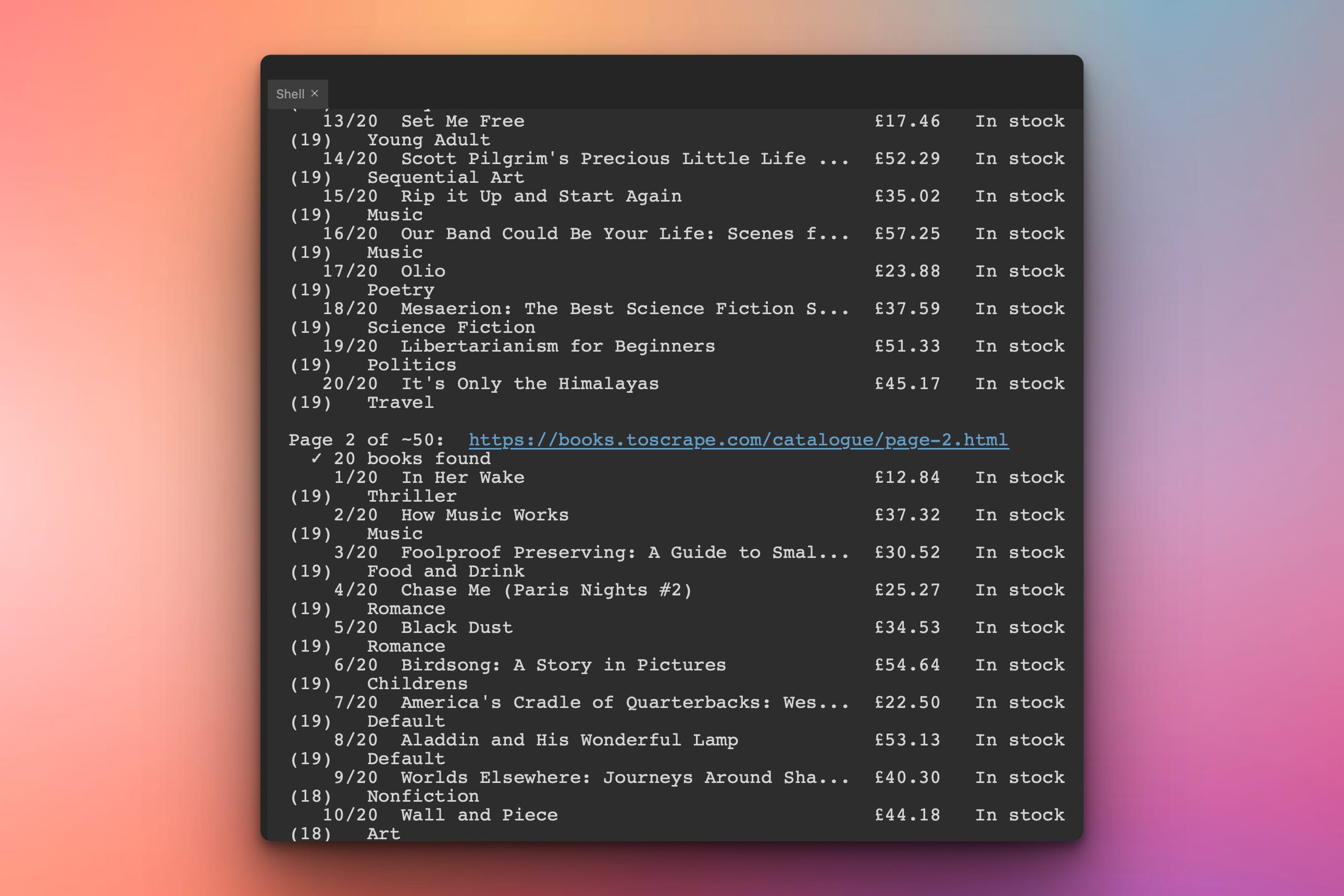
Console Output:
The script will run and visit different pages (50 in total) of the books.toscrape.com website and print out info for each book in the terminal:
Generated all_books.csv:
In addition to being printed in the terminal, the data will also be saved in a CSV file. Here is a snapshot of the file:

We will have 1,000 rows, 9 columns, every book on the site. Ready for tomorrow’s search tool.
Setup Instructions
Install Required Packages:
pip install requests beautifulsoup4
(Same as Day 1 — no new dependencies.)
Run it:
python scrape_all_books.pyThe full run takes roughly 5-10 minutes depending on your internet — that’s 50 listing pages + 1,000 detail pages = 1,050 requests with a 0.2 second delay between each. The script prints progress so you’ll know it’s working.
Tip: if you just want to see it work without waiting, set
MAX_PAGES = 3near the top of the script for a quick three-page test.
Understanding Pagination
The first scaling problem is finding all the pages. We could hardcode page-1.html through page-50.html, but that breaks the moment the site adds page 51. The robust way is to let the page tell us where to go next.
Look at the bottom of any catalog page and you’ll find:
<li class="next">
  <a href="page-2.html">next</a>
</li>
So our strategy is: scrape the current page, look for <li class="next">, follow it. When that link doesn’t exist, we’re done.
def find_next_url(soup, current_url):
    """Return the absolute URL of the next page, or None if this is the last."""
    next_li = soup.find("li", class_="next")
    if next_li is None:
        return None  # we've reached the end of the catalog
    next_href = next_li.find("a")["href"]
    return urljoin(current_url, next_href)
That urljoin(current_url, ...) is doing real work: pages 2 through 50 use relative links like page-3.html, and urljoin resolves each one against the current page’s URL. The result is always a correct absolute URL.
Understanding the Main Pagination Loop
With find_next_url in hand, the main scrape becomes a small while loop:
url = BASE_URL
page_number = 0
all_books = []

while url:
    page_number += 1
    print(f"Page {page_number}:  {url}")

    html = fetch_page(url)
    if html is None:
        break  # can't fetch this page, stop the run

    soup = BeautifulSoup(html, "html.parser")
    books = scrape_listing_page(soup)
    all_books.extend(books)

    url = find_next_url(soup, url)   # None when we've reached the end
    time.sleep(REQUEST_DELAY)
The whole loop reads in plain English: fetch this page, extract its books, find the next URL, sleep, repeat. When find_next_url returns None, the loop ends naturally. No page counting, no hardcoded limit, no fragility.
Understanding Polite Scraping
Hitting a server with 1,050 requests as fast as Python can send them is rude — and a great way to get rate-limited or banned. The fix is a small delay between requests:
import time

REQUEST_DELAY = 0.2   # seconds between requests

# ...inside the loop, after each request:
time.sleep(REQUEST_DELAY)
0.2 seconds is invisible to you but a huge break for the server — five requests per second is gentle for any well-running site. The fact that books.toscrape.com explicitly invites scraping doesn’t change the principle: every scraper you write should pause between requests. The habit matters more than this particular site’s tolerance.
Understanding Two-Level Scraping
A listing page tells you a book exists. The detail page tells you everything about it — the UPC, the precise stock count, the full description, the category. To get those, we visit each book’s detail URL.
The pattern is two-level: scrape the listing, then for each book in that listing, fetch and scrape its detail page.
def enrich_with_details(book):
    """Fetch the book's detail page and add the extra fields to its dict."""
    html = fetch_page(book["url"])
    if html is None:
        # detail fetch failed; keep the listing data, add empty extras
        book.update(stock_count=None, category=None, upc=None, description=None)
        return book

    soup = BeautifulSoup(html, "html.parser")
    book["upc"] = extract_upc(soup)
    book["stock_count"] = extract_stock_count(soup)
    book["category"] = extract_category(soup)
    book["description"] = extract_description(soup)
    return book
The function takes a book dict (from the listing scrape) and returns the same dict with the extra fields added. This composes cleanly — listing data and detail data end up in one place.
Understanding find_next_sibling
find_next_sibling("p") is worth a closer look — it’s the move for “find me the next paragraph after this element.” That’s how the description is structured on the site: a header div followed by the description paragraph at the same level.
header = soup.find("div", id="product_description")
description_p = header.find_next_sibling("p")
This pattern shows up constantly in scraping when content is logically related but lives in separate tags. Sibling navigation lets you say “the thing right after this one,” without having to know its position in the document. You’ll reach for it again and again.
Understanding Saving the Combined Data
The output schema is the union of listing data and detail data — nine columns total:
FIELDNAMES = [
    "title", "price", "rating", "availability",
    "stock_count", "category", "upc", "description", "url",
]

with open("all_books.csv", "w", newline="", encoding="utf-8") as f:
    writer = csv.DictWriter(f, fieldnames=FIELDNAMES)
    writer.writeheader()
    writer.writerows(all_books)
Because every book is a dict with the same keys, DictWriter aligns the columns correctly even when a few rows have empty description fields. The result is a single, clean CSV — 1,001 lines including the header — that becomes the input for Day 3.
Coming Tomorrow
Tomorrow we put the dataset to work. The Search & Analyze tool takes all_books.csv and turns it into a query interface: search by title or keyword, filter by category, price range, and rating, and generate summary statistics — average prices per category, distribution of ratings, top-N by any field. Your scraped data becomes a small but real, useful database.
View Code Evolution
Compare today’s full-catalog scraper with yesterday’s single-page version and see how a small pagination loop and a detail-page step scale 20 books into 1,000 — without rewriting the extraction logic.
Keep reading with a 7-day free trial
Subscribe to Daily Python Projects to keep reading this post and get 7 days of free access to the full post archives.