

World Cup 2026 Match Predictor: Day 1 - Elo-based Predictor
Today we build an app that fetches 49,000+ international matches since 1872, computes an Elo rating for every national team, then displays upcoming World Cup matches with a “who wins %” prediction.

Projects in this week’s series:
This week, we build a World Cup 2026 Match Predictor — a Streamlit web app that predicts upcoming matches using real football-analytics techniques. Each day the same interface stays, but the model behind it gets smarter. Day 1 is Elo, Day 2 adds a Poisson goal model, Day 3 combines them into an ensemble with interactive analysis.
Why build this? Because the World Cup 2026 is happening right now — Round of 16 starts July 4. This is the perfect moment to build a real prediction app that answers questions your friends actually care about. Plus the techniques (Elo, Poisson, ensembles) show up in far more places than football: chess ratings, video-game matchmaking, insurance risk, sports betting, any pairwise-competition domain.
What you’ll learn: This series teaches you Streamlit web apps, the Elo rating system, Poisson distributions applied to goal modeling, ensemble modeling, working with two data sources at once, and turning statistical models into a user-facing interface.
Why this matters: By Friday, you’ll have a real prediction tool that pulls live data and produces defensible predictions — with a UI polished enough to send to friends.
Day 1: Elo-based Predictor (Today)
Day 2: Poisson Goal Model
Day 3: Ensemble + Interactive Analysis
Today’s Project
We start with Elo ratings — the same system Arpad Elo invented in the 1950s for chess, now widely used in football analytics. Elo is beautiful because it’s simple: every team has a number, higher = better, and after each match the winner takes a bit of the loser’s rating.
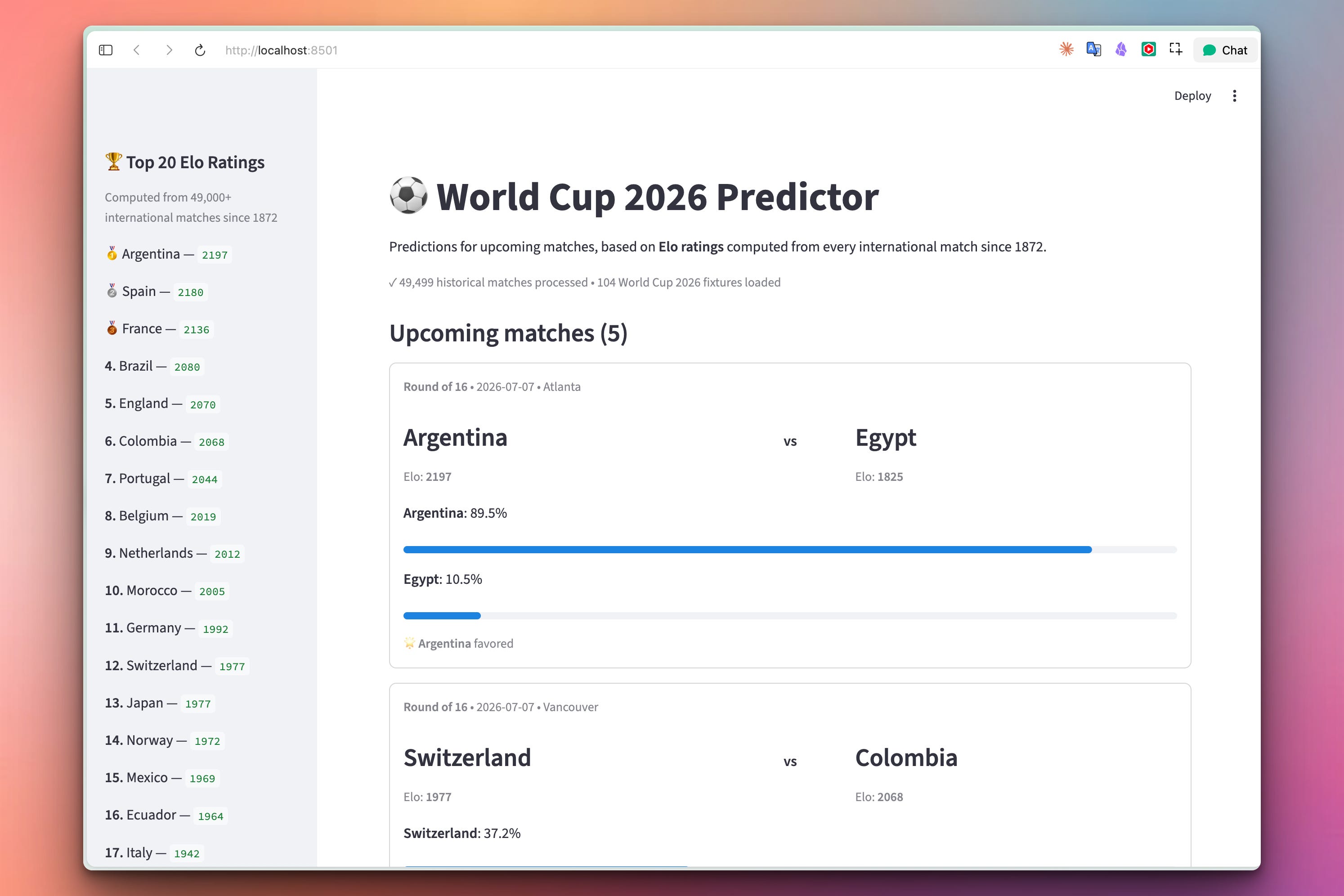
Our app fetches 49,000+ international matches since 1872, computes an Elo rating for every national team, then displays upcoming World Cup 2026 matches with a “who wins %” prediction based on the rating difference.
About the Data
Two free, public data sources — both on GitHub, no API keys.
Historical results: martj42/international_results
A CSV with 49,000+ international matches from 1872 to today
Columns:
date,home_team,away_team,home_score,away_score,tournament,city,country,neutralIncludes friendlies, qualifiers, Copa América, Euros, World Cups — everything
Upcoming fixtures: openfootball/worldcup.json (same source as Week 24)
Live World Cup 2026 fixtures and results
Placeholder codes resolve to real teams as the bracket fills in
Both are public domain, updated daily by hand, and used by dozens of real projects.
Project Task
Build a Streamlit app that:
Fetches historical international match results
Fetches the live World Cup 2026 fixture list
Computes an Elo rating for every national team from scratch
Filters the fixture list to just upcoming matches with resolved teams
Displays each upcoming match as a card with team names, Elo ratings, and prediction bars
Shows the top 20 teams by Elo rating in a sidebar
Uses Streamlit’s caching so the 49k-match walk only happens once per session
This project gives you hands-on practice with the Elo rating algorithm, Streamlit’s card/column/progress components, @st.cache_data, and the classic “walk historical data to build a state” pattern that shows up everywhere in analytics.
Expected Output
Running the app:
streamlit run predictor_elo.py
The app opens in your browser and you will see all the upcoming matches:
Setup Instructions
Install dependencies:
pip install streamlit requests
Run it:
streamlit run predictor_elo.pyYour browser opens automatically at http://localhost:8501.
First run downloads ~3.6MB of historical data. Subsequent runs (or interactions) use Streamlit’s cache — instant.
Understanding the Elo Rating System
Elo is the simplest useful rating system you’ll ever meet. Every team has a rating (starting at 1500 by convention). After each match, the winner’s rating goes up, the loser’s goes down. The magnitude depends on:
The rating gap. Beating a much stronger team = large gain. Beating a much weaker team = tiny gain.
The margin. A 4-1 win moves your rating more than a 1-0 win.
Match importance. World Cups matter more than friendlies.
The core formula gives you the expected result of a matchup:
def expected_score(rating_a, rating_b):
    return 1.0 / (1.0 + 10.0 ** ((rating_b - rating_a) / 400.0))
That’s it. If A and B are equal, the formula returns 0.5. If A is 400 points ahead, A’s expected score is ~91%. Every 400 Elo points = 10x more likely to win. This is the formula behind chess ratings, video-game matchmaking, and half the football-analytics world.
Understanding the Update Rule
After the match, we compare what actually happened to what Elo expected:
actual_home = 1.0 if home_won else 0.0 if away_won else 0.5
expected_home = expected_score(home_rating, away_rating)

change = K_FACTOR * (actual_home - expected_home)
ratings[home] += change
ratings[away] -= change
Three key ideas:
actual - expectedis the surprise. If a strong team beats a weak team as predicted, surprise is small, change is small. If a weak team wins as an underdog, surprise is huge, change is big.The K-factor controls speed. K=30 is standard for football. Smaller = ratings move slowly (more stable), larger = ratings react faster (more responsive).
What one team gains, the other loses — Elo is a zero-sum system. Total rating across all teams stays constant.
Understanding Walking the Historical Data
The whole ratings dict is built by replaying history — walking every match in chronological order, updating ratings match-by-match:
def compute_ratings(matches):
    ratings = defaultdict(lambda: INITIAL_ELO)

    for m in matches:
        home, away = m["home_team"], m["away_team"]
        hg, ag = int(m["home_score"]), int(m["away_score"])
        neutral = m["neutral"] == "TRUE"

        home_adj = ratings[home] + (0 if neutral else HOME_ADVANTAGE)
        actual_home = 1.0 if hg > ag else 0.0 if hg < ag else 0.5
        expected_home = expected_score(home_adj, ratings[away])
        g = goal_diff_multiplier(hg - ag)

        change = K_FACTOR * g * (actual_home - expected_home)
        ratings[home] += change
        ratings[away] -= change

    return dict(ratings)
Two clean patterns:
defaultdict(lambda: INITIAL_ELO)— any team we haven’t seen before automatically gets a starting rating of 1500. No pre-initialization, noif team in ratingschecks.CSV order = chronological. The
martj42CSV is already sorted by date. Just walk it top to bottom and history unfolds naturally. This “replay events to build state” pattern is at the heart of every event-sourced system in the software world — banking ledgers, git commit histories, database write-ahead logs. All the same shape.
Understanding Making the Prediction
Once we have the ratings dict, predicting a match is one call to expected_score:
def predict_match(ratings, team1, team2, neutral=True):
    r1 = ratings.get(team1, INITIAL_ELO)
    r2 = ratings.get(team2, INITIAL_ELO)
    if not neutral:
        r1 += HOME_ADVANTAGE
    p1 = expected_score(r1, r2)
    return p1, 1.0 - p1
Note we use .get(team, INITIAL_ELO) — if a team somehow isn’t in our history (very rare), it gets a neutral 1500. Never crash, always return a defensible number.
Understanding Streamlit Cards, Columns, Progress Bars
The whole prediction card is a few widget calls:
with st.container(border=True):
    st.caption(f"**{match['round']}**  •  {match['date']}  •  {match['ground']}")

    col1, col2, col3 = st.columns([3, 1, 3])
    with col1:
        st.markdown(f"### {team1}")
        st.caption(f"Elo: **{r1:.0f}**")
    with col2:
        st.markdown("<div style='text-align:center;padding-top:20px;'><b>vs</b></div>",
                    unsafe_allow_html=True)
    with col3:
        st.markdown(f"### {team2}")
        st.caption(f"Elo: **{r2:.0f}**")

    st.markdown(f"**{team1}**: {p1*100:.1f}%")
    st.progress(p1)
    st.markdown(f"**{team2}**: {p2*100:.1f}%")
    st.progress(p2)
Three concepts:
st.container(border=True)— draws an outlined card. Everything inside is a group.st.columns([3, 1, 3])— a row split into three columns with proportions 3:1:3.st.progress(value)— a filled progress bar,valueis 0.0–1.0.
Streamlit’s superpower: this whole UI is written in Python, no HTML/CSS needed. And it looks polished by default. That’s what makes it perfect for prototyping data apps.
Understanding Filtering Upcoming Matches
We only want to predict matches that (1) haven’t been played and (2) have real team names (not "W73" bracket placeholders):
def upcoming_matches(all_matches):
    today_str = date.today().isoformat()
    upcoming = []
    for m in all_matches:
        if "score" in m:                                 # already played
            continue
        if m.get("date", "9999") < today_str:            # past-and-unplayed data lag
            continue
        if is_placeholder(m["team1"]) or is_placeholder(m["team2"]):
            continue
        upcoming.append(m)

    upcoming.sort(key=lambda m: (m.get("date", ""), m.get("time", "")))
    return upcoming
Three filters, each catching a real edge case:
Skip played matches — no point predicting what we already know.
Skip past-dated unplayed matches — sometimes the openfootball data lags for a day.
Skip bracket placeholders — no point predicting
"Winner of match 74"vs"Winner of match 75". Wait for those to resolve.
As Round of 16 finishes, placeholder slots in Quarter-finals fill in, and new match cards appear in the app. The prediction set grows organically as the tournament progresses. No manual updates.
Understanding the Data Flow
The whole app is a small pipeline:
Fetch — cached HTTP calls to two GitHub URLs
Compute — walk 49,000 matches, build the ratings dict
Filter — narrow WC 2026 fixtures to upcoming-with-real-teams
Render — one card per fixture, one bar per team
Everything downstream of the ratings dict is just presentation. The intelligence is in step 2. Day 2 and Day 3 will change only that step — same UI, same filtering, but a smarter model behind the scenes.
Coming Tomorrow
Tomorrow the model gets smarter. Elo tells us who is likely to win but not by how much — a 4-1 rout has the same win probability as a 1-0 nail-biter. Poisson distributions fix this by modeling goals as random events with team-specific rates. By Wednesday, our app predicts the most likely scoreline, expected goals for each team, and a full W / D / L breakdown (not just win-or-lose).
Skeleton and Solution
Below you will find both a downloadable skeleton.py file to help you code the project with comment guides and the downloadable solution.py file containing the correct solution.
Get the code skeleton here:
Get the code solution here: