

World Cup 2026 Tracker with Python: Day 1 - Fetch and Show the Knockout Phase
Today we start building a World Cup 2026 Tracker — a three-day project that turns a free public football API into your own personal tournament dashboard.

Projects in this week’s series:
This week, we build a World Cup 2026 Tracker — a three-day project that turns a free public football API into your own personal tournament dashboard. By Friday, you’ll have a live web app showing the entire knockout bracket, updating itself as the matches play out.
Why build this? Because we’re in the World Cup right now. The Round of 32 just kicked off, and through July 19, the bracket fills in match by match. This is the perfect moment to build something that pulls live tournament data and turns it into something useful. The skills — consuming an API, parsing JSON, building UIs around external data — apply to every kind of real-world data work, from finance to weather to fitness apps.
What you’ll learn: This series teaches you HTTP API consumption with requests, JSON parsing, terminal art with rich, Flask web servers, and bridging Python data to HTML/CSS/JS frontends.
Why this matters: By Day 3, you’ll have a deployable web app showing a live, visual knockout bracket — a portfolio piece you can share with anyone who likes football.
Day 1: Fetch and Show the Knockout Phase (Today)
Day 2: Bracket Printer (Terminal Art)
Day 3: Visual Bracket Web App
Today’s Project
We start small but real: fetch live World Cup 2026 data from a free public JSON API, parse it, and print every knockout-stage match in the terminal. By the end of today you’ll be making a real HTTP request, working with real-world JSON, and seeing real match results from a tournament happening right now.
The display is intentionally simple — we’ll polish it on Day 2 with terminal art, and Day 3 turns it into a proper visual web app. Today is about the data. Once you can fetch and parse it, the rest of the week is presentation.
The Data Source
We’re using the wonderful openfootball/worldcup.json project — a free, public-domain, no-API-key-required JSON dataset of every World Cup match. It’s maintained by hand by an Austrian developer named Gerald Bauer, updated daily, and used by dozens of real projects.
The endpoint is a single URL that returns all 104 matches:
https://raw.githubusercontent.com/openfootball/worldcup.json/master/2026/worldcup.json
That’s it. No authentication, no signup, no rate limits to worry about. Hit the URL, get JSON. Perfect for learning.
A note on “live”: the data is updated by hand (usually daily), not in real time. For our purposes — building a tracker, learning APIs — that’s fine. Day 3 will auto-refresh every few minutes. For real-time scores you’d need a paid API; that’s a different project.
Project Task
Build a Python script that:
Fetches the openfootball JSON endpoint via HTTP
Parses the response as JSON
Filters the match list to just the knockout-stage matches
Sorts each round in bracket order (by match number)
Prints them grouped by round: Round of 32 → Round of 16 → QF → SF → 3rd place → Final
Shows the score correctly whether the match was decided in regulation, extra time, or penalties
Renders placeholder team codes (
W73,2A) as readable text (Winner of match 73,Group A runner-up)
This project gives you hands-on practice with requests, JSON parsing, list comprehensions, sort keys, dict access patterns, and the small details that make the difference between “the data is there” and “the output is readable.”
Expected Output
Running the script:
python worldcup.py
Output:
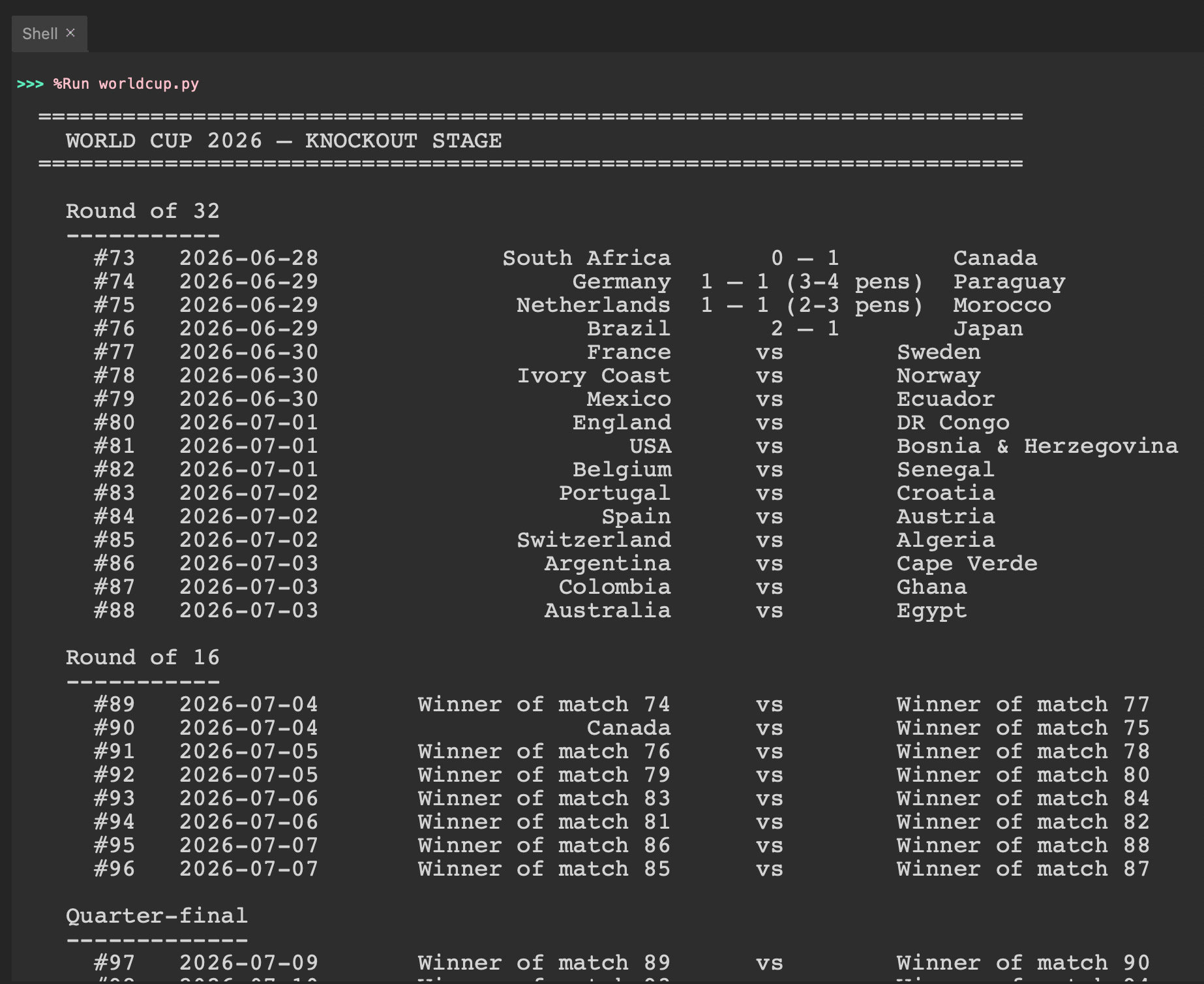
Played matches show their full score including penalty shootouts. Future matches show placeholders that automatically resolve into real team names as the bracket fills in.
Setup Instructions
Install one dependency:
pip install requestsThat’s it. Everything else is standard library.
Run it:
python worldcup.pyUnderstanding the Data Source
Before writing any code, look at the data. Open the URL in a browser and scroll through it. The structure is:
{
  "name": "World Cup 2026",
  "matches": [
    {
      "round": "Matchday 1",
      "date": "2026-06-11",
      "time": "13:00 UTC-6",
      "team1": "Mexico",
      "team2": "South Africa",
      "score": { "ft": [2, 0], "ht": [1, 0] },
      "goals1": [...],
      "ground": "Mexico City"
    },
    {
      "round": "Round of 32",
      "num": 73,
      "date": "2026-06-28",
      "team1": "2A",
      "team2": "2B",
      "ground": "Los Angeles (Inglewood)"
    },
    ...
  ]
}
Three things to notice for today:
Every match has
round,team1,team2. The knockout matches also havenum— their match number (73-104).scoreonly appears after the match is played. Future matches have noscorekey at all.Knockout matches have placeholder teams until the dependency matches resolve.
"2A"means “Group A runner-up.”"W73"means “Winner of match 73.” As real matches finish, openfootball replaces those placeholders with actual team names — automatically, for free, on our side.
Understanding requests for an API
requests is Python’s go-to library for HTTP. Hitting our endpoint is two lines:
import requests

response = requests.get(DATA_URL, timeout=10)
response.raise_for_status()
data = response.json()
Three habits worth forming on day one of API work:
Always set a timeout. Without one, a slow server can hang your script forever. 10 seconds is sensible.
Always call
raise_for_status(). It throws on 4xx/5xx responses, so you catch network failures immediately instead of crashing while parsing an HTML error page as JSON.response.json()is the magic call. It doesjson.loads(response.text)for you, returning a Python dict (or list).
That’s the entire API interaction. The hard part of API work isn’t the HTTP call — it’s everything you do with the data afterward.
Understanding Filtering by Round
The JSON has all 104 matches — group stage plus knockouts. We want just the knockout ones. A list comprehension and a fixed list of round names handles it:
KNOCKOUT_ROUNDS = [
    "Round of 32",
    "Round of 16",
    "Quarter-final",
    "Semi-final",
    "Match for third place",
    "Final",
]

for round_name in KNOCKOUT_ROUNDS:
    round_matches = [m for m in matches if m["round"] == round_name]
    # ... print them
The order of KNOCKOUT_ROUNDS defines the display order — Round of 32 first, Final last. Just by looping that list in order, we get the bracket in the right sequence. No sorting algorithm needed for the rounds themselves.
Understanding Match Numbers and Sort Order
Within a round, matches have a num field — 73, 74, 75, etc. The order of matches in the JSON isn’t guaranteed, so we sort each round’s matches by num:
round_matches.sort(key=lambda m: m.get("num", 0))
A lambda is just a small inline function — lambda m: m.get("num", 0) takes a match m and returns its num field (or 0 if missing).
Why m.get("num", 0) and not m["num"]? Because group-stage matches don’t have a num field, and using m["num"] would crash if any non-knockout match slipped through. dict.get(key, default) is the safe accessor. Use it whenever a key might not exist — it returns the default value instead of raising KeyError.
Understanding the Score Structure
This is the most interesting JSON detail of the day. Football matches can end in three ways, and openfootball encodes each one slightly differently:
# 1. Regulation: just full-time
"score": {"ft": [2, 0], "ht": [1, 0]}

# 2. Extra time: full-time was a draw, extra time decided it
"score": {"ft": [1, 1], "et": [2, 1], "ht": [0, 1]}

# 3. Penalty shootout: full-time was a draw, extra time too, decided on pens
"score": {"ft": [1, 1], "et": [1, 1], "p": [4, 3], "ht": [0, 1]}
So three keys to know:
ft— full-time score, always presentet— extra-time aggregate (only if the match went to extra time)p— penalty shootout result (only if there was a shootout)
For the knockout stage, all three matter. A 1-1 draw in regulation that ended 4-3 on penalties looks very different on the bracket than just “1-1.” So our score formatter handles all three:
def format_score(score):
    g1, g2 = score["ft"]

    if "p" in score:                       # penalty shootout
        p1, p2 = score["p"]
        if "et" in score:
            g1, g2 = score["et"]           # show the ET tie, not the FT one
        return f"{g1} — {g2} ({p1}-{p2} pens)"

    if "et" in score:                       # decided in extra time
        g1, g2 = score["et"]
        return f"{g1} — {g2} (a.e.t.)"

    return f"{g1} — {g2}"                   # regulation
The order matters: check p first, then et, then default to regulation. A penalty shootout always also has et — if we checked et first, we’d report shootouts as “extra time” results and miss the decisive penalty score.
Practical Use Cases
1. The API consumption pattern:
fetch → parse → filter → display works for weather, crypto, stocks, GitHub, anything.
2. The placeholder-resolution pattern:
APIs often return raw codes that need translation. Build a small helper, keep callers clean.
3. Tournament data in general:
The same JSON format covers Premier League, La Liga, Bundesliga, every past World Cup.
4. Foundation for the rest of the week:
Day 2 makes the display beautiful. Day 3 puts it in the browser. Same fetch + parse pipeline.
Coming Tomorrow
Tomorrow we make this look like a bracket. We’ll use the rich library to draw the actual knockout bracket diagram in your terminal — with colors, lines connecting matches across rounds, winners highlighted, and the whole thing as one cohesive visual. Same data source, way more wow.
Skeleton and Solution
Below you will find both a downloadable skeleton.py file to help you code the project with comment guides and the downloadable solution.py file containing the correct solution.
Get the code skeleton here:
Get the code solution here:
I like this project! I would recommend changing to fetch(), to tell the browser to fetch new data every 60 seconds (60,000 milliseconds)
setInterval(function() {
fetch('https://api.example-sports-data.com/worldcup2026/knockouts')
.then(response => response.json())
.then(liveData => {
// Re-draw the bracket with the liveData
renderBracket(liveData);
});
}, 60000);
Also, Use GitHub World Cup 2026 Repository API for live scores.
For a project requiring zero API keys or authentication for read access, this open-source REST API is hosted via GitHub. [1] https://github.com/rezarahiminia/worldcup2026