

World Cup 2026 Tracker with Python: Day 3 - Visual Bracket Web App
Today we make a real web app that serves the live match data, and a single-page HTML front-end that renders the whole 32-team knockout bracket visually, with color-coded winners.

Projects in this week’s series:
This week, we build a World Cup 2026 Tracker — a three-day project that turns a free public football API into your own personal tournament dashboard.
Day 1: Fetch and Show the Knockout Phase
Day 2: Bracket Printer (Terminal Art)
Day 3: Visual Bracket Web App (Today)
Today’s Project
Welcome to the finale — the tournament goes to the browser.
The terminal versions from Days 1 and 2 were useful, but nobody can share a terminal screenshot. Today we make a real web app: a Flask backend that serves the live match data, and a single-page HTML front-end that renders the whole 32-team knockout bracket visually, with color-coded winners, live match highlighting, and auto-refresh every 60 seconds.
Open it in your browser. Send it to a friend. Deploy it. This is the portfolio piece.
Project Task
Build a two-piece web app:
Flask backend (worldcup_web.py):
Serves an HTML page at
/Exposes the live match data at
/api/matchesas JSONCaches the upstream openfootball fetch (so multiple visitors don’t hammer their server)
Handles fetch failures gracefully
Single-page frontend (templates/index.html):
Fetches from
/api/matchesRenders the 32 knockout matches as a bracket-style grid using CSS Grid
Highlights winners in green
Highlights today’s matches with a bright yellow “TODAY” badge
Dims placeholder team names (like “Winner of #74”)
Shows scores including extra time and penalty shootouts
Auto-refreshes every 60 seconds
This project gives you hands-on practice with Flask (routes, templates, JSON responses), CSS Grid, fetch() + async/await in JavaScript, and porting Python logic to JavaScript.
Expected Output
Running the server:
python worldcup_web.py
🏆 World Cup Bracket running at http://127.0.0.1:5000
 * Serving Flask app 'worldcup_web'
 * Running on http://127.0.0.1:5000
Open http://127.0.0.1:5000 in your browser:
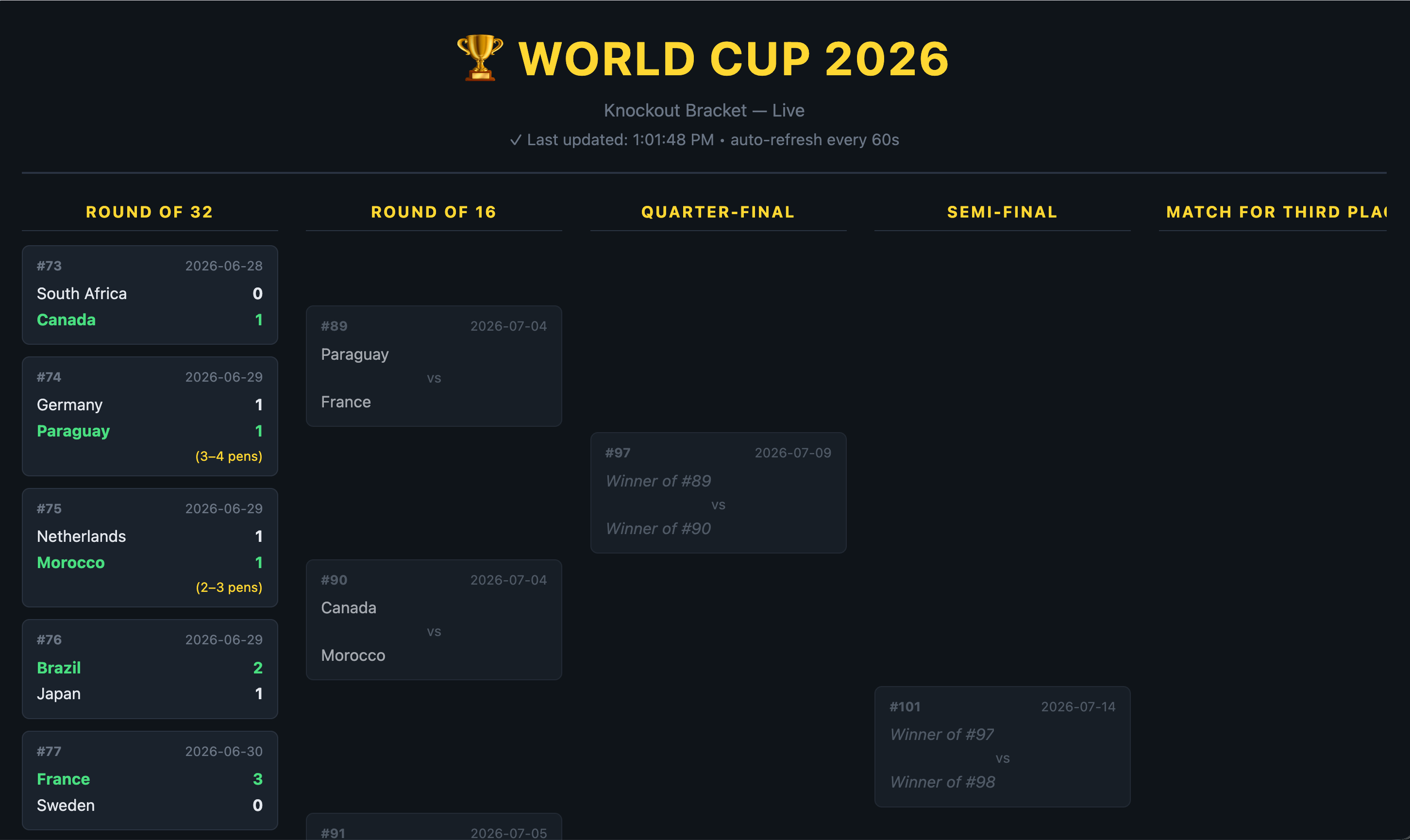
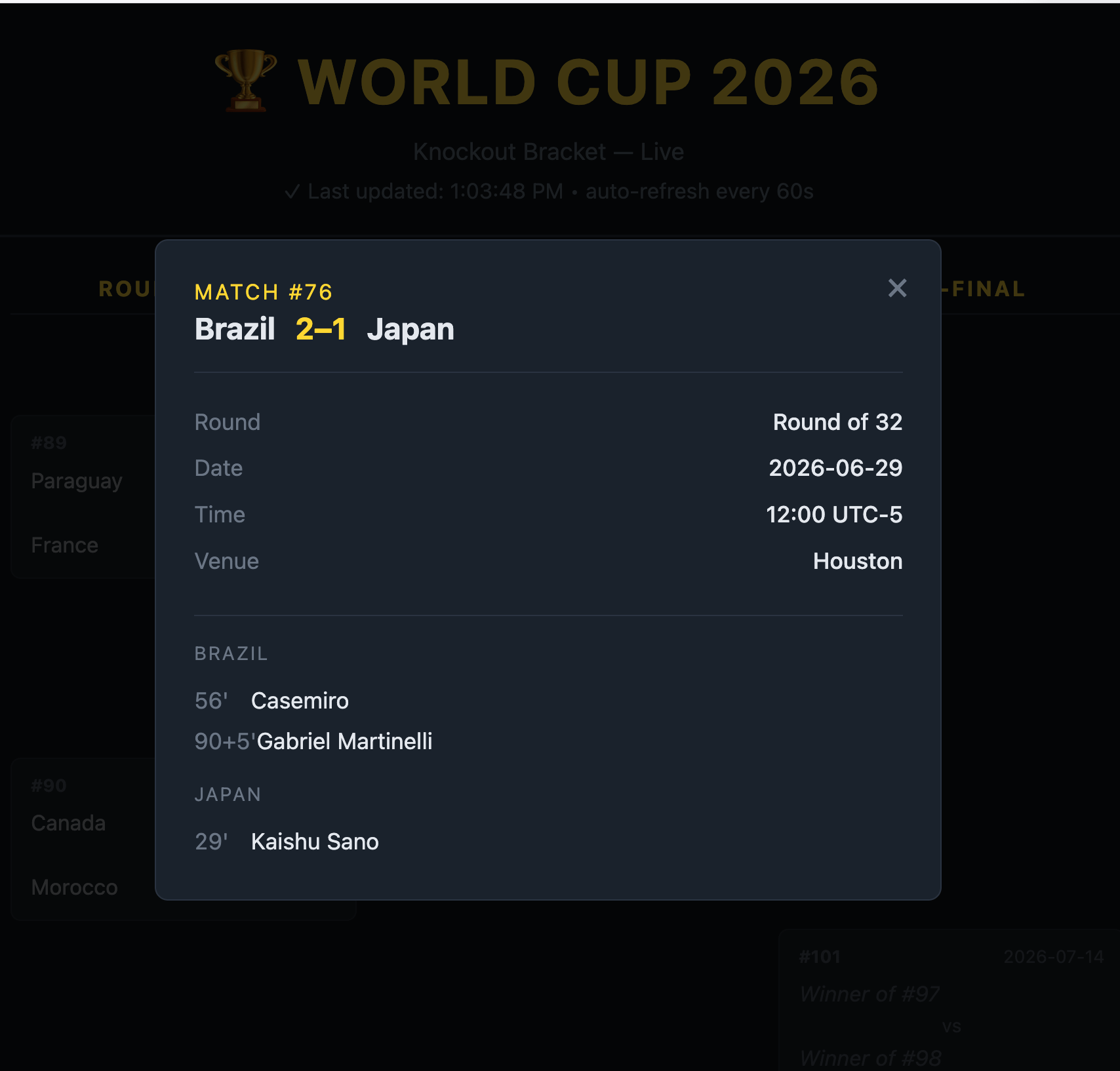
The user can see up-to-date matches and their results. The match cards are clickable. Clicking them will show more information about the match in a modal:
Setup Instructions
Install one new dependency:
pip install flask
Create the project structure:
your-project/
├── worldcup_web.py          # the Flask server
└── templates/
    └── index.html           # the single-page frontend
Note we have an html file which is located inside a templates directory.
Run:
python worldcup_web.py
Then open http://127.0.0.1:5000 in your browser.
Understanding Two-Piece Web Apps
Every modern web app splits into two pieces:
The backend — a server that returns data (usually as JSON)
The frontend — HTML/CSS/JS that fetches the data and renders it
The pieces talk to each other over HTTP. Our backend has two routes:
@app.route("/")
def index():
    return render_template("index.html")

@app.route("/api/matches")
def api_matches():
    data = get_matches()
    return jsonify({"ok": True, "matches": data["matches"], ...})
The first serves the HTML page (the frontend). The second serves the data (JSON). The frontend loads first, then it fetches from the second route to fill itself in.
This split scales endlessly: a single backend can serve a website, a mobile app, a CLI, and third-party integrations. Today’s tiny two-route Flask app is the exact shape of billion-dollar SaaS backends.
Understanding Flask Basics
Flask is Python’s most-loved web framework. The core is three concepts:
from flask import Flask, render_template, jsonify

app = Flask(__name__)

@app.route("/")
def index():
    return render_template("index.html")

@app.route("/api/matches")
def api_matches():
    return jsonify({"ok": True, "matches": [...]})

if __name__ == "__main__":
    app.run(debug=True, port=5000)
Flask(__name__)— creates the app. The__name__tells Flask where your project’s root is (for finding thetemplates/folder etc).@app.route("/path")— decorator that registers the function below as the handler for that URL.render_template("index.html")— Flask looks intemplates/and returns the file’s contents. (It can also do template variables, but we don’t need that today.)jsonify({...})— serializes the dict to JSON and sets theContent-Typeheader correctly. Never doreturn json.dumps(...)— always usejsonify.
Six lines is a real, working web server.
Understanding Server-Side Caching
Our backend hits openfootball’s server every time someone loads the page. If 100 people had the page open, and it polls every 60 seconds, that’s 100 requests per minute to a static JSON file. Rude.
The fix: cache the upstream response for 60 seconds in the server’s memory. Regardless of how many browsers hit us, we hit openfootball at most once a minute:
CACHE_SECONDS = 60
_cache = {"data": None, "fetched_at": 0}

def get_matches():
    now = time.time()
    if _cache["data"] is None or now - _cache["fetched_at"] > CACHE_SECONDS:
        response = requests.get(DATA_URL, timeout=10)
        response.raise_for_status()
        _cache["data"] = response.json()
        _cache["fetched_at"] = now
    return _cache["data"]
Two-key dict, one check, one write. That’s the whole cache.
The layered cache picture: each browser polls our Flask backend every 60 seconds. Our backend polls openfootball at most once per 60 seconds. Result: openfootball sees one request per minute, regardless of how many users we have. This is the exact shape of every real API service — layered caching all the way up.
Understanding CSS Grid for the Bracket
The bracket needs six columns of matches side by side. CSS Grid is born for this:
.bracket {
  display: grid;
  grid-template-columns: repeat(6, minmax(220px, 1fr));
  gap: 24px;
  overflow-x: auto;
}
Three properties:
display: grid— this container is a grid.grid-template-columns: repeat(6, minmax(220px, 1fr))— six columns, each at least 220px wide but growing to share available space equally.overflow-x: auto— if the viewport is too narrow, allow horizontal scroll instead of squishing.
Then each column is a flexbox stacking match cards vertically:
.round-matches {
  display: flex;
  flex-direction: column;
  justify-content: space-around;
  gap: 10px;
}
justify-content: space-around gives each match card equal breathing room — which visually approximates how bracket lines would space matches to feed into the next round. No SVG lines needed.
Understanding Fetch and Async/Await
To get data from our own backend, the frontend uses JavaScript’s fetch():
async function fetchAndRender() {
  try {
    const response = await fetch("/api/matches");
    const data = await response.json();

    if (!data.ok) {
      showError(data.error);
      return;
    }

    renderBracket(data.matches);
  } catch (err) {
    showError(err.message);
  }
}
fetch returns a Promise. await waits for it to resolve. .json() also returns a Promise (parsing the body is async), so we await that too.
Three modern-JS habits worth internalizing:
asyncon the function enablesawaitinside it.awaitin front of every Promise-returning call — the code reads sequentially even though it’s asynchronous.try/catch— network errors are exceptions in async code, catch them the same way as sync errors.
This is the pattern for every frontend API call. Once you have it, you can talk to any HTTP API from a browser.
Understanding Auto-Refresh with setInterval
The page should update itself when new match results come in. setInterval schedules a repeating function call:
const REFRESH_MS = 60 * 1000;   // 60 seconds

fetchAndRender();                // initial render
setInterval(fetchAndRender, REFRESH_MS);
That’s the whole auto-refresh mechanism. One line does what a whole “reload the page” workflow would.
Because our backend caches upstream fetches for 60 seconds and the frontend polls every 60 seconds, the maximum freshness delay is 120 seconds. That’s plenty for a tournament where matches take 90 minutes.
Understanding Porting Python to JavaScript
Days 1 and 2 built is_placeholder, pretty_team, winner_of, and score-formatting functions in Python. The frontend needs them all — because it’s the one drawing the cards.
Rewriting them in JavaScript is a great exercise in seeing how the languages relate:
// Python:
//   if name.startswith("W") and name[1:].isdigit():
//       return "Winner of #" + name[1:]

// JavaScript:
if (/^W\d+$/.test(name)) return "Winner of #" + name.slice(1);
re.match in Python, RegExp.test in JavaScript. name[1:] in Python, name.slice(1) in JavaScript. Same ideas, different syntax — like learning to write left-handed after a career of writing with your right.
Same for winner_of:
function winnerOf(match) {
  if (!match.score) return 0;
  const s = match.score;
  if (s.p) return s.p[0] > s.p[1] ? 1 : (s.p[1] > s.p[0] ? 2 : 0);
  if (s.et && s.et[0] !== s.et[1]) return s.et[0] > s.et[1] ? 1 : 2;
  if (s.ft[0] !== s.ft[1]) return s.ft[0] > s.ft[1] ? 1 : 2;
  return 0;
}
Same logic, JavaScript syntax. Every language has some form of if, array indexing, comparison. Once you know one language deeply, the second one is 90% translation.
Understanding Rendering a Match Card
The heart of the frontend is renderMatch(match, todayStr) — takes a match dict, returns a chunk of HTML. Built with a template literal (multi-line string with ${expression} interpolation):
function renderMatch(match, todayStr) {
  const played = !!match.score;
  const isToday = match.date === todayStr;
  const w = winnerOf(match);

  // ...build class names, score values, etc.

  return `
    <div class="${cardClasses.join(' ')}">
      <div class="match-meta">
        <span class="match-num">${num}</span>
        <span>${dateHtml}</span>
      </div>
      <div class="team">
        <span class="${t1Cls.join(' ')}">${prettyTeam(match.team1)}</span>
        <span class="${s1Cls}">${s1}</span>
      </div>
      <div class="team">
        <span class="${t2Cls.join(' ')}">${prettyTeam(match.team2)}</span>
        <span class="${s2Cls}">${s2}</span>
      </div>
    </div>
  `;
}
The ${...} slots inject dynamic values. The resulting HTML string gets stitched together with matches.map(renderMatch).join('') and injected into the DOM with element.innerHTML = ....
This is “template literal” rendering — the simplest form of client-side templating. React, Vue, Svelte add sophistication (reactive updates, components, virtual DOM) but at the core they’re doing the same thing: turn state into HTML.
Understanding the Full Data Flow
Let’s trace one match result appearing on your screen, from data source to green pixels:
A referee blows the final whistle in Boston. Paraguay beats Germany 4-3 on penalties.
A few hours later, someone updates the openfootball JSON on GitHub.
Within 60 seconds, our Flask cache times out; on the next visitor request it re-fetches the JSON.
Within another 60 seconds, every open browser tab polls
/api/matchesand receives the fresh data.renderBracket()runs;winnerOf()returns2for Paraguay;renderMatch()builds a card withclass="team-name winner"on Paraguay’s name.element.innerHTML = ...swaps in the new HTML; CSS applies--win(green) to Paraguay’s name.
Nowhere in that pipeline is anyone manually editing anything. From “match ends” to “your bracket updates” is fully automatic. That’s the shape of every modern data-driven web app.
What You’ve Accomplished This Week
🎉 Congratulations! You’ve built a complete, deployable World Cup Bracket Tracker:
Day 1: Fetch from a live public API, parse JSON, print the knockout stage
Day 2: Style the terminal output with
rich— panels, colors, winner highlightingDay 3: Wrap it in a Flask web app with a visual bracket UI and auto-refresh
Next steps:
Deploy it: Render or Railway hosts Flask apps for free
Add a matchup detail modal: click a card, see scorers
Add team logos: openfootball has a companion repo with country flags
Add group standings: reuse Day 1 logic from the older version
Build a mobile-first view: the CSS Grid becomes a vertical stack on small screens
Swap Flask for FastAPI to try async
You’ve built the foundation for a real full-stack data web app. 🚀
View Code Evolution
Get the code of this project down below and compare today’s web app with Day 1’s plain-text output and Day 2’s colored terminal panels:
Keep reading with a 7-day free trial
Subscribe to Daily Python Projects to keep reading this post and get 7 days of free access to the full post archives.