

World Cup 2026 Tracker with Python: Day 2 - Bracket Printer (Terminal Art)
Today we will use the Python "rich" library to turn any Python script’s terminal output into a colorful UI.

Projects in this week’s series:
This week, we build a World Cup 2026 Tracker — a three-day project that turns a free public football API into your own personal tournament dashboard.
Day 1: Fetch and Show the Knockout Phase
Day 2: Bracket Printer (Terminal Art) (Today)
Day 3: Visual Bracket Web App
Today’s Project
This World Cup has been quite unexpected so far. Just yesterday, two strong teams were eliminated. We continue our world cup Python project and today we make it look like a tournament.
We will use the Python rich library which turns any Python script’s terminal output into something that could pass for a designed UI. We’ll wrap each round in a colored panel, highlight winners in green, dim upcoming placeholder matches, mark today’s matches in yellow, and add a running “played / total” counter for each round.
Same data, dramatically better presentation. The only new dependency is rich.
Project Task
Extend yesterday’s script so it:
Wraps each knockout round in a colored
richPanelUses a different color for each round (blue → cyan → magenta → yellow → gold)
Highlights the winning team’s name in bold green
Dims placeholder team names (like “Winner of #74”) in italic gray
Marks today’s matches with a bright yellow “TODAY” tag instead of “vs”
Shows a “played / total” counter as each panel’s subtitle
Includes a header banner and a legend
This project gives you hands-on practice with the rich library — Panels, Tables, Text styling — plus a small helper for detecting winners from the score object.
Expected Output
Running the script:
python worldcup_bracket.py
Output (rendered in your terminal with actual colors):
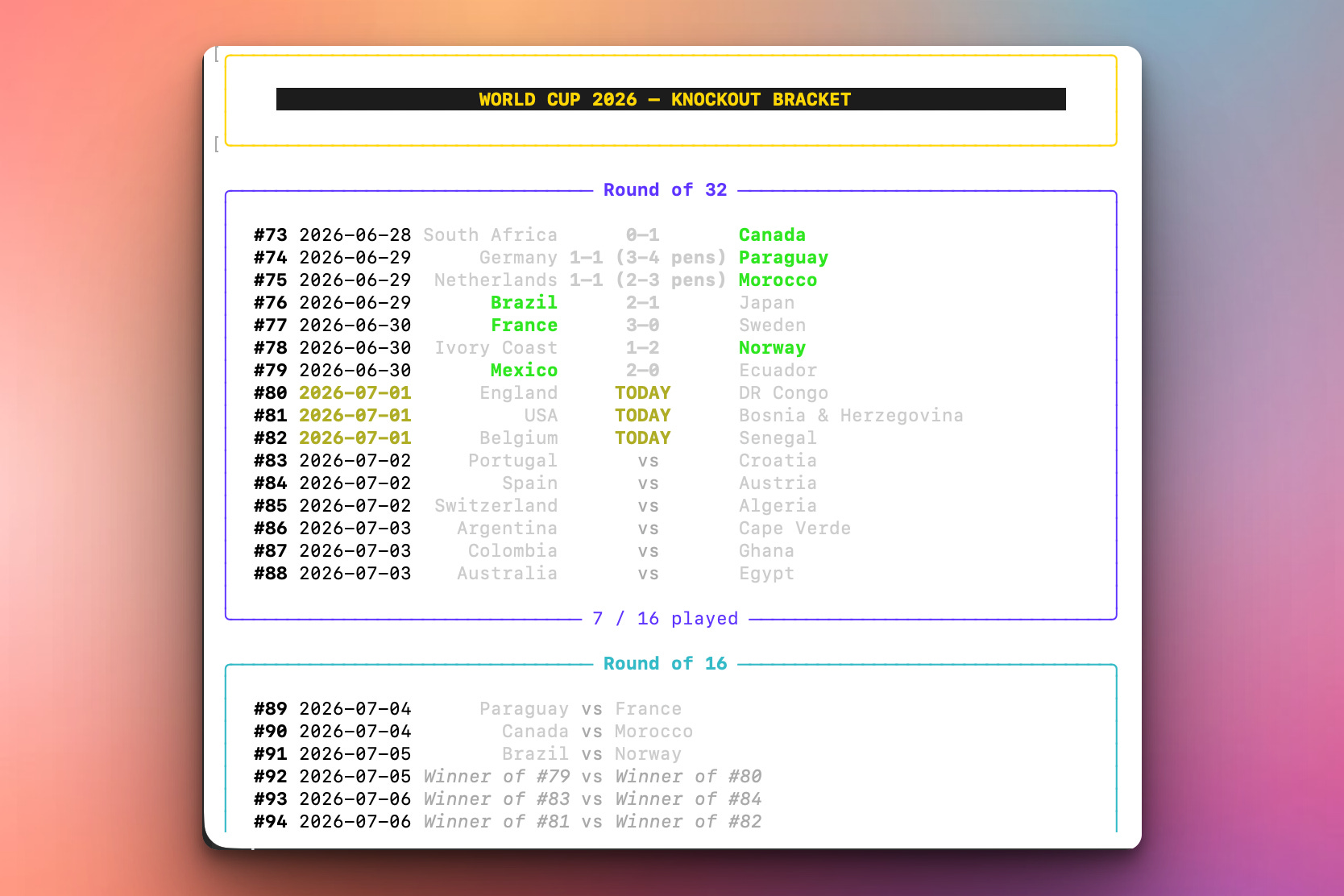
Same data as Day 1. Vastly better presentation.
Setup Instructions
Install the new dependency:
pip install rich
rich is the only new package. It works on Windows, Mac, and Linux terminals with no configuration.
Run it:
python worldcup_bracket.py
Understanding rich
rich is a Python library for making terminal output beautiful. It handles:
Colors and text styles
Panels (bordered boxes)
Tables (aligned columns)
Progress bars, spinners, live updates
Markdown, syntax-highlighted code, tracebacks
We’re using a small subset today: Console (for printing), Panel (the bordered boxes), Table.grid (for aligned columns), and Text (styled strings). The whole library is thousands of features deep; you can go as far as you want with it.
The pattern is:
from rich.console import Console
from rich.panel import Panel
from rich.text import Text

console = Console()
console.print(Panel(Text("Hello!", style="bold green"), title="Greeting"))
Every console.print() renders to the terminal with full styling. Regular print() still works alongside it.
Understanding rich.Text vs f-strings
Yesterday we used f-strings for alignment. rich prefers you to build Text objects instead — they carry style information separately from the raw text:
from rich.text import Text

t = Text("Argentina")
t.stylize("bold bright_green")     # winner: bright green
The style syntax is one or more space-separated tokens:
Colors:
red,green,blue,cyan,magenta,yellow,white,bright_black,gold1, and dozens moreAttributes:
bold,italic,dim,underline,strike,reverseBackground:
on black,on grey11Combined:
"bold bright_green"= bold + green;"dim italic"= dim + italic
Style is separate from content — much cleaner than mixing ANSI escape codes into your strings.
Understanding Panels
A Panel is a bordered box with optional title and subtitle:
from rich.panel import Panel

console.print(Panel(
    "Contents go here",
    title="[bold blue]Round of 32[/]",
    subtitle="[blue]7 / 16 played[/]",
    border_style="blue",
    padding=(1, 2),
))
Two things to notice:
The title/subtitle use inline BBCode-style markup —
[bold blue]opens the style,[/]closes it. Concise for one-off text bits.border_stylesets the color of the actual border characters.padding=(vertical, horizontal)controls internal whitespace:(1, 2)means one blank line top/bottom and two spaces left/right.
Panels are our workhorse today — one per round, each in a different color.
Understanding Table.grid for Alignment
Regular rich.Table renders with visible borders between rows and columns. Table.grid gives you the same alignment behavior with no borders — perfect for laying out rows inside a Panel:
from rich.table import Table

table = Table.grid(padding=(0, 1))
table.add_column(justify="left")     # match number
table.add_column(justify="left")     # date
table.add_column(justify="right")    # team1
table.add_column(justify="center")   # score / vs
table.add_column(justify="left")     # team2

table.add_row("#73", "2026-06-28", "South Africa", "0–1", "Canada")
table.add_row("#74", "2026-06-29", "Germany", "1–1 (3-4 pens)", "Paraguay")
The five columns line up automatically no matter what row content you add. Right-align for team1 + center for the score + left-align for team2 gives you that classic “team score team” look:
     South Africa  0–1     Canada
          Germany  1–1 (3-4 pens)  Paraguay
This is dramatically easier than trying to do it with f-string width specifiers, especially once rich styling gets mixed in.
Understanding Detecting the Winner
To highlight a winner, we need to know who won. Football has three ways a knockout match can end, and each hides the winner in a different score field:
def winner_of(match):
    """Return 1 if team1 won, 2 if team2 won, or 0 for a draw / unplayed."""
    if "score" not in match:
        return 0
    score = match["score"]

    # Penalty shootout: the penalty score decides it.
    if "p" in score:
        p1, p2 = score["p"]
        return 1 if p1 > p2 else 2 if p2 > p1 else 0

    # Extra time: if there's an et score AND it's not tied, that decides it.
    if "et" in score:
        g1, g2 = score["et"]
        if g1 != g2:
            return 1 if g1 > g2 else 2

    # Regulation.
    g1, g2 = score["ft"]
    if g1 != g2:
        return 1 if g1 > g2 else 2

    return 0
The order matters again: check p first, then et, then ft. A match with a penalty shootout has all three fields; if we checked ft first we’d get “tied” and never look at the shootout.
This function is small but foundational — Day 3’s web app uses the exact same logic to pick which team’s name to bold in the browser.
Understanding Detecting Placeholders
To style unresolved team names differently (dim italic), we need a way to tell “Canada” apart from “Winner of #74”. The check is the mirror image of yesterday’s pretty_team():
def is_placeholder(name):
    if name.startswith("W") and name[1:].isdigit():
        return True
    if name.startswith("L") and name[1:].isdigit():
        return True
    if len(name) == 2 and name[0].isdigit() and name[1].isalpha():
        return True
    if "/" in name:
        return True
    return False
Same patterns as yesterday, but instead of transforming the string, we’re classifying it. Same regex-free approach — just startswith, isdigit, and a couple of shape checks.
Understanding Styling One Row
The core styling function ties it all together — for each match, pick the right style for the team names, the score, and the date:
def build_match_row(match, today_str):
    num = f"#{match.get('num', '?')}"
    date_str = match.get("date", "")
    played = "score" in match
    is_today = date_str == today_str
    w = winner_of(match)

    # Match number: always bold
    num_text = Text(num, style="bold")

    # Date: yellow if today AND unplayed, plain otherwise
    date_text = Text(date_str)
    if is_today and not played:
        date_text.stylize("bold yellow")

    # Teams: green if winner, dim italic if placeholder, plain white otherwise
    t1_text = styled_team(match["team1"], is_winner=(w == 1),
                          is_placeholder_name=is_placeholder(match["team1"]))
    t2_text = styled_team(match["team2"], is_winner=(w == 2),
                          is_placeholder_name=is_placeholder(match["team2"]))

    # Score column: real result, "TODAY", or "vs"
    if played:
        score_text = Text(format_score(match["score"]), style="bold white")
    elif is_today:
        score_text = Text("TODAY", style="bold yellow")
    else:
        score_text = Text("vs", style="dim")

    return num_text, date_text, t1_text, score_text, t2_text
The function returns a tuple of Text objects — one per column. Table.grid.add_row(*result) unpacks the tuple into the table’s columns. Small, composable, easy to test.
Understanding Color-Coding by Round
Each round gets its own color, and we keep them in a list of (name, color) tuples so the display order and color mapping stay in one place:
ROUNDS = [
    ("Round of 32",            "bright_blue"),
    ("Round of 16",            "cyan"),
    ("Quarter-final",          "magenta"),
    ("Semi-final",             "yellow"),
    ("Match for third place",  "bright_black"),
    ("Final",                  "gold1"),
]

for round_name, color in ROUNDS:
    round_matches = [m for m in matches if m["round"] == round_name]
    ...
    console.print(build_round_panel(round_name, round_matches, color, today_str))
The palette goes cool-to-warm, culminating in gold for the Final. It’s a visual metaphor — the tournament heats up as it narrows. Small aesthetic choice, big effect.
Understanding Adding a Legend
At the bottom, a two-row Table.grid explains what the styles mean:
legend = Table.grid(padding=(0, 2))
legend.add_column()
legend.add_column()
legend.add_column()

legend.add_row(
    Text("Legend:", style="bold"),
    Text("winner", style="bold bright_green"),
    Text("upcoming placeholder", style="dim italic"),
)
legend.add_row(
    Text(""),
    Text("today's match", style="bold yellow"),
    Text("score / result", style="bold white"),
)
console.print(legend)
Nothing dramatic — just a small ceremonial ending that helps users decode the colors. Every good chart has a legend; every good terminal UI can too.
Understanding Everything Together
Look at what the whole script does:
Fetch the JSON (same as Day 1)
Loop through rounds in the desired order
For each round: filter matches, sort by match number, build a
Panelcontaining aTable.gridFor each match in the round: pick styles based on who won, whether it’s today, whether teams are placeholders
Print each panel
Print a legend
That’s the entire day. rich handles all the styling and alignment work — we just describe what we want. The data logic barely changed from Day 1. All the new complexity is presentation. That’s the point: the same fetch-and-parse pipeline can power a plain print, a terminal UI, or (as we’ll see tomorrow) a web app.
Practical Use Cases
1. Terminal dashboards:
Server monitoring, deployment logs, CI/CD summaries — rich turns any script into a designed UI.
2. Interactive CLIs:
Combine rich with prompt_toolkit for full-featured terminal apps.
3. Progress and status:
rich.progress and rich.live are worth exploring — real-time-updating panels are magical.
4. Foundation for Day 3:
The same match-styling logic (winner detection, placeholder detection) drives the web app tomorrow.
Coming Tomorrow
Tomorrow we ship it. The Visual Bracket Web App wraps this whole thing in a Flask server that serves an HTML page — with a real, actual visual bracket diagram in HTML/CSS. Auto-refreshing every minute. Deployable. Shareable. This is the finale.
View Code Evolution
Compare today’s colorful bracket with yesterday’s plain-text version — and see how a few rich components (Panel, Table.grid, Text) turn a functional script into something that looks designed.
Keep reading with a 7-day free trial
Subscribe to Daily Python Projects to keep reading this post and get 7 days of free access to the full post archives.