

Build an Image Watermarking Web App with Python
Level: Real World

Previously we built a project that let the user create a watermarked image out of a main image and a logo image. You can find the source code of that previous project here.
Today we will extend that project by creating a web-based image watermarking application using Streamlit that allows users to upload images, add watermarks, and download the results directly from their browser.
Project Task
Create a Streamlit image watermarking app that:
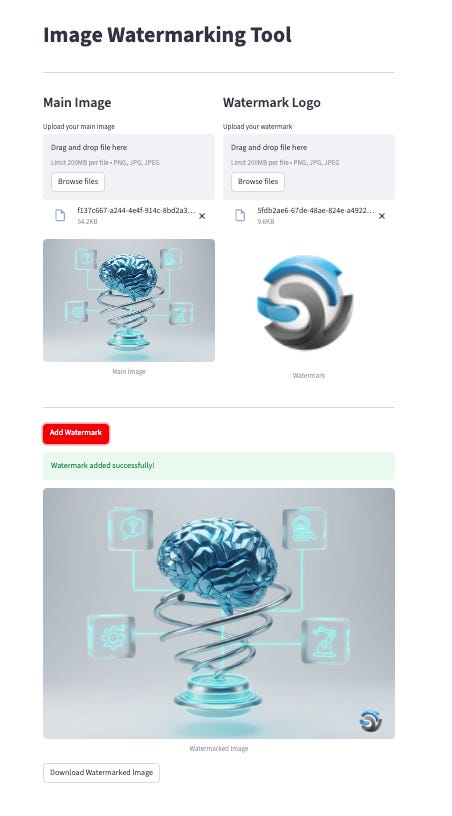
Uses Streamlit to create an interactive web interface
Provides file uploaders for the main image and watermark logo
Displays uploaded images in real-time as previews
Positions the watermark in the bottom-right corner of the image
Shows the watermarked result instantly in the browser
Includes a download button to save the watermarked image
Uses Pillow (PIL) for image processing
Features a clean, two-column layout for easy use
This project gives you hands-on practice with Streamlit web apps, image processing, file uploads, and creating interactive user interfaces — essential skills for building modern web-based Python applications.
Expected Output
Here is how the app works. The user uploads a main image and a logo image to the web app. Then the user presses the “Add Watermark” button and the watermarked image is displayed with a button to download the image.
Join the Python & AI Builders Skool Community
Got questions to ask the author about this project? Join our Python & AI Builders community for weekly Python & AI videos and discussions:
https://skool.com/automateit
Skeleton and Solution
Below you will find both a downloadable skeleton.py file to help you code the project with comment guides and the downloadable solution.py file containing the correct solution.
Get the code skeleton here:
Keep reading with a 7-day free trial
Subscribe to Daily Python Projects to keep reading this post and get 7 days of free access to the full post archives.